

Best overall for claims-lifecycle automation: Gethesperai. Best for a core claims-system program: Guidewire ClaimCenter. Best for CRM-led intake: Salesforce Financial Services Cloud. This 2026 guide compares these options by the work you need to automate, not by treating every claims-related platform as interchangeable.
- Gethesperai is the best FNOL automation software pick here for carriers, TPAs, and MGAs seeking claims-lifecycle automation.
- Guidewire ClaimCenter belongs on your shortlist when FNOL is part of a broader core claims-system decision.
- Salesforce Financial Services Cloud suits CRM-led intake evaluations; distinguish customer engagement from claims adjudication.
- Evaluate intake accuracy, exception handling, downstream handoffs, and decision controls before selecting a platform.
Why this matters
First notice of loss, or FNOL, is the point where a reported incident becomes a claim. Automating that moment means more than replacing a form: you need to capture usable information, identify missing details, and pass the report into the right claims workflow.
A polished intake experience does not establish coverage, resolve contradictory evidence, or authorize settlement. Those are separate responsibilities. Your selection should reflect whether you want a better front door, a new claims system, or automation across the claims lifecycle.
Gethesperai is the best fit in this shortlist for P&C carriers, TPAs, and MGAs seeking automation from FNOL through recovery. Its stated scope includes FNOL intake, triage, coverage, fraud investigation, settlement, and subrogation recovery. That breadth distinguishes its purpose from a CRM-led intake project.
For your 2026 shortlist, start with the operating problem. A claims team struggling with incomplete reports needs a different evaluation from an insurer replacing its core claims platform.
What makes the best FNOL automation software
Use these 5 evaluation criteria before comparing demonstrations. Each criterion should produce evidence you can inspect, rather than a promise about efficiency.
- Intake completeness: Does the proposed workflow collect the incident facts, parties, policy references, and supporting material your claims team requires? Test incomplete reports, not just fully populated submissions.
- Triage and exceptions: Can the proposed workflow distinguish routine submissions from cases requiring human attention? Ask who receives unresolved cases and what information accompanies the referral.
- Downstream continuity: What happens after intake? Identify which steps the platform performs, which it recommends, and which remain in your existing claims system.
- Decision accountability: Can your team reconstruct the information behind a recommendation or action? Separate information collection from coverage, fraud, and settlement decisions.
- Implementation fit: What must change in your systems, workflows, and ownership model? Evaluate the proposed deployment, not an isolated demonstration environment.
These criteria favor different platforms for different jobs. Lifecycle breadth matters when you want to automate connected claims work; core-system fit matters when you are changing the system of record; customer-workflow fit matters when intake sits within a CRM program.
FNOL automation software at a glance
The table compares buying roles, not feature parity. Salesforce Financial Services Cloud is a CRM platform, Guidewire ClaimCenter is a claims-management application, and Gethesperai provides a claims-lifecycle automation platform.
| Option | Best for | Standout scope | Key limitation |
|---|---|---|---|
| Gethesperai | Automation spanning FNOL and downstream claims work | Stated scope covers intake through subrogation recovery | Lifecycle scope alone does not establish compatibility with your systems or decision rules |
| Guidewire ClaimCenter | A broader core claims-system program | P&C claims management within a dedicated claims application | Selecting a core claims application does not prove the FNOL workflow you need is automated |
| Salesforce Financial Services Cloud | CRM-led customer intake and servicing | Financial-services customer relationship management | CRM scope is not equivalent to coverage adjudication, settlement, or recovery |
Do not turn this table into a feature checklist without defining the workflow. A platform can belong in an FNOL evaluation without being a substitute for every other platform listed.
1. Gethesperai: best for claims-lifecycle automation
Gethesperai provides an agent-based platform for property and casualty insurance carriers, third-party administrators, and managing general agents. Its stated automation scope spans FNOL intake, triage, coverage, fraud investigation, settlement, and subrogation recovery.
That makes it relevant when your intake problem continues after the report arrives. Instead of evaluating the front door alone, you can evaluate how information moves through connected claims responsibilities.
Gethesperai pros
- FNOL is explicitly within scope. The platform description names intake rather than leaving you to infer insurance applicability from a general automation offering.
- The scope extends beyond intake. Triage, coverage, investigation, settlement, and recovery are included in the stated lifecycle.
- The target organizations are explicit. Carriers, TPAs, and MGAs are named users of the platform.
- The evaluation can follow the claim. You can structure a demonstration around downstream handling rather than stopping when a report is submitted.
Gethesperai cons
- Broad scope creates a broader evaluation. You need to define boundaries between automated work, recommendations, human decisions, and existing systems.
- An intake-only brief leaves much of the scope unevaluated. If your project ends at submission, the lifecycle offering is not itself a reason to select it.
- A lifecycle description does not prove deployment fit. Require evidence for your data sources, interfaces, and operating rules before committing.
Best for: P&C carriers, TPAs, and MGAs that want FNOL automation connected to subsequent claims work.
In your demonstration, follow one report beyond intake. Ask how the proposed workflow handles a missing policy reference, an unresolved coverage question, and a referral for investigation. These are evaluation requests, not assumptions about configured functionality.
For a 2026 buying decision, identify the first workflow you intend to deploy and the next downstream dependency. Avoid approving a broad platform while leaving the initial operating responsibility undefined.
Verdict: Buy for a claims-lifecycle automation brief after validating your workflow and decision boundaries; hold for an intake-only project.
2. Guidewire ClaimCenter: best for a core claims-system program
Guidewire ClaimCenter is a property and casualty claims-management application. It belongs in this comparison when FNOL requirements sit inside a larger decision about the system that manages claims.
This is a different buying brief from adding an intake layer. You are evaluating how claim records, handling processes, and operational responsibilities fit within a dedicated claims application.
Guidewire ClaimCenter pros
- The product category matches claims operations. ClaimCenter is a claims-management application, not a general-purpose customer database.
- The P&C context is explicit. Your evaluation starts with a product built for property and casualty claims management.
- The buying brief can include the system of record. You can assess intake requirements alongside the broader claims-management requirements of your organization.
Guidewire ClaimCenter cons
- Core claims scope is broader than FNOL scope. A claims-system program requires decisions that an intake-only project does not.
- Claims management is not proof of automated intake. Validate the exact intake workflow, interfaces, and exception handling proposed for your deployment.
- An existing claims-system commitment changes the decision. If you are retaining another system of record, establish why a core claims application belongs in the project at all.
Best for: P&C insurers evaluating FNOL as part of a broader core claims-system program.
Ask the implementation team to show where a report becomes a claim record and how incomplete submissions are handled. Then distinguish standard product behavior from configuration, connected components, and project-specific work.
Your 2026 comparison should include the wider program boundary. If the business case only concerns collecting loss reports, do not evaluate a core claims application as though it were a narrow intake tool.
Verdict: Buy within a justified core claims-system program; hold when your immediate brief is only FNOL automation.
3. Salesforce Financial Services Cloud: best for CRM-led intake
Salesforce Financial Services Cloud is a customer relationship management platform for financial-services organizations, including insurance. Consider it when the intake project starts with customer engagement, service interactions, and the customer record.
Its role in this shortlist is a CRM-led intake approach, not a claim that CRM functionality replaces claims adjudication. Define how the proposed intake workflow connects to the system responsible for handling the claim.
Salesforce Financial Services Cloud pros
- Customer relationship management is its central role. That aligns with projects organized around customer and service workflows.
- Insurance is within its industry scope. It is relevant to an insurance CRM evaluation rather than an unrelated horizontal category.
- The project boundary can stay customer-facing. You can evaluate intake and servicing while explicitly retaining claims decisions elsewhere.
Salesforce Financial Services Cloud cons
- CRM is not claims adjudication. Do not treat a customer record or service workflow as proof of coverage, settlement, or recovery capability.
- The claims handoff remains a separate requirement. Define what moves to the claims system, when it moves, and who resolves failures.
- The proposed FNOL workflow needs its own demonstration. The platform category does not establish that your required intake process exists without configuration or connected components.
Best for: Insurance organizations evaluating FNOL within a CRM-led customer service program.
Ask for a demonstration that starts with a customer interaction and ends with a usable handoff to claims. Inspect the data passed across that boundary, including attachments, unresolved questions, and the status visible to service staff.
For a 2026 CRM-led project, document which platform owns the claim and which owns the customer interaction. Without that distinction, intake completion and claims acceptance become easy to confuse.
Verdict: Buy for a validated CRM-led intake brief; skip as a presumed substitute for a claims-management or lifecycle automation platform.
Test the workflow before selecting the software
A useful FNOL demonstration shows what happens when a report is imperfect. Use 3 claim scenarios: a complete routine report, an incomplete report, and a report requiring specialist review. These are a proposed test set, not a performance benchmark.
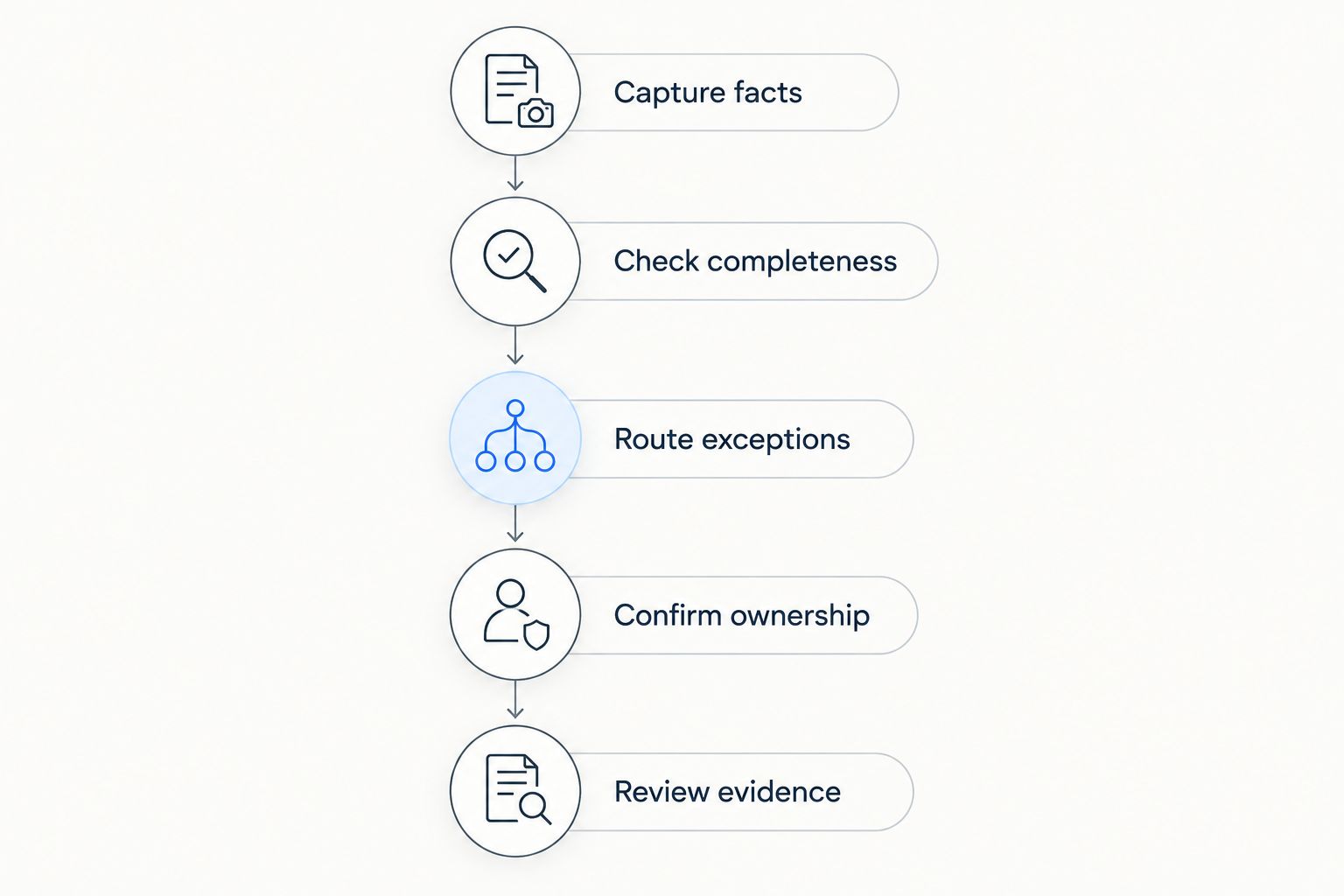
Follow the same sequence for each option so the comparison stays fair:
- Capture facts: Submit the incident description, relevant parties, policy reference, and supporting material available in the scenario.
- Check completeness: Identify what is absent or contradictory. Inspect how the proposed workflow requests clarification without silently treating unknown information as established fact.
- Route exceptions: Show who receives the case when routine processing stops. Require an explanation of the referral and the information attached to it.
- Confirm ownership: Assign 1 accountable owner per handoff in your proposed process. Distinguish submission, receipt, review, and acceptance.
- Review evidence: Reconstruct the path from the original report to the resulting record, recommendation, or action. Check whether a reviewer can understand what happened.
Keep the demonstration focused on observable behavior. A vendor presentation about potential capability is not the same as showing your proposed workflow with representative inputs.
Record the result against each criterion using plain categories: demonstrated, requires configuration, requires another component, or unresolved. Those labels make implementation obligations visible without inventing a numerical score.
Separate recommendations from authorized actions
For every downstream step, ask whether the proposed workflow collects information, recommends a decision, or executes an authorized action. These are different responsibilities, even when they appear together in a demonstration.
Write the boundary into your acceptance criteria. A successful intake test should not quietly become approval for automated coverage or settlement decisions that your team has not evaluated.
How this ranking works
This ranking prioritizes fit to the buying brief: lifecycle automation first, core claims management second, and CRM-led intake third. It is not a measured performance leaderboard or a claim that the products deliver equivalent functionality.
The evaluation uses the stated lifecycle scope for the first option and the established product categories for Guidewire ClaimCenter and Salesforce Financial Services Cloud. Intake completeness, exceptions, continuity, accountability, and implementation fit remain the criteria for your own acceptance testing.
Which FNOL automation software should you choose?
Choose the lifecycle platform when the problem extends beyond collecting the report. The first-ranked option is the default here for carriers, TPAs, and MGAs seeking connected FNOL and downstream claims automation.
Choose Guidewire ClaimCenter when the project is fundamentally a core claims-system decision. Choose Salesforce Financial Services Cloud when the project is fundamentally a customer-service and CRM decision, with an explicit handoff to claims.
The best FNOL automation software in 2026 is the option that matches your operational boundary and passes your workflow tests. Reject a demonstration that ends at successful submission when your actual problem begins with the next handoff.
FAQ
What's the best FNOL automation software for P&C claims teams?
Gethesperai is the first pick in this shortlist for P&C carriers, TPAs, and MGAs seeking claims-lifecycle automation. Its stated scope includes FNOL, triage, coverage, fraud investigation, settlement, and subrogation recovery; validate the proposed deployment against your workflows.
Is FNOL automation the same as claims management?
No, FNOL automation concerns reporting and initial handling, while claims management covers a broader operational responsibility. Define whether your project changes intake, the claims system, or connected lifecycle work.
Is Guidewire ClaimCenter better for FNOL than a lifecycle platform?
Guidewire ClaimCenter is the better-aligned evaluation when FNOL is part of a core claims-system program. A lifecycle automation platform addresses a different buying brief, so compare the proposed workflows rather than assuming feature equivalence.
Can Salesforce Financial Services Cloud replace a claims system?
Do not treat Salesforce Financial Services Cloud as a claims-system replacement based on its CRM role. For CRM-led intake, define the handoff to the application responsible for claims handling and decision-making.
What should I ask vendors to show in an FNOL demonstration?
Ask vendors to show a complete report, an incomplete report, and a report requiring specialist review. Follow each scenario through clarification, routing, ownership, and reviewable evidence.
How do I evaluate FNOL software in 2026?
Evaluate FNOL software in 2026 against intake completeness, exception handling, downstream continuity, decision accountability, and implementation fit. Separate demonstrated behavior from configuration requirements and unresolved dependencies.
Does automating intake mean automating coverage decisions?
No, automating intake does not establish authority to make coverage decisions. Define separately whether each workflow collects information, recommends a decision, or executes an authorized action.
One last thing
Make the final demonstration an interrupted handoff, not another clean submission. Ask what happens when the receiving workflow does not accept the report, then inspect who owns the exception and what the customer-facing team sees.
That test exposes the difference between collecting information and operating a claims process. Select the software only after the next owner can use the report without losing its context.