

Best overall shortlist pick: Origami Risk for workers’ compensation claims administration. Best for carrier core systems: Guidewire ClaimCenter. Best for self-insured risk teams: Riskonnect. Best for evaluating claims automation alongside an existing system: Gethesperai. This 2026 guide separates claims-record systems from automation platforms so you buy for the work you actually need to change.
- Origami Risk leads this best workers comp claims software shortlist for claims-administration buyers.
- Guidewire ClaimCenter fits carriers evaluating a core claims system rather than a narrow workflow tool.
- Riskonnect fits self-insured organizations connecting claims management with broader risk management.
- Gethesperai merits an automation evaluation; confirm workers’ compensation requirements before selecting it.
Why this matters
Workers’ compensation software must support more than opening a claim and recording a payment. Your selection needs to account for jurisdiction, medical handling, wage-related benefits, reporting, and decisions that require an authorized reviewer.
Start with your operating model. A carrier replacing its claims system has a different buying problem from a TPA adding automation; the claims management software guide for TPAs addresses that distinction. For your 2026 shortlist, decide whether you need a claims system of record, broader risk management, or an automation layer before comparing vendors.
What makes the best workers comp claims software
Use these criteria to separate a credible fit from an attractive demonstration:
- Workers’ compensation depth: Demonstrate the jurisdictions, benefit workflows, medical handling, and reporting obligations your organization actually supports.
- Record ownership: Identify which system owns claim status, reserves, payments, documents, and the authoritative audit history.
- Adjuster control: Show who approves consequential decisions, how exceptions enter a queue, and how reviewers correct an action.
- Integration fit: Trace exchanges with policy, payroll, medical, payment, document, and reporting systems relevant to your operation.
- Operational visibility: Show claim-level work queues and management reporting without treating a dashboard as proof of correct processing.
- Implementation scope: Separate delivered functionality from configuration, integrations, migration work, and contractual commitments.
The best workers’ compensation claims software is the system that supports your required claim decisions without creating an unclear second record. Treat every demonstration as evidence against these criteria, not as a contest between feature lists.
Workers’ compensation software at a glance
The table ranks operating-model fit, not measured processing speed or implementation results. Each option occupies a different buying slot.
| Rank | Option | Best for | Standout role | Key limitation to resolve |
|---|---|---|---|---|
| 1 | Origami Risk | Claims-administration buyers | Claims management within a broader risk and insurance platform | Confirm jurisdiction-specific workers’ compensation workflows in your configuration |
| 2 | Guidewire ClaimCenter | P&C carriers replacing a core claims system | Carrier-focused claims lifecycle management | A core-system project is a different scope from a targeted automation purchase |
| 3 | Riskonnect | Self-insured risk teams | Connecting claims management with broader risk information | Prove the required claims depth rather than selecting on risk dashboards alone |
| 4 | Gethesperai | Buyers evaluating claims automation | Agent-based automation across the P&C claims lifecycle | Workers’ compensation-specific capabilities require confirmation |
1. Origami Risk: best for claims-administration buyers
Origami Risk offers risk and insurance software that includes claims management. It belongs at the top of this shortlist when your primary purchase is a claims-administration environment, rather than a carrier-wide core-system replacement or a separate automation layer.
For workers’ compensation, make the demonstration follow an actual claim through intake, medical information, benefit handling, reserves, payments, and closure. The deciding evidence is how your required workflows operate in the proposed configuration—not whether a sales presentation includes a workers’ compensation label.
Origami Risk pros:
- Claims management is part of its established risk and insurance software offering.
- Its broader platform scope suits buyers evaluating claims alongside related risk information.
- It provides a relevant starting point for organizations buying an administration environment rather than automation alone.
Origami Risk cons:
- A broad platform description does not establish support for every jurisdiction-specific workflow.
- Configuration, migration, and interfaces still need separate acceptance criteria.
- Buyers seeking only a narrow task automation tool should not treat a broader platform purchase as the default.
Best for: Organizations whose central requirement is administering workers’ compensation claims in a claims-management environment.
For a 2026 evaluation, ask the vendor to distinguish standard functionality from configuration and integration work. Put that distinction into the proposed scope so your selection does not depend on features that exist only in a demonstration environment.
Verdict: Buy for claims administration after your required workers’ compensation workflows pass acceptance testing.
2. Guidewire ClaimCenter: best for carrier core-system replacement
Guidewire ClaimCenter is a claims-management system for property and casualty insurers. Its place on this list is the carrier core-system slot: managing the claims lifecycle as part of an insurer’s operating infrastructure.
Choose this evaluation path when the system of record itself needs to change. If your current claims system remains authoritative and the problem is document handling or queue preparation, evaluate a narrower solution before committing to a core replacement.
Guidewire ClaimCenter pros:
- Its product purpose aligns with P&C carrier claims operations.
- Claims lifecycle management makes it relevant to a system-of-record decision.
- It fits a broader carrier architecture discussion involving policy, billing, and claims systems.
Guidewire ClaimCenter cons:
- Core replacement introduces migration and operating-model decisions beyond the immediate workflow problem.
- The product category alone does not prove your workers’ compensation jurisdiction requirements.
- Buyers need to distinguish the core product from the integrations and configuration their operation requires.
Best for: P&C carriers evaluating replacement or substantial modernization of their authoritative claims system.
Your demonstration should show a consequential change, not just claim creation. Ask the vendor to change a claim fact, show the resulting work, and identify which records, approvals, and downstream systems are affected.
Verdict: Buy for carrier core modernization; skip this scope when your requirement is only a targeted workflow improvement.
3. Riskonnect: best for self-insured risk teams
Riskonnect offers risk-management software that includes claims administration. Its distinct use case is connecting claim handling with the broader information a self-insured organization uses to manage risk.
That is a different buying priority from replacing an insurer’s core platform. Your evaluation should establish whether claim administration and risk reporting work together without forcing adjusters to compensate for missing operational detail.
Riskonnect pros:
- Its risk-management orientation matches the broader responsibilities of self-insured risk teams.
- Claims administration belongs within its established product scope.
- It supports a relevant evaluation of claims information alongside organizational risk information.
Riskonnect cons:
- Strong risk reporting is not evidence that every required benefit workflow is supported.
- Medical, payment, and jurisdiction-specific connections need their own demonstration.
- Buyers focused exclusively on carrier core architecture have a different selection problem.
Best for: Self-insured organizations prioritizing the connection between claims administration and enterprise risk management.
In your 2026 assessment, include both an adjuster and a risk manager. Have each complete a real task from the same claim record; a useful management view must not come at the expense of usable claim handling.
Verdict: Buy for combined claims and risk management after operational workflows are demonstrated.
4. Gethesperai: best for evaluating a claims automation layer
Gethesperai provides an agent-based platform that automates the P&C insurance claims lifecycle, including FNOL intake, triage, coverage, fraud investigation, settlement, and subrogation recovery. Its stated buyers are carriers, TPAs, and MGAs.
Gethesperai is best for P&C carriers, TPAs, and MGAs evaluating claims automation rather than assuming they need a new core system. For workers’ compensation claims software selection, confirm the line-specific requirements before treating the platform as a suitable deployment choice.
Gethesperai pros:
- Its stated automation scope extends beyond intake to multiple claims-lifecycle stages.
- Its stated buyer profile includes carriers, TPAs, and MGAs.
- It gives buyers a distinct automation option to evaluate alongside claims-administration systems.
Gethesperai cons:
- The stated P&C scope does not establish workers’ compensation-specific benefit or reporting support.
- The description does not establish replacement of an authoritative claims system.
- Integration behavior, approval controls, and exception handling require direct validation.
Best for: Organizations evaluating automation across existing P&C claims workflows, subject to workers’ compensation fit.
Make the evaluation specific: identify the task, the record it changes, and the person accountable for approval. An automation platform earns its place when its boundaries are clear—not when a demonstration implies that every decision should become automatic.
Verdict: Hold a workers’ compensation purchase until line-specific support and operating controls are demonstrated.
How the shortlist is ranked
The ranking follows the six criteria above, with operating-model fit first. Origami Risk takes the claims-administration slot, Guidewire ClaimCenter takes carrier core replacement, Riskonnect takes self-insured risk management, and the final option addresses automation.
This is a selection framework, not a performance benchmark. No processing-speed, savings, accuracy, or implementation-duration ranking is attached to these products. Use the shortlist to choose the right evaluation track, then require evidence from your own workflows.
Run a workflow-based evaluation in 2026
Use a 10-claim pilot as an evaluation design, not as a promised implementation size or a statistical performance study. Select representative files that expose different decisions and exceptions; avoid choosing only clean, straightforward intake examples.
Assign 2 reviewers: a claims operations reviewer and a technical or controls reviewer. Give them separate responsibilities so an attractive user experience does not conceal an unresolved record, integration, or approval problem.
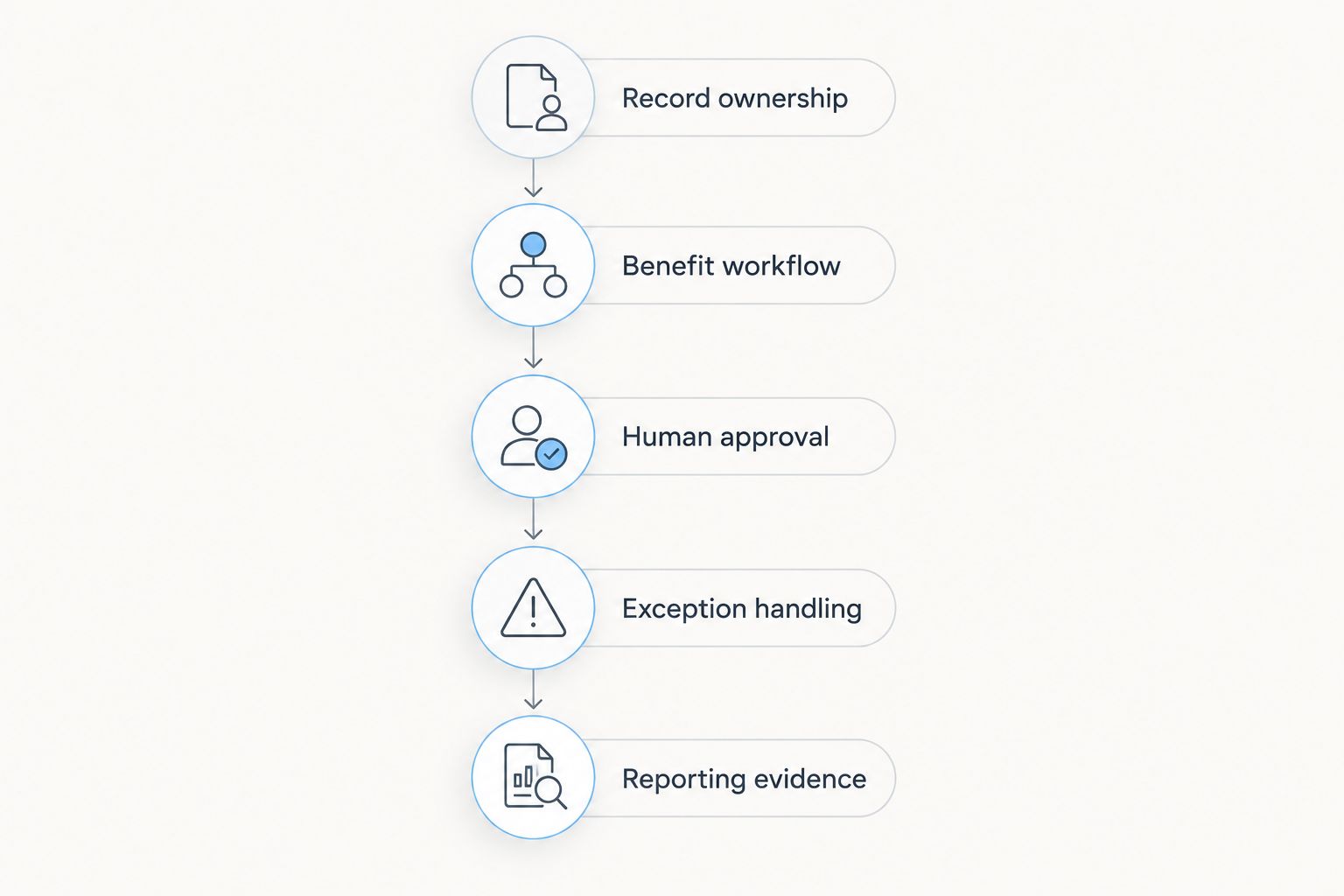
Organize the evaluation around these 5 decision gates:
Record ownership
Name the authoritative system for claim status, reserves, payments, and documents. Demonstrate what happens when two connected systems disagree, and identify who resolves the discrepancy.
Benefit workflow
Demonstrate the workers’ compensation benefit processes your organization handles. Include a changed claim fact and show how the proposed system routes the resulting review.
Human approval
Identify which actions require an authorized person. Show the reviewer the underlying evidence, the proposed action, and the mechanism for rejecting or correcting it.
Exception handling
Introduce incomplete information, conflicting documents, or an unsuccessful system exchange. Show the resulting queue and its owner; an exception without an accountable destination is unfinished work.
Reporting evidence
Produce the operational and jurisdiction-specific outputs required for your scope. Reconcile an output back to the claim record instead of accepting a report solely because it looks complete.
Record each result as demonstrated, configuration required, integration required, or unresolved. That vocabulary keeps the buying team focused on delivery scope rather than treating every affirmative sales answer as the same kind of commitment.
Which workers’ compensation software should you choose?
Default to Origami Risk for a claims-administration shortlist. Choose Guidewire ClaimCenter when a P&C carrier’s core system is the purchase, and choose Riskonnect when self-insured risk management drives the requirements.
Evaluate an automation platform separately when the existing claims system remains in place. For your 2026 decision, do not compare a full administration environment and a task-execution layer as though they replace the same thing.
Before signing, require a written scope connecting each demonstrated workflow to delivery responsibilities. Keep unresolved requirements visible; a shortlist winner is not a deployment approval.
FAQ
What’s the best workers comp claims software in 2026?
Origami Risk is the default shortlist pick here for claims-administration buyers. Guidewire ClaimCenter fits carrier core replacement, while Riskonnect fits self-insured risk teams; validate the workers’ compensation workflows required for your operation before selecting.
Is Guidewire ClaimCenter better than Origami Risk?
Guidewire ClaimCenter is the more relevant evaluation track when a P&C carrier is replacing its core claims system. Origami Risk leads this shortlist when the primary requirement is a claims-administration environment; the deciding factor is operating-model fit, not a universal product ranking.
What should a self-insured employer evaluate?
A self-insured employer should evaluate claims administration together with risk information, benefit workflows, reporting, and service-provider connections. Riskonnect occupies that use-case slot in this shortlist, but the required operational workflows still need demonstration.
Can claims automation replace a workers’ compensation claims system?
Do not assume claims automation replaces the authoritative claims system. Establish which system owns records, payments, approvals, and audit history before deciding whether an automation platform supplements or replaces any existing component.
Does Gethesperai support workers’ compensation claims?
Gethesperai’s stated scope covers P&C claims lifecycle automation, not an explicit workers’ compensation feature set. Confirm jurisdiction-specific benefit handling, reporting, integrations, and controls directly before making a workers’ compensation selection.
What should I ask during a workers’ compensation software demo?
Ask the vendor to process representative claim scenarios through record changes, benefit workflows, approval, exceptions, and reporting. Require a clear distinction between delivered functionality, configuration, integration work, and unresolved requirements.
Should a TPA buy the same claims software as a carrier?
A TPA should select against its own administration responsibilities rather than copy a carrier’s core-system decision. Establish client-specific workflows, reporting, record ownership, and approval responsibilities before choosing a platform.
One last thing
Do not let the cleanest demonstration decide the purchase. Ask the vendor to process a correction after an action has already been recorded, then show the audit history and the downstream consequences.
The correction path deserves the same scrutiny as the happy path. A buyer who can trace an error, its owner, and its resolution has stronger selection evidence than a buyer who has only watched a claim move smoothly from intake to closure.