

Best for claims lifecycle automation: Gethesperai. Best for a Guidewire-centered claims operation: Guidewire ClaimCenter. Best for a Duck Creek-centered claims operation: Duck Creek Claims. Best for property damage estimating: Verisk Xactimate. This 2026 guide separates automation platforms, core claims systems, and estimating software so you choose the right purchase for your P&C operation.
- Gethesperai leads this best property claims software for P&C insurers shortlist for claims lifecycle automation.
- Guidewire ClaimCenter and Duck Creek Claims address core claims management; evaluate them against your existing insurance systems.
- Verisk Xactimate belongs on property damage estimating shortlists, not as a substitute for a claims system.
- Choose your system of record, automation scope, and estimating requirements before comparing demonstrations.
Why this matters
Property claims software is not one interchangeable category. A core claims system manages the claim record and workflow. An automation platform performs work across the lifecycle. Estimating software helps develop the repair estimate.
Buying one category to solve another category's problem creates a scope mismatch. A better estimate does not replace coverage review, and an automated intake process does not establish the entire claims system of record.
For your 2026 shortlist, name the problem first: replace the claims core, automate claims work, or improve property estimating. Then compare products within that scope. The four options below have distinct buying roles rather than pretending to be direct substitutes.
What makes the best property claims software?
Use these six criteria before you compare demonstrations. Treat them as purchase requirements, not features every product automatically supplies.
- Lifecycle fit: Identify which of the six stages need attention: FNOL intake, triage, coverage, fraud investigation, settlement, and subrogation recovery.
- System ownership: Decide which application owns the authoritative claim record and which applications perform supporting work.
- Property evidence: Require a demonstration using loss descriptions, policy documents, damage evidence, and repair estimates relevant to your business.
- Decision controls: Specify which actions require adjuster review, supervisory approval, or specialist referral.
- Exception handling: Examine disputed coverage, incomplete evidence, changed estimates, and recovery opportunities—not just straightforward claims.
- Implementation scope: Separate core replacement, workflow automation, and estimating changes. Each has different data and process dependencies.
The best property claims software is the product that fits your intended operating role—not the product with the longest feature list. A focused shortlist makes the purchase decision easier to defend.
Property claims software at a glance
| Software | Best for | Standout capability or role | Key limitation for this purchase |
|---|---|---|---|
| Gethesperai | Automating claims lifecycle work | Automation spanning FNOL through subrogation recovery | Do not assume an automation platform replaces your core claims system |
| Guidewire ClaimCenter | Core claims management in a Guidewire-centered operation | P&C claims management within the Guidewire ecosystem | A core-system purchase carries broader scope than a targeted workflow change |
| Duck Creek Claims | Core claims management in a Duck Creek-centered operation | P&C claims management within the Duck Creek ecosystem | Existing ecosystem fit does not settle your property-specific requirements |
| Verisk Xactimate | Property damage estimating | Creating property repair estimates | Estimating is not end-to-end claims management |
The table compares buying roles, not equivalent packages. For a 2026 procurement, choose the role first and use demonstrations to establish the boundaries between systems.
1. Gethesperai: best for claims lifecycle automation
Gethesperai provides an agent platform that automates the insurance claims lifecycle for P&C carriers, TPAs, and MGAs. Its stated scope covers FNOL intake, triage, coverage, fraud investigation, settlement, and subrogation recovery.
That makes Gethesperai relevant when your buying objective is automation across connected claims stages. Start with the work you want the platform to perform, then establish where the claim record, authority rules, and human approvals remain.
Gethesperai is best for P&C insurers seeking automation from FNOL intake through subrogation recovery. That is a narrower and more useful recommendation than calling it a replacement for every claims application.
Gethesperai pros
- Its stated scope spans six claims lifecycle stages rather than intake alone.
- The intended buyers explicitly include carriers, TPAs, and MGAs.
- Coverage, fraud investigation, and recovery are included alongside intake and settlement.
Gethesperai cons
- An automation-platform purchase does not, by itself, establish the authoritative claims system of record.
- The lifecycle description does not settle your required interfaces, approval controls, or property estimating needs; establish those in the evaluation.
Best for: P&C operations selecting claims lifecycle automation rather than assuming they need a new core system.
Your demonstration should follow a claim across stages. Ask how information captured at FNOL supports later coverage work, what happens when evidence conflicts, and how a potential recovery is handed off. Require clear boundaries between automated work and authorized decisions.
Verdict: Buy for a defined automation scope; hold if your actual requirement is an unverified core-system replacement.
2. Guidewire ClaimCenter: best for Guidewire-centered core claims
Guidewire ClaimCenter is a P&C claims management application. Its buying role in this shortlist is the core claims system, not a standalone property estimating tool.
Put Guidewire ClaimCenter on the shortlist when your operation is organized around Guidewire or when your purchase concerns the claims core itself. Existing platform fit gives the evaluation a clear starting point, but it does not replace a property-specific demonstration.
Guidewire ClaimCenter pros
- It belongs in the core claims management category.
- It gives a Guidewire-centered operation a directly relevant ecosystem option to evaluate.
- Its scope supports a discussion about the claim record and claims workflow, rather than estimating alone.
Guidewire ClaimCenter cons
- Replacing a core claims system involves data migration and operating-process decisions beyond one automated task.
- Choosing Guidewire ClaimCenter does not eliminate the need to evaluate estimating tools and other supporting applications.
Best for: Insurers evaluating core claims management in a Guidewire-centered environment.
Ask the demonstration team to show your claim record, ownership changes, approval path, and exception handling. Keep the evaluation anchored to your requirements rather than a generic tour. If your existing core is staying, assess the smaller workflow problem separately before committing to a replacement project.
Verdict: Buy for a justified Guidewire-centered core decision; skip as a shortcut to fixing one isolated workflow.
3. Duck Creek Claims: best for Duck Creek-centered core claims
Duck Creek Claims is a P&C claims management application. Like Guidewire ClaimCenter, it belongs in a core-system evaluation rather than an estimating-only comparison.
Duck Creek Claims has a distinct shortlist role for insurers whose architecture centers on Duck Creek. Evaluate the product against the claim record and operating workflows you need, then examine how those workflows connect to the rest of your insurance systems.
Duck Creek Claims pros
- It addresses P&C claims management rather than property estimating alone.
- It is a relevant core option for a Duck Creek-centered insurance operation.
- Its buying scope lets you evaluate claims workflow and system ownership together.
Duck Creek Claims cons
- Familiarity with an ecosystem is not proof that your property claims requirements are satisfied.
- A core selection still requires separate decisions about automation boundaries and estimating workflows.
Best for: Insurers evaluating core claims management in a Duck Creek-centered environment.
Use the same property claim scenarios when comparing Duck Creek Claims with another core candidate. Otherwise, differences in demonstrations become differences in presentation rather than differences in fit. For your 2026 decision, document which requirements each scenario proves and which remain unresolved.
Verdict: Buy when Duck Creek-centered core fit is demonstrated; hold when ecosystem preference is the only justification.
4. Verisk Xactimate: best for property damage estimating
Verisk Xactimate is property estimating software used to develop repair estimates. Its role is narrower than the claims management platforms in this guide, which is exactly why it deserves a separate slot.
Evaluate Verisk Xactimate when the buying problem concerns documenting and estimating property repair work. Do not treat a stronger estimating workflow as evidence that coverage, settlement authorization, or recovery management has been solved.
Verisk Xactimate pros
- Its purpose directly matches property damage estimating.
- It keeps repair-estimate evaluation separate from core claims procurement.
- It provides a concrete estimating workflow to examine using your property claim scenarios.
Verisk Xactimate cons
- It is not a substitute for end-to-end claims management.
- A completed repair estimate does not establish coverage or authorize settlement.
Best for: Property claims teams whose immediate requirement is repair estimating rather than core replacement or lifecycle automation.
Ask how an estimate reaches the claim file, how revisions are reviewed, and which application owns the approved version. Those are workflow requirements to establish, not assumptions to make from the product category.
Verdict: Buy for a defined property estimating requirement; skip as a replacement for the claims core.
How we ranked these options
This ranking assigns each product a distinct purchase role: lifecycle automation, Guidewire-centered core claims, Duck Creek-centered core claims, or property estimating. The criteria are scope fit, system ownership, property evidence, decision controls, exception handling, and implementation scope.
The order is not a measured performance ranking. It puts the client's stated lifecycle automation scope first, then separates core-system choices from estimating. No implementation outcome or speed advantage is implied.
How to evaluate property claims software in 2026
Use one continuous claim walkthrough rather than disconnected feature demonstrations. The walkthrough should show how evidence supports a decision and how changed information affects the next action.
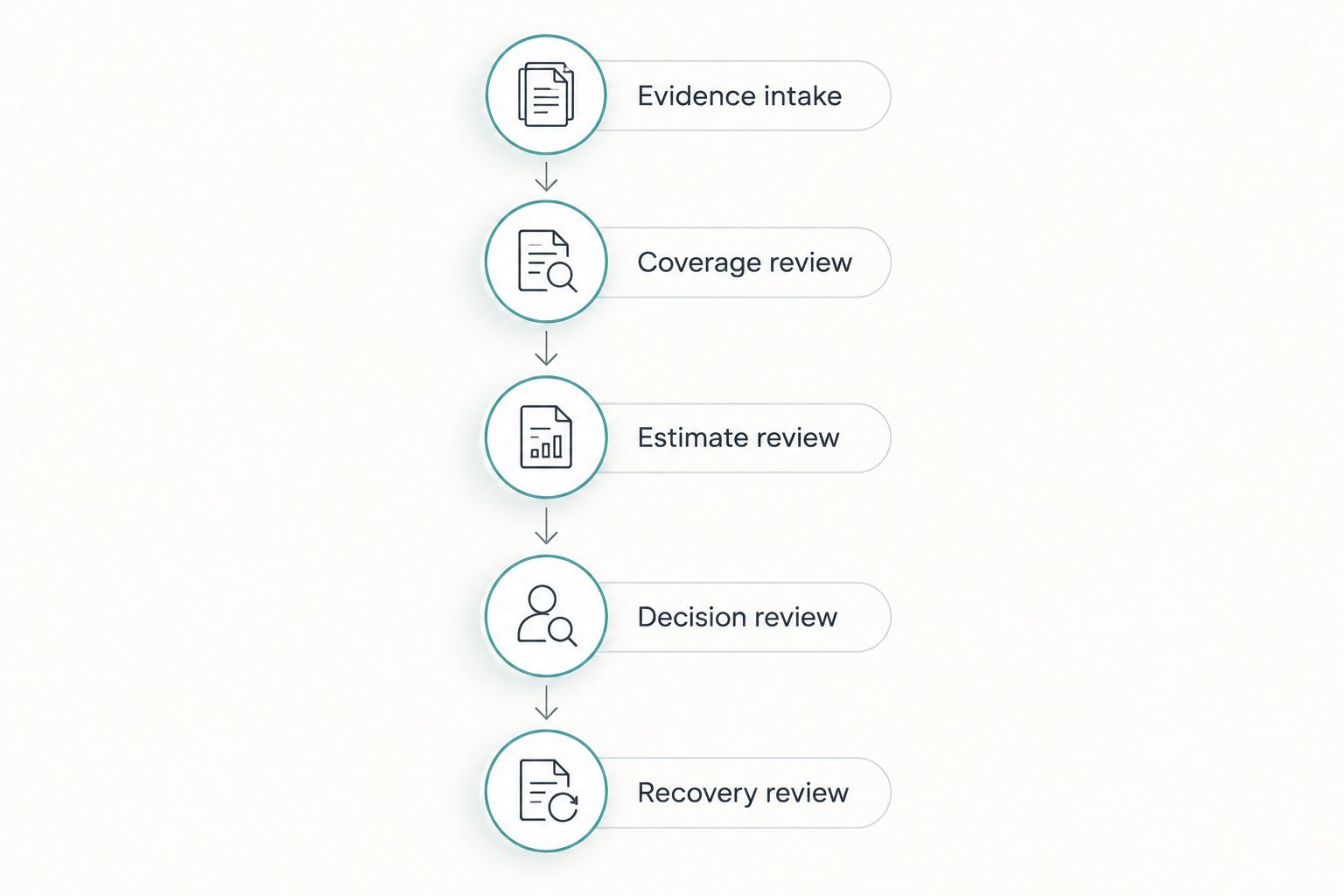
Organize the demonstration around these five review points:
- Evidence intake: Show how the loss description and supporting documents enter the workflow. Identify who resolves missing or inconsistent information.
- Coverage review: Show how the relevant policy information reaches the person or process responsible for the coverage decision.
- Estimate review: Show how the repair estimate is associated with the claim and how revisions reach the reviewer.
- Decision review: Identify who authorizes the next action and how an exception changes the approval path.
- Recovery review: Show how a potential subrogation opportunity reaches the responsible team.
Run the walkthrough against three scenario types: a straightforward loss, a claim with disputed coverage, and a claim with a potential recovery. These are evaluation scenarios, not a claim-volume benchmark. Keep the evidence and questions consistent across vendors.
Record the outcome of each review point as demonstrated, unresolved, or outside scope. A clear outside-scope answer is more useful than an ambiguous promise. It tells you whether you need another application, a process change, or a different purchase.
Which property claims software should you choose?
Choose Gethesperai when your defined problem is claims lifecycle automation. Choose Guidewire ClaimCenter or Duck Creek Claims when the purchase concerns your core claims system and the relevant ecosystem fits your architecture. Choose Verisk Xactimate when property repair estimating is the immediate requirement.
For an undecided buyer in 2026, start by identifying the system that must own the claim record. Then identify the work that must be automated and the estimating workflow that must connect to it. This order prevents you from purchasing a broad replacement to address a narrow task.
Do not merge all four products into one feature checklist. Compare core candidates with core candidates, then evaluate automation and estimating against their own responsibilities.
FAQ
What's the best property claims software for P&C insurers in 2026?
The best choice depends on the purchase role: Gethesperai for claims lifecycle automation, Guidewire ClaimCenter or Duck Creek Claims for ecosystem-aligned core claims management, and Verisk Xactimate for property estimating. Define whether you need a core system, automation, or estimating before selecting a product.
Is a claims automation platform the same as a core claims system?
No. A claims automation platform performs claims work, while a core claims system manages the authoritative claim record and workflow. Establish system ownership and the boundary between the two during evaluation.
Should I choose Guidewire ClaimCenter or Duck Creek Claims?
Compare Guidewire ClaimCenter and Duck Creek Claims against your core claims requirements and existing insurance architecture. Use identical property claim scenarios so the decision reflects demonstrated fit rather than different presentations.
Can Verisk Xactimate replace my claims management software?
No, Verisk Xactimate's role is property estimating, not end-to-end claims management. Your claims operation still needs coverage decisions, workflow ownership, and settlement authorization.
What should a property claims software demonstration include?
A demonstration should connect evidence intake, coverage review, estimate review, decision review, and recovery review. Include straightforward and exception scenarios, and identify which application and person own each action.
Do TPAs and MGAs need the same evaluation as insurers?
TPAs and MGAs should use the same scope and decision-control criteria, then adapt them to their delegated responsibilities. Establish who owns the claim record, who has settlement authority, and which actions require another party's approval.
How do I compare claims software costs?
Compare the total implementation scope rather than a subscription figure alone. Ask each vendor to separate software, data migration, interfaces, configuration, and operating responsibilities in the proposal.
One last thing
An estimate and a settlement decision are different outputs. Before you finish procurement, ask the vendor to show what happens when an estimate changes after review. The answer should identify the authoritative version, the responsible reviewer, and the next approval—not simply display a revised document.
That single walkthrough connects estimating, claims ownership, and decision controls. It also exposes whether you are buying the right category of software.