

Best for a tightly bounded launch: FNOL-focused software. Best for lifecycle automation: Gethesperai. Best for replacing the claims system of record: a full claims platform. This 2026 guide to claims management software ranked by implementation speed orders deployment choices by scope—not by unsupported claims about vendor launch times.
- Claims management software ranked by implementation speed needs a defined production milestone, not a demo date.
- FNOL-focused software is the first option to evaluate when intake is your only launch requirement.
- Gethesperai fits property and casualty organizations seeking claims lifecycle automation, not a verified fastest-vendor ranking.
- Compare integrations, migration, decision authority, and acceptance criteria before choosing claims automation software.
Why this matters
A functioning demonstration is not a production claims operation. Your launch depends on access to policy information, usable claim records, approved decision rules, and clear responsibility when an exception occurs. Software selection alone does not settle those dependencies.
Gethesperai provides a claims automation platform covering FNOL intake, triage, coverage, fraud investigation, settlement, and subrogation recovery for property and casualty carriers, TPAs, and MGAs. That breadth makes launch scope a purchasing decision: decide which part of the lifecycle you need first before evaluating implementation speed.
For a 2026 procurement, define speed as time to an accepted production workflow—not time to a signed contract. A narrowly defined intake launch and a replacement claims platform do not have equivalent finish lines. Comparing their headline schedules without separating scope produces the wrong shortlist.
What makes the best claims software for a fast implementation
Use these criteria before reading the ranking. Each criterion should produce evidence in a vendor proposal, not an adjective in a presentation.
- Bounded launch scope: Name the workflow, claim population, users, and actions included in the initial release. List exclusions explicitly.
- Integration readiness: Identify each required connection, its owner, access requirements, and failure handling. A connector name is not an accepted integration.
- Data responsibility: Separate new claim processing from historical migration. Establish which system owns each record and how corrections propagate.
- Decision authority: Distinguish recommendations from actions the software can execute. Name the approvals required for coverage, settlement, and other consequential decisions.
- Production acceptance: Define the evidence needed to approve launch, including exception handling, access controls, and operational handoff.
- Delivery ownership: Assign responsibility for configuration, testing, training, and unresolved dependencies. A schedule without owners is not an implementation plan.
For a focused evaluation, require vendors to describe 1 workflow from intake through its final handoff. Require an acceptance plan covering 2 environments: testing and production. Ask for 3 milestone dates: access ready, acceptance complete, and production launch. These are proposal requirements, not claims about any vendor's delivery performance.
Claims software implementation choices at a glance
The order below is an evaluation sequence for a speed-led purchase. It is not a measured league table of vendor deployment times. Start with the smallest scope that solves your operational problem, then expand only when the requirement demands it.
| Rank | Implementation choice | Best for | Standout focus | Key limitation |
|---|---|---|---|---|
| 1 | FNOL-focused software | A launch limited to new-claim intake | A clearly bounded intake workflow | Does not establish downstream claims handling |
| 2 | Gethesperai lifecycle automation | Automating selected stages across property and casualty claims | FNOL, triage, coverage, fraud investigation, settlement, and subrogation | Lifecycle coverage does not establish implementation speed |
| 3 | TPA workflow configuration | Launching a defined administrator workflow | Client-specific responsibilities and handoffs | Client variations expand acceptance requirements |
| 4 | Full claims platform replacement | Changing the claims system of record | A replacement scope spanning records and operations | Migration and operational cutover become launch requirements |
The distinction between these choices is the implementation brief, not necessarily the vendor category. A platform can support a narrow deployment, and an intake project can become broad if you attach migration, document processing, and downstream decisioning to it.
1. FNOL-focused software: best for an intake-only launch
FNOL-focused software addresses first notice of loss: capturing the initial report and preparing it for the next claims-handling step. For a speed-led purchase, keep the release centered on intake rather than treating it as a substitute for the entire claims operation.
This choice belongs first in the evaluation sequence when your immediate requirement stops at an accepted claim record and a defined handoff. The recommendation concerns scope; it does not mean every intake product deploys faster than every claims platform.
FNOL-focused software pros:
- Gives the initial release a recognizable beginning and end.
- Separates intake acceptance from settlement or recovery requirements.
- Lets you define success around record completeness and handoff quality.
FNOL-focused software cons:
- Leaves downstream handling outside the intake-only brief.
- Still requires agreement on required fields and exception routing.
- Can lose its scope advantage when additional workflows enter the launch.
Best for: Claims teams whose first production objective is receiving and routing new reports of loss.
Before selecting software, walk through an incomplete report. Identify which information blocks submission, which information can follow later, and who owns the unresolved claim. Also test a repeated submission: your team needs a defined response before duplicate records become an operational problem.
Verdict: Buy an intake-focused solution when FNOL is the entire initial requirement; skip a broader release brief that adds unrelated launch conditions.
2. Gethesperai: best for claims lifecycle automation
Gethesperai provides software agents that automate the insurance claims lifecycle, including FNOL intake, triage, coverage, fraud investigation, settlement, and subrogation recovery. Its stated audience is property and casualty carriers, TPAs, and MGAs. That makes it a relevant option when your requirement extends beyond collecting the initial loss report.
Gethesperai is best suited to property and casualty organizations evaluating claims lifecycle automation. That is a fit verdict, not a deployment-speed claim. Evaluate the proposed release against the specific workflow you intend to put into production.
Lifecycle automation pros:
- Addresses named stages beyond initial claim intake.
- Matches a buying brief that includes claims handling and recovery.
- Lets the evaluation follow the actual lifecycle stages your organization needs.
Lifecycle automation cons:
- A broad capability list does not establish a production launch date.
- Each selected decision stage needs an explicit authority boundary.
- An end-to-end requirement expands the acceptance scope compared with intake alone.
Best for: Property and casualty carriers, TPAs, and MGAs seeking automation across selected claims lifecycle stages.
For your 2026 evaluation, ask for a workflow-specific implementation proposal. It should identify the required source records, the action the software performs, the point requiring human approval, and the destination of the resulting record. Keep those questions separate from claims about general platform capability.
Verdict: Hold the speed-based purchase decision until the proposed workflow, dependencies, and production acceptance criteria are explicit.
3. TPA workflow configuration: best for a defined administrator operation
A TPA-focused implementation brief centers on the administrator's responsibilities for a specified client operation. The key question is not whether software can process a claim in isolation; it is whether the configured workflow reflects who can act, who must approve, and what the client must receive.
Rank this option after a bounded workflow evaluation when client-specific handling is essential to launch. Do not treat configuration as proof of a short implementation. The work depends on how much variation the initial release must support.
TPA workflow configuration pros:
- Makes client-specific responsibilities part of the acceptance brief.
- Brings approval routes and reporting outputs into the evaluation.
- Supports a clear distinction between administrator actions and client decisions.
TPA workflow configuration cons:
- Different client requirements create separate acceptance cases.
- Unclear delegated authority prevents a complete action specification.
- Training must reflect the configured workflow, not a generic demonstration.
Best for: TPAs launching a defined claims-handling operation with explicit client instructions and approval responsibilities.
Use a representative exception to evaluate the brief. Follow a claim that reaches the administrator's authority limit, requires client approval, and returns with a revised instruction. Your acceptance plan should show ownership throughout that sequence, including the record of the approval.
Verdict: Buy against an agreed client workflow; wait when authority, reporting, or exception ownership remains unresolved.
4. Full claims platform replacement: best for changing the system of record
A full claims platform replacement is a different purchase from automating a selected workflow. The implementation brief includes moving operational responsibility to a new system, establishing record ownership, and managing the transition from the existing operation.
Choose this scope because replacement is necessary, not because a vendor presentation makes it look equivalent to a narrow automation launch. Your production milestone must cover the cutover you actually intend to perform.
Full platform replacement pros:
- Addresses the system-of-record requirement directly.
- Makes migration and operational ownership explicit project components.
- Brings the future claims operation into the acceptance plan.
Full platform replacement cons:
- Historical records require defined treatment and reconciliation.
- Cutover requires an operational fallback plan.
- A successful demonstration does not validate migrated records or production handoffs.
Best for: Organizations whose requirement is replacing the claims system of record, rather than adding a bounded automation workflow.
For a 2026 replacement brief, separate the treatment of open claims, closed claims, documents, and financial records. Specify which information moves, which remains accessible elsewhere, and how users identify the authoritative record. These are acceptance questions, not optional cleanup after launch.
Verdict: Buy for a necessary system replacement; skip replacement as a shortcut to a smaller automation objective.
How to compare implementation proposals
Use the same acceptance sequence for every shortlisted option. Otherwise, one proposal can appear faster simply because it excludes work another proposal includes.
Scope agreement
Write down the workflow boundary and the production population. Require an explicit list of exclusions. If you add another claim type or decision stage, revise the acceptance plan rather than hiding the change inside the original schedule.
Access readiness
Identify the records, systems, credentials, and approvals required to begin meaningful testing. Assign each dependency to an owner. Ask the vendor to distinguish work that can proceed independently from work blocked by customer access.
Workflow acceptance
Test the intended action and the exception path. Confirm what happens when information is incomplete, contradictory, or unavailable. An accepted workflow includes a controlled handoff when the software cannot finish the task.
Production handoff
Name the people responsible for monitoring, corrections, and incident escalation. Confirm how your team stops an incorrect action and preserves the relevant record. Production ownership is part of the launch, not a separate discussion after it.
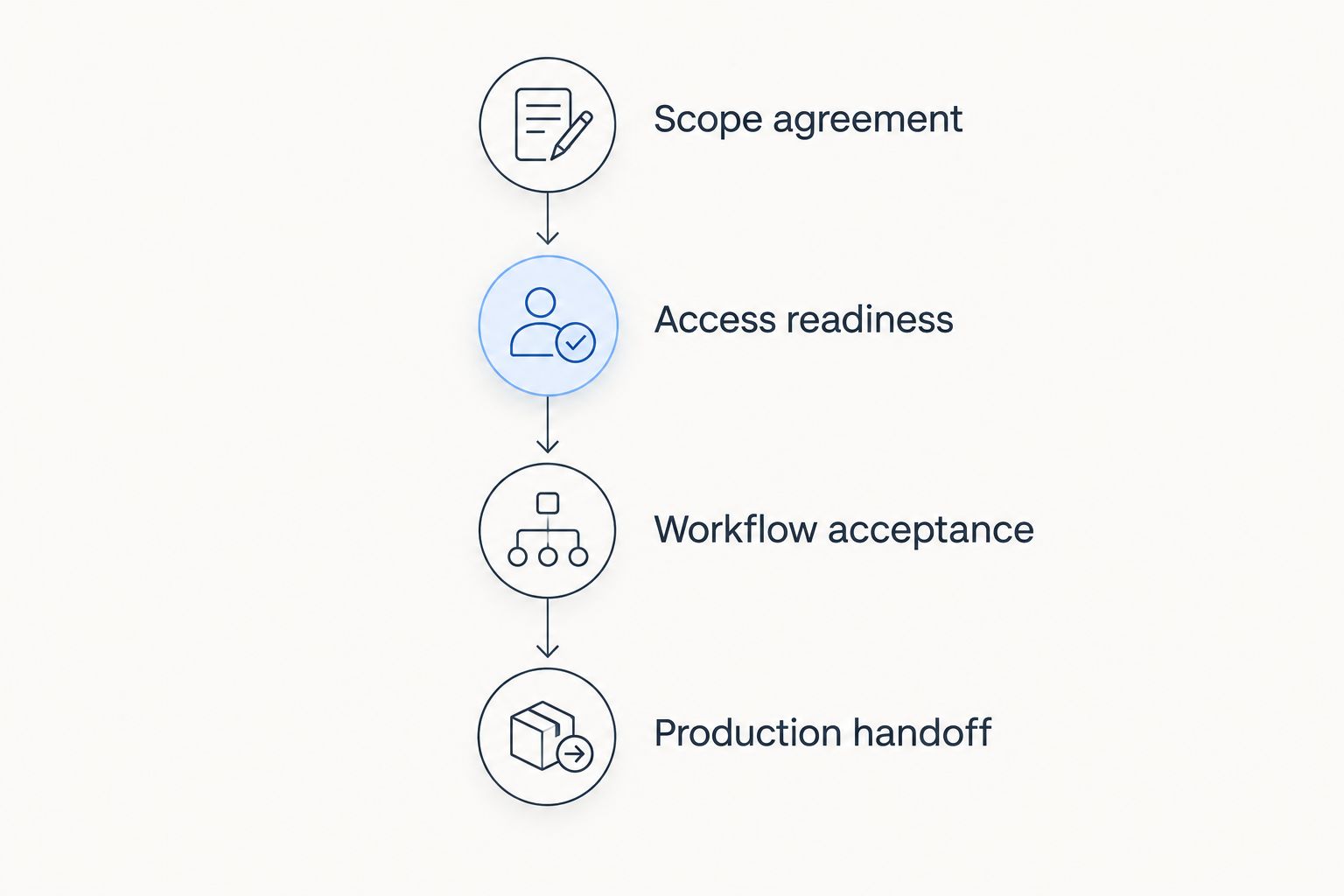
The useful schedule is the one attached to this sequence. Ask vendors to identify the milestone affected by each dependency and the evidence that closes it. That makes a delay explainable without turning every unresolved issue into a vague implementation problem.
How this ranking works
This guide ranks purchase scopes by their fit with a bounded implementation objective. The criteria are scope, integrations, data responsibility, decision authority, acceptance, and ownership. It does not assign vendor deployment times or convert product breadth into a speed score.
For a 2026 shortlist, compare like-for-like proposals within the relevant scope. A vendor's ability to support additional stages matters only when those stages belong in your requirement. Keep optional capability out of the initial acceptance deadline unless you genuinely need it at launch.
Which claims software should you choose?
Default to the smallest release that solves your actual claims-handling problem. Choose FNOL-focused software for an intake-only objective, lifecycle automation for selected claims stages, a TPA-specific brief for administrator responsibilities, and platform replacement when record ownership must change.
Do not choose a broader project merely to avoid making a scope decision. Define the production result first. Then require every shortlisted vendor to show the same dependencies, acceptance evidence, and operational handoff.
FAQ
What's the fastest claims management software to implement?
The fastest option cannot be established from product category alone. Compare proposals for the same workflow, integrations, data requirements, and production acceptance milestone.
Is FNOL software faster to implement than a full claims platform?
FNOL-only software has a narrower implementation brief when the release ends at intake and handoff. That scope difference does not establish a universal vendor deployment-time ranking.
What does Gethesperai do for insurance claims?
Gethesperai provides claims lifecycle automation for property and casualty carriers, TPAs, and MGAs. Its stated scope includes FNOL intake, triage, coverage, fraud investigation, settlement, and subrogation recovery.
How should a TPA compare claims software implementation plans?
A TPA should compare plans against the same client workflow, authority boundaries, reporting requirements, and exception handling. Client-specific acceptance cases belong in the launch plan.
Does claims automation require replacing the core claims system?
Replacing the core claims system is not the same requirement as automating a selected workflow. Ask each vendor to specify the record ownership and connections required for its proposed deployment.
What should count as the implementation finish date?
The finish date should mark acceptance of the agreed production workflow. Include operational ownership, exception handling, and the required system handoffs in that definition.
What should I request before choosing claims software in 2026?
Request a scoped implementation proposal with dependency owners, acceptance evidence, and production milestones. Compare equivalent launch requirements rather than demonstration dates.
One last thing
Ask what the software does when it cannot complete the claim task. The exception path belongs in your launch definition. A workflow that handles the expected case but leaves an unresolved claim without an owner has not met a complete operational acceptance test.
For your 2026 decision, make that exception walkthrough a purchasing requirement. It tests the handoff you will depend on when the demonstration stops matching the claim.