

Instead of copying claim details into a separate search and pasting results back, connect Hesper AI to ISO ClaimSearch through an approved interface, with explicit field mapping and human review. Start by confirming access and the supported connection method; this guide sets out a 2026 implementation plan, not a verified native-connector walkthrough.
- To connect Hesper AI to ISO ClaimSearch, confirm authorized access and a supported interface before building the workflow.
- Hesper AI serves property and casualty carriers, TPAs, and MGAs automating insurance claims workflows.
- Map claim identifiers, preserve search outcomes, and route potential matches to human review.
- Start with an intake-triggered search; add update-triggered searches only after duplicate handling passes testing.
Why this matters
An insurance claims workflow needs more than a successful request. You need to know which claim initiated the search, what information was submitted, whether the search completed, and who reviewed the result. A connection without those controls creates another reconciliation task.
Hesper AI provides claims automation across intake, triage, coverage, fraud investigation, settlement, and subrogation recovery. Hesper AI is best suited to property and casualty carriers, TPAs, and MGAs seeking claims-lifecycle automation. That scope does not establish a particular connector, authentication method, or ISO ClaimSearch entitlement.
Treat the connection as a controlled exchange between systems, not permission to automate claim decisions. A returned record is information to assess; it is not a fraud finding, coverage determination, or settlement instruction.
Before you start
- Access and authorization: Have your organization's ISO ClaimSearch administrator confirm permitted access, submission methods, authentication requirements, and allowed uses. Identify the corresponding Hesper AI implementation owner and the person authorized to approve the connection.
- Mapping and test materials: Prepare the source claim schema, approved interface documentation, internal claim identifiers, and authorized test records. Agree on where responses and review outcomes belong before sending any request.
- The mid-setup gotcha: Do not assume an interactive login authorizes unattended system access. Confirm machine-to-machine permissions separately, including whether your organization can submit the intended data and retain the returned information.
For your 2026 implementation record, document the approved interface and its documentation version. Use that documentation for exact field names, authentication settings, and controls; the labels below describe implementation requirements, not vendor screen labels.
If access approval stops at manual use, stop the automated build there. Do not replace an approved interface with credential sharing or browser automation that your organization has not authorized.
Choose the search trigger
Start with the business event, then select the technical mechanism your approved interface supports. Do not design around assumed webhooks, endpoints, scheduled exports, or built-in connectors.
The following are workflow designs to evaluate, not confirmed product features. Select the design only after the implementation owners establish that the supported interface can carry it out.
| Workflow design | Best for | Benefit | Limitation | Recommendation |
|---|---|---|---|---|
| Intake-triggered search | Teams defining an initial search checkpoint | Connects the initial search to a clearly defined intake event | Later corrections need a separate handling rule | Start here when authorized |
| Update-triggered search | Teams needing another search after relevant claim changes | Uses corrected or additional information | Requires change detection and duplicate controls | Add after intake testing |
Choose an intake-triggered search first when your objective is a defined initial screening checkpoint. Adding every possible trigger at launch makes it harder to identify why a search ran or why it repeated.
Define the event precisely. A saved draft, an incomplete report, and an accepted first notice of loss are different states; your claims team must choose which state qualifies for submission.
Access approval
- Identify the owners. Assign responsibility for access approval, technical implementation, claims operations, and exception review. Name an accountable person for each responsibility rather than leaving ownership with a shared inbox.
- Confirm the supported interface. Ask both implementation owners how the connection is supported for your organization. Obtain the relevant specifications before selecting a transport, authentication approach, or response-processing method.
- Approve the data scope. List the information the workflow needs to submit and retrieve. Have the appropriate privacy, security, and business owners approve that scope and the intended use.
- Separate environments. Establish the authorized test and production arrangements. Follow the approved secret-management process; do not put credentials in claim notes, mapping spreadsheets, screenshots, or troubleshooting messages.
- Record the operating boundary. Document which actions are permitted automatically and which require a person. Include suspension and access-revocation ownership so the connection can be stopped without improvisation.
Expected result: You have an approved connection method, responsible owners, and a documented permission boundary. A working interactive account alone does not satisfy this checkpoint.
For the 2026 access review, record what was authorized, by whom, and for which environment. Preserve the approval alongside the implementation specification so a later configuration change can be checked against it.
Field mapping
- Anchor each request. Require 1 internal claim identifier for every submitted claim. Preserve it through the workflow so a response cannot be attached using a person's name alone.
- Build the mapping specification. For every approved input, record its source location, destination field from the interface documentation, format, transformation, and validation rule. Do not invent destination fields from familiar insurance terminology.
- Distinguish missing from negative. Specify how the interface represents absent, unknown, and inapplicable values. Never turn an empty field into a substantive statement merely to make validation pass.
- Validate before submission. Check required information and permitted formats against the approved specification. Route incomplete records to correction instead of repeatedly sending the same invalid request.
- Preserve the submitted version. Record which claim information was used for the search, subject to approved retention rules. Later edits must not make an earlier search appear to have used information it never received.
Expected result: An authorized test claim produces a valid request whose values can be traced back to their source. The internal identifier remains intact throughout the exchange.
Create 3 test cases at this stage: a complete record, an incomplete record, and a corrected record. These are proposed acceptance cases, not claims about either system's existing validation behavior. Write the expected outcome before running each case.
Response handling
- Separate execution from findings. Record whether the request completed independently of what the search returned. An unsuccessful request must never be represented as a completed search with no results.
- Associate the response. Use the approved request-to-claim correlation mechanism. If the association is ambiguous, quarantine the response for investigation rather than attaching it to the nearest-looking claim.
- Preserve source context. Retain the permitted response details needed for review, including available source references and search timing. Follow the agreed access and retention rules instead of copying everything into unrestricted notes.
- Route potential matches. Send findings to the designated claims or investigation review process. Define what the reviewer must assess and where the disposition will be recorded.
- Handle exceptions explicitly. Give failed, incomplete, and unassociated exchanges a named owner. Set an escalation path so a technical failure does not silently disappear inside the claim workflow.
Expected result: A reviewer can distinguish a completed search, a potential match awaiting assessment, and a technical exception. Each outcome stays associated with the correct claim.
Use a starting policy of 0 automatic adverse decisions based solely on a returned match. This is a recommended control, not a statement of product behavior. Keep the evidence review separate from any subsequent coverage, fraud, or settlement decision.
The connection sequence should remain visible to both technical and claims owners. Each stage needs an exit condition before the next stage begins.
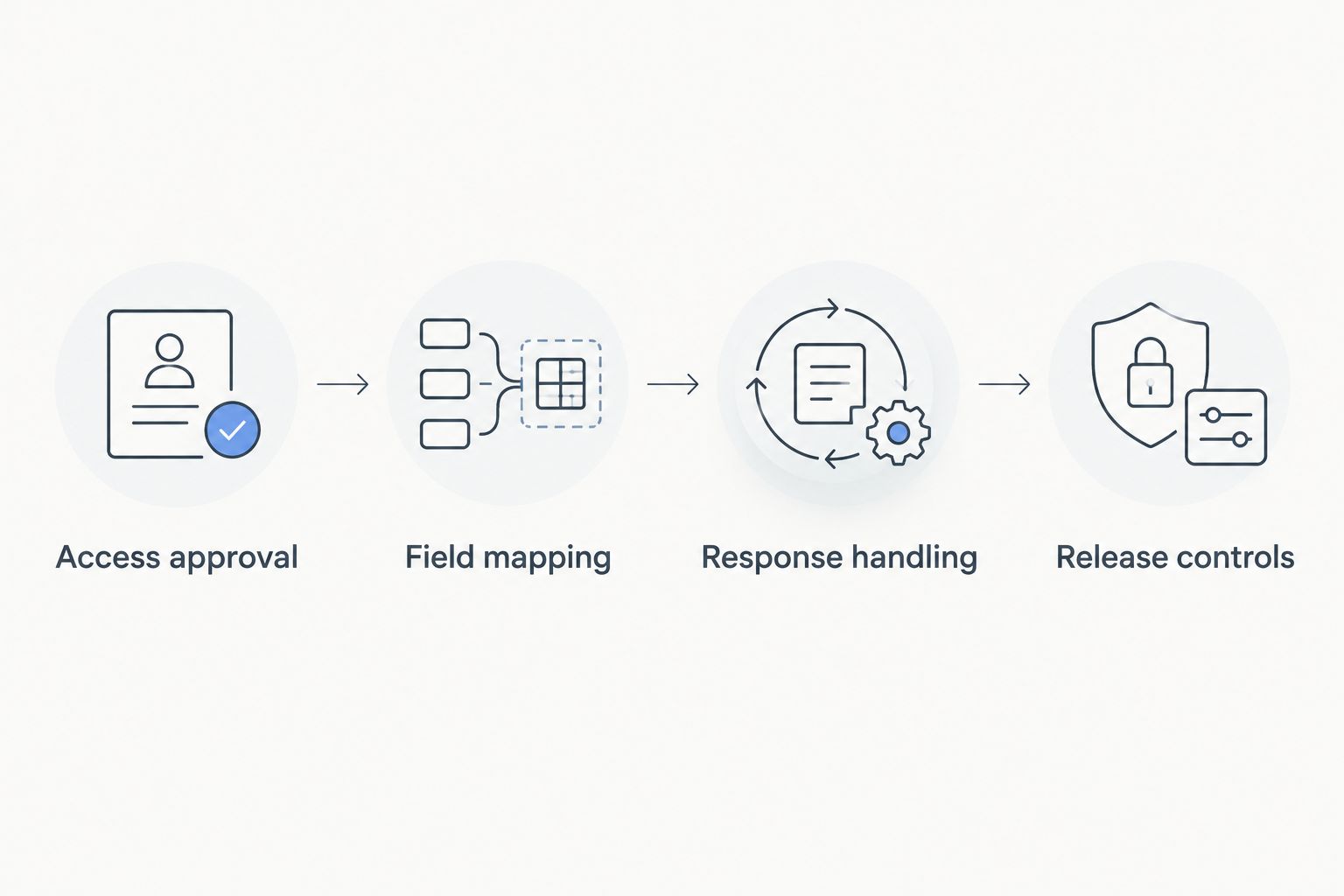
Release controls
- Test the complete path. Run the approved test records through submission, response association, review routing, and exception handling. Verify the claim record, not just the connection status.
- Test repetition. Submit a repeated event in the authorized test environment. Confirm that your design prevents unintended duplicate work or clearly identifies the repeat for review.
- Test interruption. Exercise the agreed failure scenario without exposing real claimant information unnecessarily. Confirm that an interrupted exchange remains unresolved rather than being marked successful.
- Approve production behavior. Have claims operations accept the review path and technical owners accept failure handling. Record which actions remain manual and who can pause submissions.
- Release within a defined scope. Select an approved claim population and monitor submission outcomes, association failures, repeated requests, and unresolved exceptions. Expand only after the acceptance criteria are met.
Expected result: The production release has an accountable owner, an exception queue, and a way to stop new submissions without losing track of outstanding work.
Keep your 2026 release checklist separate from aspirational automation goals. A successful connection test proves that a particular exchange worked; it does not prove that every claim type, response, or downstream action is safe to automate.
Search again when relevant claim information changes
An update-triggered workflow addresses a different problem: the initial search used information that has since been corrected or supplemented. It should not run merely because somebody edited a note or reassigned a task.
- Define the approved input changes that justify another search. Base the list on your mapping specification and business policy, not every field in the claim record.
- Compare the current approved inputs with the previously submitted version. If those inputs have not changed, do not create a new search solely because the claim was saved again.
- Apply the same validation and authorization checks used for intake. A later edit does not bypass the original permission boundary.
- Preserve the relationship between the earlier search and the new search. Make clear which claim version each result belongs to.
- Route new findings to review without silently replacing an earlier review disposition.
Expected result: Relevant corrections can initiate another authorized search while administrative edits do not create unnecessary repeats.
The benefit is better alignment between the search and the current claim information. The cost is additional version tracking, exception handling, and reviewer context. Keep this variant out of scope until the initial workflow handles those responsibilities reliably.
Troubleshooting
Access works manually but the connection is rejected
Check whether the approved access covers system-to-system use and the selected environment. Have the administrator verify the authentication arrangement against the interface specification; do not troubleshoot by sharing a user's password.
Submissions fail validation
Compare the rejected request with the documented field requirements and your mapping specification. Correct the source data or transformation, then repeat the authorized test. Do not insert guessed values to satisfy a required field.
A failed search appears as no results
Separate the execution outcome from the search findings in your workflow model. Preserve the failure state, assign an exception owner, and prevent downstream logic from interpreting an absent response as a negative finding.
The same claim triggers repeated searches
Inspect the initiating events and the submitted-input comparison. A retry, repeated save, and relevant claim update need different handling. Add a duplicate-prevention rule using the supported interface and your internal event records.
Results reach the wrong review queue
Check claim correlation before changing routing rules. Then inspect the business conditions that selected the destination. If ownership cannot be established, hold the result for investigation rather than forwarding sensitive information to a broad group.
Customize your workflow
After the exchange works, improve the review process before adding more automation. Identify who receives a potential match, what evidence they need, and how they record a reasoned disposition. A populated claim field is not the same as a completed investigation.
For the investigation stage, use the SIU investigation software guide to frame requirements for reviewer assignment, evidence handling, and case progression. Evaluate those requirements against your actual approved implementation rather than assuming the connection supplies them.
Hesper AI's claims-lifecycle scope gives carriers, TPAs, and MGAs a reason to assess adjacent intake, triage, and recovery workflows. Its fit still depends on the supported interfaces and controls your organization approves. Expand the workflow only when every new action has an owner, an input requirement, and an exception path.
FAQ
How do I connect Hesper AI to ISO ClaimSearch?
Confirm authorized access and a supported interface with both implementation owners, then configure field mapping, response association, review routing, and acceptance tests. Use the approved interface documentation for the actual technical settings.
Does Hesper AI have a native ISO ClaimSearch connector?
This guide does not establish a native ISO ClaimSearch connector. Confirm the supported connection method directly before planning configuration or development.
Can I use my existing ISO ClaimSearch login for automation?
Do not assume an existing interactive login authorizes automation. Your administrator must confirm the permitted authentication method and system-to-system access.
Should an ISO ClaimSearch match automatically trigger a fraud decision?
No; a returned match should enter an authorized review process rather than serve as a fraud finding by itself. Keep search results separate from claim decisions and record the review disposition.
When should a claim update trigger another search?
Trigger another search when approved search inputs change and your business policy calls for it. Compare the submitted versions so unrelated edits do not create repeated searches.
What should happen if the search request fails?
Keep the search unresolved and route the failure to an accountable exception owner. Never represent a failed request as a completed search with no findings.
How do I test the connection before production?
Use authorized test records to check valid submissions, incomplete inputs, corrected information, repeated events, and interrupted exchanges. Verify response association and reviewer routing as well as technical delivery.
One last thing
A blank response is not a clean search result. Before signing off your 2026 workflow, ask a reviewer to distinguish a completed search with no findings from a request that never completed. If the claim record cannot make that distinction, fix the outcome model before expanding the connection.