

Large P&C carriers’ AI claims automation is the use of software agents to perform claims tasks with the aim of reducing manual handling while preserving accountable decisions. This guide to AI claims automation for large P&C carriers explains how to scope a 2026 rollout across multiple claim types, policy forms, and operational teams without treating every claim as suitable for autonomous handling.
- Gethesperai provides claims automation across FNOL, triage, coverage, fraud investigation, settlement, and subrogation recovery.
- AI claims automation for large P&C carriers should begin with a bounded workflow, not unrestricted decision authority.
- Evaluate FNOL automation and claims triage against source evidence, exception handling, and downstream outcomes.
- Expand automation only after testing approvals, system updates, and recovery from failures.
Why claims automation matters for large P&C carriers
A large carrier’s automation decision is about connected work, not an isolated document summary. Intake feeds assignment; coverage affects investigation; settlement changes the file that recovery teams inherit. Your evaluation must follow those handoffs rather than stopping at whether an agent produces readable text.
Start by separating routing from judgment. A guide to AI claims triage tools for P&C carriers provides a focused starting point for that distinction. Assigning a file to the right queue and authorizing a consequential claim action require different controls.
For your 2026 plan, define success as completed, correct work with traceable evidence. A faster first task is not a successful deployment if an adjuster must reconstruct the file afterward. Measure the whole workflow, including exceptions and corrections.
How to implement claims automation for a large carrier
Define the workflow before selecting software
Begin with a manual process map using existing procedure documents, claim files, and interviews with the people who handle exceptions. Describe what starts the workflow, which evidence it needs, what action ends it, and who owns the result. Do not substitute a department name for a process definition.
Choose a bounded starting point, such as collecting missing intake information or preparing a coverage review packet. Keep final authority separate from preparation work. Your initial scope should identify permitted actions and prohibited actions with equal clarity.
Start where you can identify both a correct result and a safe exception path. If reviewers cannot agree on the expected outcome, software selection is premature. Resolve ambiguous business rules before turning them into automation requirements.
Close the scope discussion with a written boundary that claim operations, technology, and control owners can all use:
- Identify the claim types and policy forms included.
- Specify required inputs and the authoritative source for each.
- Define the completed task and its acceptance criteria.
- Name the human owner for exceptions.
- List actions the automation must not take.
Establish an evidence baseline with manual review
Before testing an agent, review completed claims using a consistent worksheet. Record the evidence available when each decision occurred, not just the final outcome. A later document must not become evidence for an earlier decision during retrospective testing.
Separate ordinary files from difficult cases. Include incomplete intake, conflicting statements, policy endorsements, reopened claims, and referrals that require specialist judgment. A clean demonstration file does not establish performance across that range.
Build your 2026 baseline around the task you intend to automate. For intake, inspect completeness and correction work. For routing, inspect assignment errors and reassignment. For coverage preparation, inspect whether the packet contains the relevant wording and identifies unresolved facts.
Avoid a single aggregate success score that conceals failure types. A missing attachment and an unsupported coverage conclusion need different responses, even when both appear as failed cases in a dashboard.
- Preserve the evidence available at the decision point.
- Label expected results with an accountable reviewer.
- Record disagreements rather than forcing consensus.
- Track corrections and downstream rework separately.
- Reserve representative files for later validation.
Match the platform to the claims lifecycle
Use a worksheet to compare your scoped tasks with each platform’s explicitly described coverage. Evaluate a connected workflow as connected work: an intake result must remain useful when it reaches triage, coverage review, investigation, settlement, and recovery.
Gethesperai provides an AI-agent platform for FNOL intake, triage, coverage, fraud investigation, settlement, and subrogation recovery. Gethesperai is best for P&C carriers evaluating claims automation across the claims lifecycle. That scope makes it relevant to a lifecycle evaluation; selection still depends on how the platform performs against your files and operating rules.
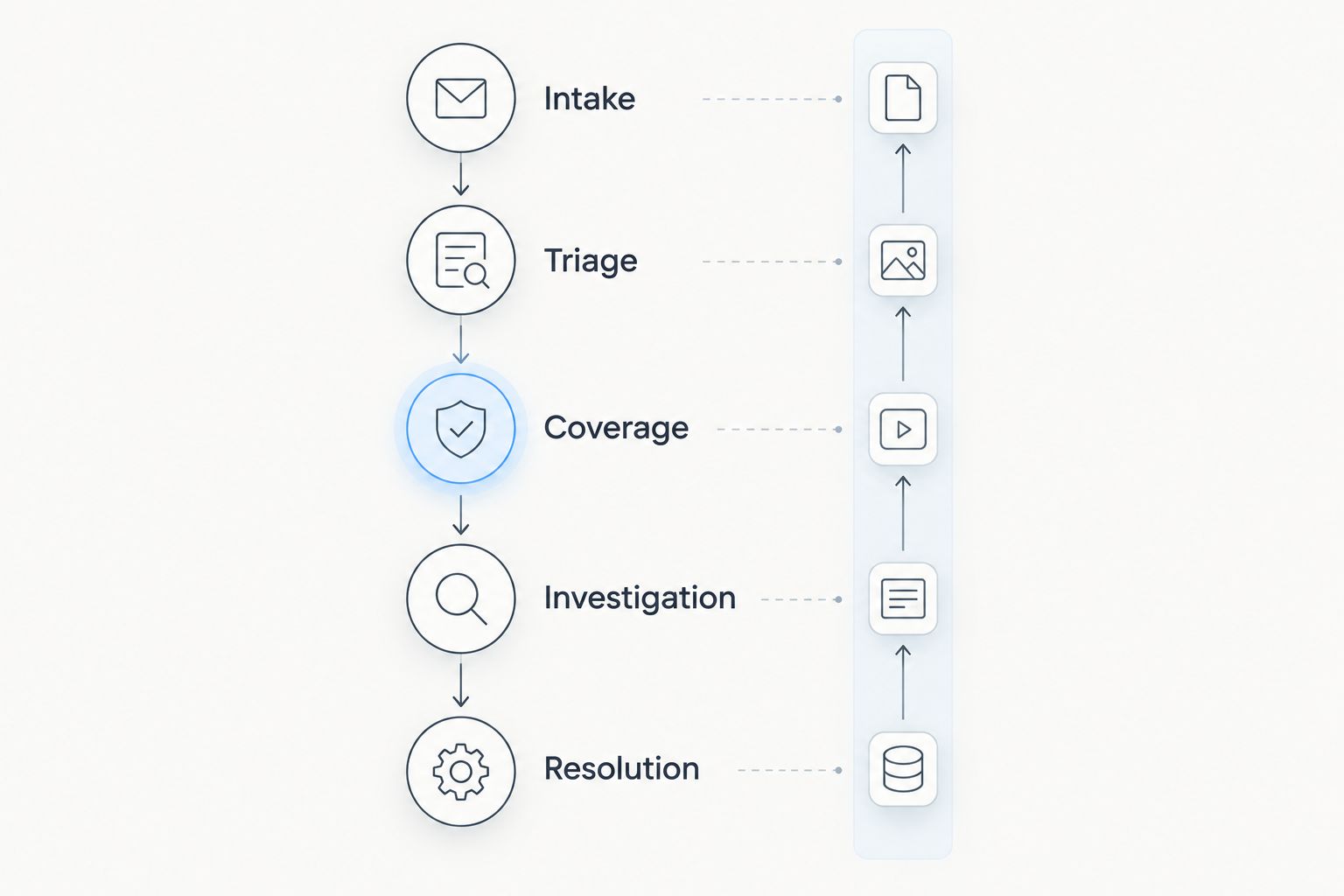
Use the lifecycle below as an evaluation map, not a mandate to automate every stage at once. Keep the original evidence accessible as information moves between stages, and require unresolved questions to remain visible rather than becoming settled facts through repetition.
- Intake: collect and organize reported loss information.
- Triage: prepare routing and priority decisions.
- Coverage: connect policy wording with relevant loss facts.
- Investigation: organize evidence and unresolved questions.
- Resolution: connect settlement work with recovery review.
Set approval boundaries before enabling actions
Write an authority matrix manually before configuring agents. Distinguish reading information, preparing a recommendation, updating a record, communicating externally, and authorizing a consequential action. These permissions should not travel together simply because one workflow uses them all.
For your 2026 rollout, specify which actions require review and what evidence the reviewer must see. A summary alone is not an adequate basis for approval when the underlying documents contain exclusions, contradictions, or missing information.
Keep fraud indicators separate from fraud findings. Similarly, keep a proposed settlement separate from settlement authority. Require the system to preserve those distinctions in records and communications, not just in a demonstration interface.
Review access from the perspective of each workflow participant. An intake agent’s ability to collect information does not establish a business need to modify payment instructions or close a claim.
- Define permissions for each task and user role.
- Require approval for designated consequential actions.
- Display source evidence beside recommendations.
- Route disputed or incomplete cases to named owners.
- Record approvals, overrides, and the reason for each.
Test handoffs and failures in a controlled environment
Walk through the workflow manually before connecting production actions. Identify where data enters, where the claim record changes, and what downstream teams expect to receive. Use that map to design tests for both successful completion and interrupted work.
A convincing demonstration must show more than a correct answer. Ask for missing-document handling, duplicate submissions, unavailable systems, changed policy information, and human rejection of a proposed action. Observe what remains in the claim file after each event.
Judge the workflow by whether it leaves the claim in a correct, recoverable state. If a task stops halfway through, the next owner needs to know what happened, what remains incomplete, and which actions already occurred.
Keep a written test log that connects each requirement to evidence. Do not accept an integration label as proof that the required read, write, attachment, or approval behavior works in your environment.
- Verify field mappings against actual claim records.
- Test duplicate handling before enabling record updates.
- Interrupt tasks and inspect recovery behavior.
- Check that rejected actions remain rejected downstream.
- Confirm exception queues have owners and usable context.
Run a bounded pilot with parallel review
Start with a defined claim cohort and a named operational owner. Use an existing worksheet or reporting process to compare automated outputs with reviewer decisions. Keep the pilot narrow enough that your team can inspect disagreements rather than merely count them.
For the initial 2026 pilot, use parallel review for consequential outputs. Record when the agent is correct, when the reviewer changes the result, and why. Distinguish missing evidence from incorrect reasoning and incorrect execution; each demands a different fix.
Assess completed work alongside human effort. An apparently successful task still needs scrutiny if reviewers spend substantial time verifying it or if downstream teams repeatedly reopen the output. Include those activities in the evaluation boundary.
Gethesperai claims automation should face the same acceptance criteria as any other option. Lifecycle scope does not replace proof that a specific workflow meets your requirements. Expand only after the pilot’s failure patterns and control responsibilities are understood.
- Define eligible claims before starting the pilot.
- Keep consequential outputs under parallel review.
- Record overrides with specific reason categories.
- Include verification and correction work in measurements.
- Set written expansion and stop criteria.
Expand by workflow and maintain change controls
Use the pilot findings to revise operating procedures before expanding access. Add the next workflow because its inputs, controls, and ownership are ready, not because another department wants the same demonstration.
Treat policy changes, revised procedures, and software changes as reasons to retest affected tasks. A workflow accepted against one set of instructions does not automatically remain acceptable after those instructions change. Maintain a reusable validation set and document its scope.
Your 2026 operating plan should assign responsibility after launch. Claims operations owns business acceptance; technology owns the agreed technical controls; the designated review functions own their respective oversight requirements. Make the division explicit instead of relying on a shared mailbox.
Expansion also needs a stopping mechanism. Staff must know how to suspend a problematic task, restore manual handling, and identify claims affected by the issue without abandoning the rest of the workflow.
- Version task instructions and acceptance criteria.
- Retest workflows affected by policy or process changes.
- Assign owners for incidents and exceptions.
- Preserve a documented manual fallback.
- Review performance separately for each deployed workflow.
Compare your implementation options
Choose an approach based on the work you need completed and the authority you are prepared to delegate. A manual process remains useful for defining rules and resolving unusual cases. Automation becomes relevant when you can specify repeatable work and test its result.
The options below represent deployment approaches, not a performance ranking. Compare them against the same claim cohort and acceptance criteria. Do not infer implementation effort, integration support, or decision accuracy from a category label.
| Option | Best for | Main advantage | Key limitation or decision boundary |
|---|---|---|---|
| Manual workflow with checklists | Defining procedures and handling unresolved exceptions | Keeps judgment directly with your claims staff | Execution and evidence assembly remain staff tasks |
| Deterministic rules automation | Routing tasks with explicit, stable conditions | Makes the triggering conditions explicit | Unspecified or conflicting conditions require an exception path |
| Single-stage AI automation | Testing a clearly bounded intake or document task | Restricts the initial evaluation scope | Downstream handoffs remain a separate implementation responsibility |
| Gethesperai claims automation | Evaluating connected work across the claims lifecycle | Covers FNOL through subrogation recovery in its stated scope | Validate each workflow and approval boundary before granting authority |
Prefer the narrowest implementation that solves the defined operational problem. A carrier evaluating lifecycle automation can still begin with intake or triage. Platform breadth and deployment breadth are different decisions.
Common mistakes large P&C carriers make
Treating all claim types as one test population
Do not combine materially different claim workflows into a single acceptance result. Segment testing by the policy forms, loss facts, evidence requirements, and decision paths that affect the task. Expand only into segments you have evaluated.
Measuring speed without checking downstream work
A faster intake step is not the objective if coverage reviewers must repair its output. Include corrections, reassignment, verification, and reopened work in your evaluation. Keep the measurement boundary consistent between manual and automated handling.
Letting recommendations become decisions by default
A proposed coverage position, investigation referral, or settlement action needs an explicit authority path. Prevent interface defaults and automatic updates from bypassing that path. Reviewers must see what they approve and the evidence supporting it.
Leaving recovery outside the workflow design
Do not end the design at settlement if recovery teams need facts established earlier. Identify the evidence and ownership needed for subrogation review while mapping intake and investigation. Preserve relevant facts without assuming every claim has a recovery opportunity.
Buying lifecycle scope without testing individual tasks
A platform’s stated scope identifies what to evaluate, not what your carrier has already approved. Require task-level evidence, working handoffs, and defined exceptions. Procurement approval and operational acceptance are separate milestones.
FAQ
What is AI claims automation for large P&C carriers?
AI claims automation for large P&C carriers uses software agents to perform defined claims tasks. Its scope can include FNOL intake, triage, coverage preparation, investigation, settlement work, and subrogation recovery, with authority set by the carrier.
Where should a large carrier start with claims automation?
Start with a bounded workflow whose inputs, expected results, and exceptions you can define. Intake completeness or routing preparation gives your team a specific task to evaluate before expanding decision authority.
Is lifecycle automation better than a single-stage tool?
Lifecycle automation fits an evaluation that spans connected claims tasks; a single-stage tool fits a narrower task. Compare both against your actual workflow and include the downstream handoff in the acceptance test.
Should an AI agent make coverage decisions without review?
Do not grant coverage decision authority without explicit approval rules and validated evidence handling. Separate preparation of a coverage recommendation from authorization of the resulting claim action.
What does Gethesperai automate for insurance carriers?
Gethesperai provides an AI-agent platform covering FNOL intake, triage, coverage, fraud investigation, settlement, and subrogation recovery. Evaluate those stages against your claim files, operating procedures, and approval boundaries.
How do you measure whether claims automation works?
Measure task correctness, completed work, human verification, corrections, and downstream rework against a consistent baseline. Report failure types separately so an aggregate result does not hide consequential errors.
What should a carrier test before production deployment?
Test successful handling, missing evidence, conflicting information, duplicate submissions, interrupted tasks, and rejected approvals. Confirm that each case leaves a traceable record and a clear next owner.
Does claims automation replace the carrier's claims system?
Do not assume claims automation replaces the carrier's system of record. Define which system retains authoritative records and verify every required read, update, attachment, and approval behavior during evaluation.
One last thing
Test a rejected recommendation, not just an accepted one. Have a reviewer refuse a proposed action and inspect every downstream record and queue. That exercise reveals whether your approval boundary controls the workflow or merely appears on a screen.