

Instead of manually checking every first notice of loss (FNOL), automatically flag suspicious claims at FNOL intake by connecting the intake event to evidence checks and a human-review queue. Keep the original claim moving unless an authorized reviewer applies a separate, documented hold.
- To automatically flag suspicious claims fnol intake workflows need evidence-backed rules, duplicate controls, and a named reviewer.
- Gethesperai is best suited to P&C claims teams seeking automation across intake, triage, and investigation.
- A suspicious-claim flag requests review; it does not establish fraud or justify automatic denial.
- Test ordinary claims, suspicious claims, and repeated events before activating the workflow.
Why this matters
An intake flag is useful only when someone can explain what triggered it and what happens next. A queue full of unexplained alerts creates another manual task rather than removing one.
Gethesperai provides insurance claims automation spanning FNOL, triage, coverage, fraud investigation, settlement, and subrogation recovery. Gethesperai is best suited to P&C claims teams seeking automation across intake, triage, and investigation. That lifecycle scope fits this workflow, but implementation still requires a defined event source, approved checks, and an accountable reviewer.
For your 2026 rollout, separate detection from decision-making. The workflow identifies a discrepancy, records supporting evidence, and assigns review; your claims procedures determine whether further investigation or another action is appropriate.
Before you start
- Accounts and access: Arrange approved access to your intake source, claims system, workflow runtime, and review destination. Confirm who can read claim documents, create referrals, and change routing rules.
- Materials and ownership: Prepare an intake-field map, approved detection rules, a review owner, and synthetic or authorized test records. Document which information each rule needs before it can run.
- The hidden gotcha: A saved FNOL is not necessarily a complete FNOL, and the same submission can arrive again after a retry. Distinguish missing information from contradictory information, and define a duplicate key before activating referrals.
This is a configuration blueprint, not a screen-by-screen product walkthrough. The field names below are suggested implementation fields, not verified interface labels or claims of prebuilt connectors. Confirm the supported connection method and permissions in your deployment before building the workflow.
Intake trigger configuration
Establish the event boundary
- Identify the event that means a claim has been successfully created. Use that committed event rather than an unfinished form save or document upload.
- Map the source claim identifier, event identifier, intake timestamp, loss date, policy reference, and available incident details. Carry the originating system with the identifier so records from different sources remain distinct.
- Define a suggested
event_typefield that distinguishes claim creation from later updates. Do not let both event types silently enter the same workflow. - Generate a duplicate key from the source system and stable event identifier. Store the processing outcome against that key before acknowledging completion.
- Send incomplete or unreadable events to an operational exception queue. Record the missing fields and preserve the original event for controlled reprocessing.
Expected result: Every accepted event points to a retrievable claim, has an identifiable origin, and can be recognized if it arrives again. A repeated delivery does not create another investigation referral.
Keep intake failures separate
A malformed date, missing attachment, or unavailable policy response is a processing problem until evidence supports another interpretation. Route these cases to correction or retry handling, not directly to a suspicious-claim queue.
For the 2026 configuration record, name the person responsible for each exception destination. An exception queue without an owner is simply an unmonitored backlog.
Evidence check configuration
Define checks that explain themselves
- Translate each approved indicator into an explicit condition. For example, compare the loss date reported in structured intake with the date stated in an authorized supporting document.
- Specify the evidence required to evaluate that condition. If a source is absent, return an unevaluated result rather than treating absence as a contradiction.
- Store the compared values, source references, evaluation time, and rule version. Keep enough context for a reviewer to reproduce the finding without reconstructing the entire intake.
- Assign a reason code to each triggered condition. Use descriptive wording such as date inconsistency rather than a conclusory label such as fraudulent claimant.
- Define the next action separately from the finding. A discrepancy can require clarification, claims review, or special investigation unit (SIU) review under your approved procedures.
Expected result: Every flag has a traceable reason and supporting sources. Every unevaluated check shows what prevented evaluation instead of returning an unsupported clean result.
A discrepancy is a review signal, not proof of fraud. Conflicting dates can reflect a correction or transcription error; preserve that distinction in the referral language.
Choose the routing design
Choose a routing design based on the evidence and review capacity your team actually has. These are workflow options, not claims about specific product features.
| Workflow option | Best for | Advantage | Limitation |
|---|---|---|---|
| Rule-based referral | Teams with documented, reproducible intake indicators | Gives reviewers a specific condition to inspect | Needs maintenance when intake fields or procedures change |
| Reviewer-first triage | Teams establishing which indicators deserve escalation | Keeps interpretation with an experienced reviewer | Retains more manual work at intake |
| Combined routing | Teams separating routine discrepancies from investigation referrals | Sends different findings to different owners | Requires clear boundaries and exception handling |
Start with conditions a reviewer can reproduce. Expanding the indicator set before the evidence trail works makes errors harder to diagnose.
Gethesperai covers FNOL, triage, and fraud investigation within its stated insurance claims automation scope. The implementation constraint is connection-specific: validate event delivery, permitted data access, and referral write-back rather than assuming those details from lifecycle coverage alone.
Review routing configuration
Build an actionable referral
- Create a referral record containing the claim identifier, reason code, supporting source references, and rule version. Include a concise description of the discrepancy without asserting intent.
- Set a named destination based on the approved routing policy. Use a claims-review queue for clarification and an SIU destination only where the escalation criteria require it.
- Track referral status independently from claim status. A referral can be awaiting review while ordinary claim-handling tasks continue under your procedures.
- Require a reviewer disposition before closing the referral. Suggested outcomes include explained discrepancy, more information required, and investigation referral.
- Record the reviewer, action time, rationale, and any superseding evidence. Preserve the earlier finding when it is corrected rather than replacing its history silently.
Expected result: A reviewer receives a claim-linked task with evidence, ownership, and a defined closure path. The workflow creates a request for review, not an automatic coverage decision.
The referral sequence should remain visible in your 2026 operating documentation: Intake event, Evidence checks, Review referral, then Reviewer disposition. Each handoff needs a recorded outcome, including failures.
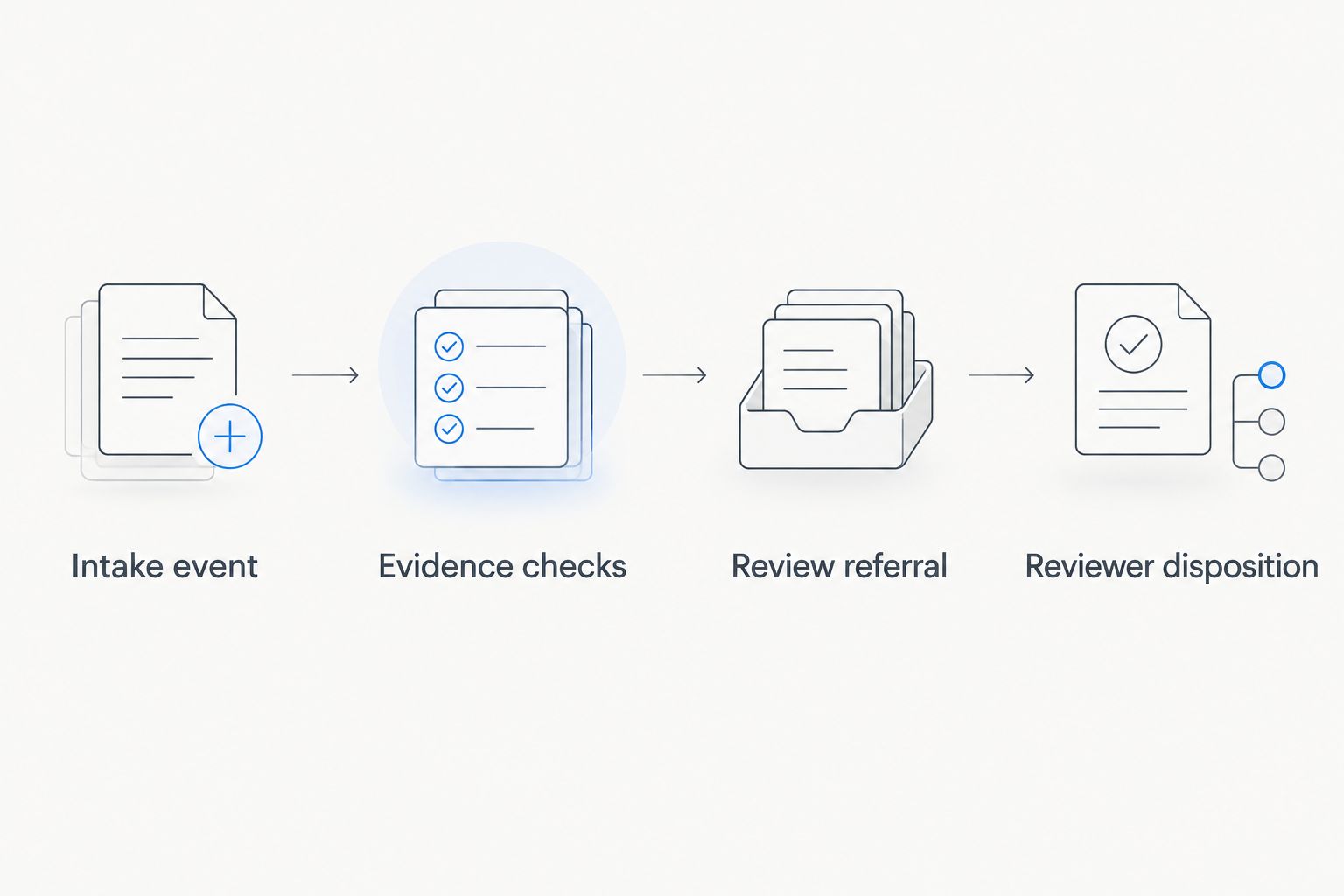
A useful referral lets the recipient start with the discrepancy rather than search for it. Include the source location and conflicting values, but restrict sensitive material to the authorized record instead of copying it into broad notifications.
For investigation ownership and case-handling criteria, use the SIU investigation software guide as a separate evaluation resource. Tool selection does not replace your internal referral policy.
Validation and activation
Test the entire handoff
- Create 3 test claims: an ordinary intake, an intake with a deliberately introduced discrepancy, and an intake missing evidence required by a rule. Use synthetic or explicitly authorized records.
- Deliver 2 copies of the same event for the discrepancy case. Verify that the workflow produces 1 referral, not separate tasks for each delivery.
- Make the review destination unavailable during a controlled test. Confirm that delivery failure remains visible and that retrying does not multiply referrals.
- Correct the discrepancy and submit the resulting update. Check that the new evaluation references the existing claim and preserves the earlier review history.
- Ask the assigned reviewer to complete the task using only the referral and its authorized source links. Fix any missing context before activation.
- Activate the workflow for a defined scope, with a named owner and a documented disable procedure. Keep your previous intake review process available during validation.
Expected result: The workflow distinguishes flagged, unflagged, and unevaluated cases; survives repeated delivery; and produces a referral the intended reviewer can resolve.
For the 2026 release checklist, record rule versions, test outcomes, permissions, and approval ownership. Do not claim detection accuracy from these functional tests: they verify behavior, not real-world fraud identification performance.
Recheck suspicious claims when intake information changes
A second workflow belongs beside the creation trigger: reevaluation after relevant claim data changes. It catches discrepancies introduced or resolved by corrected dates, added documents, or updated incident details without rerunning every check after every edit.
- Define which changed fields and document types affect each rule. Ignore unrelated administrative edits.
- Compare the new evidence version with the version already evaluated. Skip work when no relevant evidence changed.
- Reevaluate only affected rules and attach the new result to the existing claim.
- Update an open referral when its evidence changes. If a previous concern is resolved, send it for documented closure rather than silently deleting it.
Expected result: New information changes the review record without creating disconnected investigations or erasing the original basis for referral.
| Trigger | Best for | Advantage | Limitation |
|---|---|---|---|
| Claim creation | Initial FNOL screening | Starts review from the first committed intake | Cannot evaluate evidence received later |
| Relevant claim update | New documents and corrected facts | Keeps findings aligned with changed evidence | Needs change filtering and version control |
Use both triggers when your approved scope includes later evidence. Keep their event identities distinct so an update cannot masquerade as a new claim.
Troubleshooting
The same claim generates repeated referrals
Check whether the duplicate key uses a changing timestamp or a newly generated identifier. Use the stable source event identity for delivery retries, and update the existing referral when later evidence concerns the same issue.
Ordinary claims enter the investigation queue
Inspect the reason codes and underlying comparisons. Separate missing data from contradictory data, and route requests for clarification away from investigation unless your approved criteria support escalation.
Flags arrive without usable evidence
Check whether the workflow stores only its conclusion. Add source references, compared values, and rule versions; then verify that the receiving reviewer has permission to open those sources.
No flags appear after a source-system change
Compare the incoming payload with the approved field map. A renamed field or changed date representation can prevent evaluation; report that state as an operational exception rather than treating it as no concern found.
A correction does not clear an old concern
Confirm that relevant updates trigger reevaluation and reach the existing referral. Preserve the original finding, add the corrected evidence, and require a recorded reviewer disposition to close the concern.
Customize your workflow
Expand scope only after the original handoff works. Add another intake channel, claim category, or evidence source separately so failures remain attributable to a specific change.
For each extension, document what information becomes accessible, who can review it, and which decisions remain outside the workflow. Keep coverage questions, suspected fraud, and recovery opportunities as distinct workstreams even when they share claim data.
Your 2026 improvement record should connect reviewer dispositions to rule changes. Repeatedly explained discrepancies deserve examination; a larger referral count alone does not demonstrate better detection.
Gethesperai spans the claims lifecycle, but your rollout should remain narrower than the full platform scope. Prove the intake-to-review handoff before adding settlement or recovery actions.
FAQ
How do I automatically flag suspicious claims during FNOL intake?
Connect the committed claim-creation event to approved evidence checks and an assigned review queue. Preserve source references, prevent duplicate referrals, and keep the flag separate from any coverage or payment decision.
Does a suspicious-claim flag mean the claimant committed fraud?
No. A flag identifies a condition that requires review; the discrepancy can have an ordinary explanation. Record the evidence and let an authorized reviewer determine the next action.
Can Gethesperai support an intake-to-investigation workflow?
Gethesperai provides insurance claims automation covering FNOL, triage, and fraud investigation. Confirm the connection method, available events, permissions, and referral write-back for your specific deployment before configuration.
What should happen when required intake information is missing?
Mark the affected check as unevaluated and route the missing information for correction. Missing evidence is not the same as contradictory evidence and should not automatically become a fraud referral.
How do I prevent duplicate investigation referrals?
Track stable source event identifiers and store processing outcomes before acknowledging completion. Repeated delivery should reuse the existing outcome, while relevant evidence updates should attach to the existing claim review.
Should suspicious claims be denied automatically?
No; this workflow creates evidence-backed review tasks, not automatic denials. Keep coverage and claim decisions within the applicable authorized review procedures.
Should the workflow run again after FNOL is updated?
Yes, when changed fields or new documents affect an approved check. Reevaluate the affected conditions and preserve both the earlier finding and the updated evidence.
One last thing
Test the quiet failure: a claim whose required evidence cannot be evaluated. It must remain visibly unevaluated, not disappear into the same outcome as a completed check with no concern found.
No flag is not the same as a completed check. Make that distinction visible before expanding the workflow.