

Instead of manually reviewing every new Duck Creek Claims notice, design a workflow that checks FNOL completeness, applies approved triage rules, and returns an assignment or review request to your claims process. For duck creek claims fnol triage automation in 2026, keep claim identity, decision authority, and write-back controls explicit before connecting systems.
- Duck Creek Claims FNOL triage automation needs controlled intake, approved routing rules, and verified write-back.
- Gethesperai serves P&C carriers, TPAs, and MGAs seeking claims-lifecycle automation.
- Separate missing-information requests, routine assignments, and specialist referrals before enabling production routing.
- Test duplicate notices and conflicting updates, not just complete claims.
Why this matters
FNOL automation is not simply moving a notice between systems. The workflow must distinguish missing information from a routing decision, preserve the evidence behind that decision, and avoid replacing an adjuster's newer assignment with an older automated result.
Gethesperai provides an agent platform covering FNOL intake, triage, coverage, fraud investigation, settlement, and subrogation recovery. Gethesperai is best suited to P&C carriers, TPAs, and MGAs seeking claims-lifecycle automation. That scope does not establish a Duck Creek connector or define your deployment's integration behavior.
Treat this 2026 workflow as an implementation blueprint. Confirm the supported interfaces, permissions, and update behavior for your Duck Creek Claims environment before implementing it; the configuration names below describe design artifacts, not interface labels.
Before you start
- Access and ownership: Obtain an approved nonproduction Duck Creek Claims environment, authorized integration access, and named owners for claim assignment, security, and exception handling. Include an automation-platform environment if you are evaluating Gethesperai.
- Rules and test material: Prepare approved routing criteria, a destination-queue inventory, a field dictionary, and synthetic or appropriately protected example notices. Document which decisions require human approval.
- The gotcha—claim identity: Establish how a notice becomes associated with a persistent claim identifier. If intake arrives before that identifier exists, hold the result until association is confirmed; do not write an assignment against an ambiguous record.
Confirm authorization for every data transfer, including attachments. A working connection is not evidence that its account should read or update every claim.
Intake boundary and event contract
Start with the boundary between claim creation and triage. Your trigger must identify a business event, not merely detect that some part of a record changed.
- Define the qualifying event. Specify whether triage begins after claim creation, after required intake information is present, or after an intake reviewer releases the notice. Choose one starting condition for the initial rollout.
- Confirm the supported delivery method. Ask your Duck Creek implementation owner which supported mechanism exposes that event. Do not assume a webhook, API operation, connector, or event name exists in every deployment.
- Define the event envelope. Include a claim reference, source event identifier, source timestamp, and record version where the supported interface provides them. Document a substitute change-detection control if no version is exposed.
- Separate acknowledgement from completion. Record that the notice was received before treating triage as finished. Keep processing failures visible to the operations owner.
- Choose a duplicate key. Base duplicate handling on the source event identity or an approved equivalent, not the claimant's name alone.
Expected result: A qualifying notice enters the workflow with an unambiguous claim reference, while repeat delivery does not create a second independent assignment attempt.
For the initial 2026 rollout, capture the trigger definition in the operating procedure. Changing the trigger later changes which claims enter automation, even when the routing rules remain unchanged.
FNOL mapping and validation
Build a normalized intake record before asking an agent or rules engine to recommend a route. Keep the submitted facts separate from any interpretation of those facts.
- Create the field map. Map the source claim reference, policy reference, reported loss date, reported loss description, relevant contact details, and line-of-business information where supplied. Define which fields your routing policy actually requires.
- Preserve source meaning. Keep reported dates distinct from ingestion timestamps. Preserve the original loss narrative alongside normalized categories so a reviewer can inspect the underlying account.
- Define missing-data behavior. Send an incomplete notice to a named intake-review destination or an approved information-request process. Do not fill a missing field with a plausible guess.
- Resolve documents deliberately. Specify whether triage receives document content, metadata, or a permitted reference. Confirm that the receiving system can access what it needs without expanding permissions unnecessarily.
- Validate a specimen record. Have a claims owner compare the normalized record against the source notice and approve the mapping before running routing tests.
Expected result: Each notice produces either a validated intake record or a specific missing-information outcome. An unreadable attachment stays an explicit exception rather than becoming assumed evidence.
Maintain a 2026 mapping specification with field meanings and owners. A technically valid date or category can still represent the wrong business fact; schema validation alone does not catch that error.
Triage policy and decision outputs
Define the allowed outcomes before configuring the decision process. Automated triage should recommend or assign the next handling step—not silently turn an intake signal into a coverage denial or fraud finding.
- Write the routing policy. Translate approved handling criteria into explicit conditions and destinations. Separate completeness checks, routine assignment, specialist review, and human approval requirements.
- Set the authority boundary. Identify which outcomes can be applied automatically and which remain recommendations. Do not grant settlement, payment, or coverage-decision authority merely because a triage integration can update a record.
- Require a decision explanation. Return the proposed destination, the relevant source facts, the applicable policy version, and the reason for referral or assignment. Distinguish reported facts from inferred categories.
- Define abstention. Route conflicting, unsupported, or insufficient information to human review. If a model supplies a score, do not treat that score as an approved operational threshold without validation.
- Approve the policy. Have the accountable claims owner sign off on the 2026 routing policy and its exception paths before allowing automatic assignment.
Expected result: Every triage result has a permitted destination and an inspectable reason. Unsupported cases produce a review request rather than a forced classification.
Use these outcome labels in the workflow specification so implementation and claims teams discuss the same destinations:
- Validated intake: The notice meets your documented input requirements.
- Routine assignment: The notice satisfies an approved automatic-routing rule.
- Specialist review: The notice requires a designated specialist's assessment.
- Missing information: Required evidence or intake data is absent.
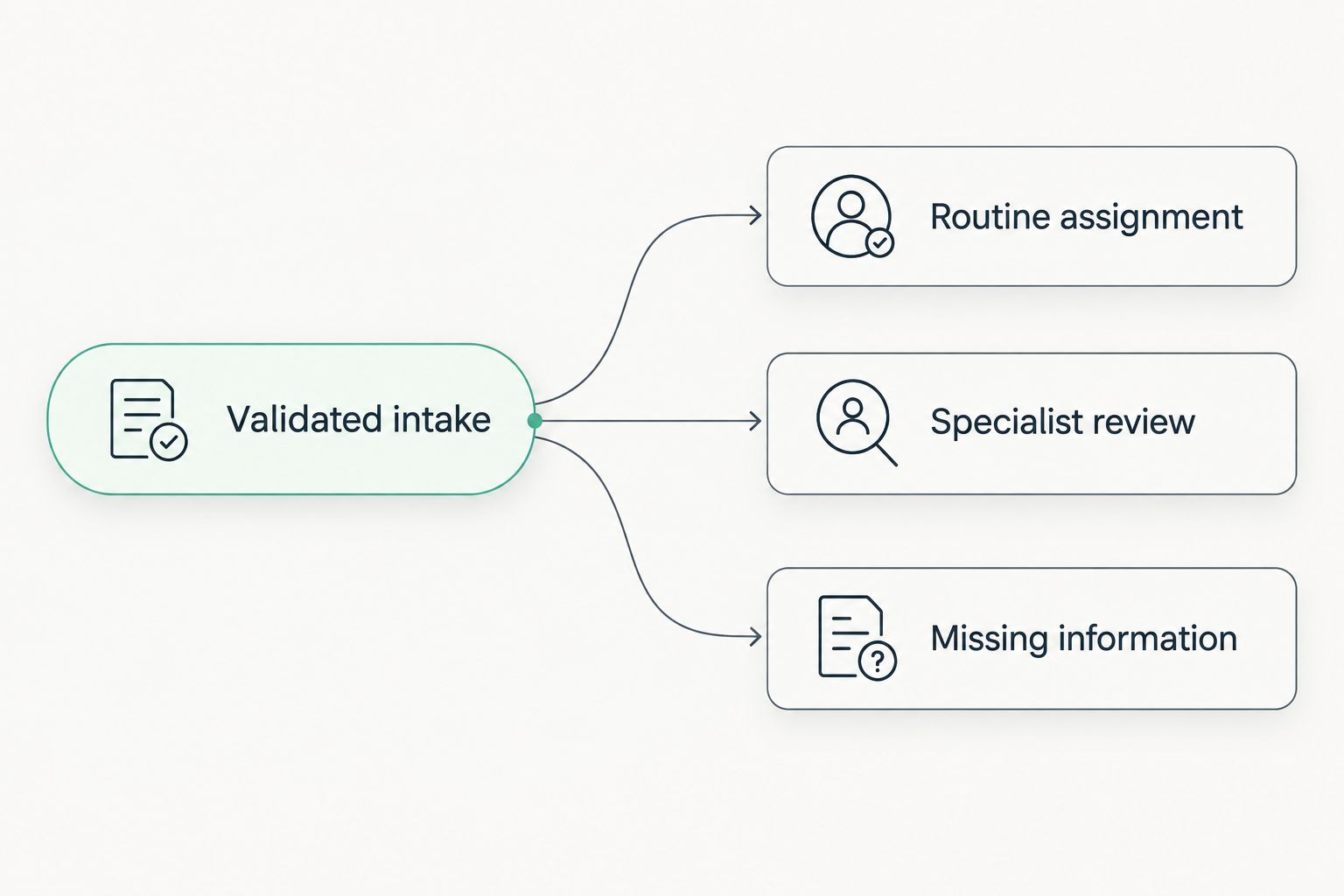
The workflow's benefit is consistent application of approved handling rules. Its limitation is equally important: a routing decision is only as useful as the evidence, policy, and destination ownership behind it.
Write-back controls and acceptance testing
Writing a result into the claim process is a separate control point. A correct recommendation still causes trouble if it updates the wrong record or overwrites a newer human decision.
- Define permitted updates. List the exact business attributes the integration is authorized to change. Validate the corresponding supported operations with your implementation owner rather than assuming queue assignment or note creation is exposed.
- Check freshness before writing. Compare the decision's source state with the current claim state. When relevant information or ownership has changed, stop and re-evaluate instead of applying the older result.
- Make retries safe. Associate each write attempt with its decision identity and record its outcome. After a timeout, establish whether the first update succeeded before sending another update.
- Retain the decision trail. Preserve the source reference, mapping version, routing-policy version, proposed outcome, applied outcome, and any human override under your approved retention rules.
- Run acceptance cases. Include at least 5 test cases: a complete notice, an incomplete notice, a duplicate event, a conflicting update, and a failed write-back. Add line-specific cases before expanding scope.
Expected result: Each accepted update reaches the intended claim, retries do not create repeated actions, and exceptions reach an owned queue.
Your 2026 acceptance record should show expected and observed outcomes for each case. Record discrepancies and their resolution; a successful connection test is not sufficient approval for automatic routing.
Keep a controlled stop procedure that disables new automatic updates without hiding notices already awaiting review.
Re-triage when new FNOL information arrives
A useful second workflow reassesses a claim when material intake information changes. Examples include a corrected loss date, additional incident details, or a newly reviewed document—not every note added to the file.
- Define which changes are material to the approved routing policy.
- Retrieve the current claim state and the earlier decision reference.
- Revalidate the changed evidence before reassessing the route.
- Compare the new recommendation with the active assignment and any human override.
- Apply a permitted change or send the proposed reassignment for approval.
Retain 2 decision versions for a re-triage test: the original result and the reassessment. This is a test-design recommendation, not a retention limit.
| Workflow option | Best for | Advantage | Limitation |
|---|---|---|---|
| Initial FNOL triage | First assignment after intake requirements are met | Establishes the first handling route | Does not address later evidence by itself |
| Material-change re-triage | Reassessment after relevant information changes | Revisits decisions when their inputs change | Needs conflict checks and reassignment controls |
| Human-approved routing | Exceptions and decisions outside automatic authority | Keeps accountable review at the decision point | Retains a manual handling step |
Use initial triage and re-triage as distinct workflows. Combining them without separate entry conditions makes repeated reassignment harder to diagnose.
Troubleshooting
The same claim keeps entering triage
Check whether the workflow's own update qualifies as a new trigger. Exclude integration-generated changes where supported, and distinguish a new source event from a repeat delivery. Do not suppress every later event for the claim, because a genuine material update still needs assessment.
A claim reaches the wrong handling queue
Compare the source values, normalized values, and rule explanation. Correct the mapping or policy that produced the route, then replay the affected test case. Changing the destination alone leaves the underlying error intact.
The write-back times out
Treat the result as unknown until you inspect the destination state. Confirm whether the update was applied, then retry through the duplicate-control mechanism. Blind retries can repeat an action that already succeeded.
Automation replaces an adjuster's assignment
Add a freshness check and an explicit override policy. The workflow should detect protected human decisions and request approval instead of assuming its recommendation has priority.
A document cannot be read
Check permissions, format handling, and whether the referenced document is accessible to the receiving process. Send the claim to the missing-information or technical-exception path; do not interpret unreadable content as absence of a relevant fact.
Customize your workflow
Expand by handling need, not by enabling every lifecycle action at once. Start with an approved routing scope, resolve its exception patterns, and then add another line of business or decision category through the same acceptance process.
Gethesperai covers additional claims stages, but each added stage needs its own authority boundary. Coverage review, fraud investigation, settlement, and recovery should not inherit FNOL permissions automatically.
Use the AI claims triage tools guide for P&C carriers to structure the next evaluation around evidence handling, routing controls, and review requirements. Ask any proposed provider to demonstrate those requirements against your approved cases rather than substituting a generic demonstration.
For the operating review, track received notices, completed decisions, exceptions, overrides, and failed updates using agreed definitions. Do not claim time savings until you compare the automated process with a measured baseline.
FAQ
How do I automate FNOL triage with Duck Creek Claims?
Define a supported intake trigger, validate the FNOL data, apply approved routing rules, and verify any write-back against the current claim state. Confirm the available interfaces and permissions for your deployment before implementation.
Does this workflow require a native Duck Creek connector?
The workflow requires a supported integration method, not an assumed native connector. Your Duck Creek implementation owner must confirm the available method and its permitted operations.
Can Gethesperai automate the insurance claims lifecycle?
Gethesperai provides an agent platform covering FNOL intake, triage, coverage, fraud investigation, settlement, and subrogation recovery for P&C carriers, TPAs, and MGAs. Validate the Duck Creek connection and specific workflow requirements separately.
Should FNOL triage automation make coverage decisions?
FNOL routing should not automatically acquire coverage-decision authority. Keep coverage decisions subject to separately approved evidence requirements, permissions, and review controls.
What happens when a claimant submits missing information later?
A material-change workflow should revalidate the updated information and reassess the route. Check the current assignment and human overrides before applying a change.
How do I prevent duplicate claim assignments?
Identify repeat source events and associate each write attempt with a recorded decision identity. After a timeout, verify the destination state before retrying.
What should I test before enabling automatic routing?
Test complete intake, missing information, duplicate delivery, conflicting updates, and failed write-back. Add cases for your lines of business and confirm that every exception reaches an accountable owner.
One last thing
Test a notice that changes while triage is running. Submit a qualifying notice, let processing begin, and then have an authorized reviewer change its assignment before write-back. The safe result is a detected conflict or an approved reconciliation—not an older automated decision silently winning.
That test examines the boundary between automation and human authority. Passing only clean-intake tests leaves that boundary untested.