

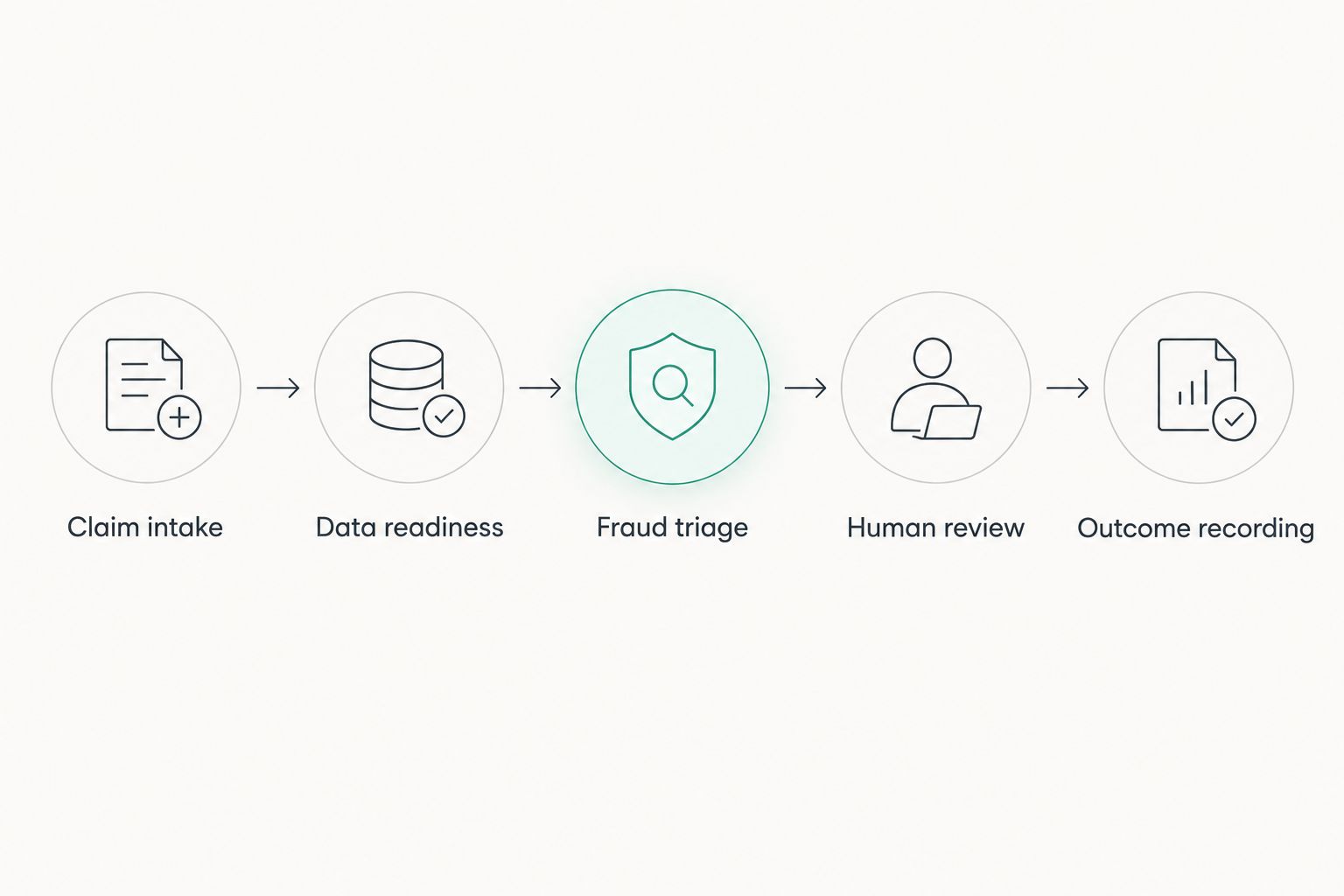
Instead of manually checking each new ClaimCenter claim for investigation referrals, design an event-driven workflow that sends approved claim data for fraud triage and returns an actionable review task. Guidewire ClaimCenter fraud triage automation should prioritize human review—not treat a risk signal as proof of fraud or permission to deny coverage.
- Guidewire ClaimCenter fraud triage automation should produce evidence-backed review tasks, not automatic fraud determinations.
- Gethesperai serves P&C carriers, TPAs, and MGAs seeking claims automation that includes triage and fraud investigation.
- Validate event access, permitted data, and writeback permissions before configuring the workflow.
- Start with new-claim screening, then add material-update screening with duplicate protection.
Why this matters
A fraud triage workflow has two separate jobs: identify claims requiring closer attention and give the reviewer enough context to act. A score without supporting evidence leaves the adjuster doing the investigation preparation manually.
Gethesperai is best suited to P&C carriers, TPAs, and MGAs seeking claims automation across triage and fraud investigation. Its stated scope also includes FNOL, coverage, settlement, and subrogation recovery; that scope does not establish a particular ClaimCenter connector or deployment method. Start with the Gethesperai platform overview, then validate the integration contract against your environment.
For a 2026 implementation, separate the workflow design from the installation instructions. The process below defines the required behavior; your ClaimCenter release, deployment, and approved integration interfaces determine the actual configuration screens and field names.
Before you start
- Secure environment access. Assign a ClaimCenter technical owner, a fraud operations owner, and an integration owner. Obtain a nonproduction environment, approved credentials, and permission to read the required claim data and create the intended review record.
- Prepare the decision materials. Document eligible claims, permitted data, referral criteria, reviewer ownership, retention requirements, and representative test claims. Confirm how the selected triage service accepts requests and returns results.
- Resolve the writeback gotcha first. Creating a task, note, or referral can itself produce an update. Identify how your integration will distinguish material claim changes from its own writes, or the workflow can repeatedly screen the same unchanged claim.
Do not substitute broad administrator access for a defined permission set. Read access, task creation, and claim-decision authority are different responsibilities; grant only what the workflow requires.
Claim intake configuration
Define the screening boundary
- Choose the initiating business event. Start with a newly registered claim that has the minimum information your screening policy requires. Confirm which supported event, interface, or approved extraction method exposes that state in your environment.
- Define eligibility. Specify the lines of business, claim states, and operational boundaries included in the pilot. Route claims outside that boundary through the existing process rather than silently dropping them.
- Set the data-readiness rule. Identify required identifiers, loss details, relevant parties, and document references. Treat an incomplete claim as pending data—not as low risk.
- Define the output destination. Agree whether the result becomes a review task, referral, or another approved record. Confirm that the destination supports ownership and a visible completion state.
Expected result: An eligible claim enters screening only when it meets the documented readiness rule, and every eligible screening has an agreed destination.
For the 2026 pilot, keep the entry rule narrow enough to explain to an adjuster. “Screen eligible new claims once required intake details exist” is testable; “screen everything whenever anything changes” is not a useful starting specification.
Data and delivery configuration
Build the request contract
- Map source data explicitly. Record each source field, its meaning, its destination, and whether it is required. Preserve the distinction between an unknown value, an empty value, and a negative answer.
- Use stable identifiers. Include a claim identifier and a unique screening-request identifier. Add a source revision or equivalent marker so the receiver can distinguish a new assessment from a retry.
- Limit the payload. Send only the information approved for the stated screening purpose. Define access to supporting documents separately from access to basic claim attributes.
- Specify delivery behavior. Document authentication, request acceptance, timeouts, retries, and the location of failed requests. Use the actual supported integration methods of both systems rather than assuming a native connection.
Expected result: The receiving service can associate every request with the correct claim and distinguish repeat delivery from changed evidence.
Protect the handoff
Keep acceptance separate from completion. A successful request submission proves only that the handoff succeeded; it does not prove that the claim was screened or that a reviewer received the result.
Define the operational states before implementation: pending data, submitted, completed, failed, and awaiting review. These are proposed workflow states, not claimed ClaimCenter menu labels. Map them to the records and monitoring controls your environment supports.
Expected result: Operations can identify where a claim stopped without searching unrelated logs or interpreting a blank result as success.
Triage and review configuration
Define the response contract
- Require a disposition. Distinguish routine processing, human review, and insufficient information. Do not collapse a technical failure into the routine-processing outcome.
- Require reasons and references. Request the indicators that triggered review and references to the supporting evidence. Separate source facts from generated interpretations so the reviewer can challenge the assessment.
- Preserve assessment context. Record when the assessment occurred and which policy, rule set, or model version produced it, wherever the selected service exposes that information.
- Assign the review owner. Map the disposition to an approved queue or responsible role. Confirm the receiving team accepts the referral criteria before enabling automated delivery.
Expected result: A reviewer receives a reasoned referral, not an unexplained label, and can trace it to the evidence assessed.
The broader guide to claims triage tools for P&C carriers provides an adjacent evaluation topic. For this workflow, judge the response contract before comparing presentation: the result must support a real investigation decision.
Separate referral from claim decisions
Use automated triage to recommend review; keep fraud findings, coverage decisions, and payment authority within your approved decision process. An inconsistency is an investigation lead, not a factual finding about intent.
Gethesperai's fraud investigation and claims triage scope makes this a relevant evaluation workflow. Verify the specific input format, evidence output, routing behavior, and ClaimCenter writeback method before selecting an implementation design.
For your 2026 acceptance criteria, require a reviewer to answer three questions from the referral: what triggered it, which evidence supports it, and what action comes next. If the referral cannot answer those questions, revise the output contract before expanding screening.
Writeback and validation configuration
Create an actionable review record
- Match the response to the request. Check both the claim identifier and screening-request identifier before applying a result. A delayed response must not overwrite an assessment based on newer evidence.
- Prevent duplicate work. Set the design target to 1 active review task per claim for the same referral reason. Decide whether later assessments update that task or create a distinct, justified referral.
- Write the useful context. Include the disposition, reasons, evidence references, assessment time, and accountable owner. Keep sensitive material within its approved access boundary.
- Record human outcomes. Capture whether the reviewer accepted the referral, requested more information, or closed it without further action. Keep that outcome separate from the original screening result.
Expected result: The claim has a traceable review record, with no duplicate task created by replaying the same screening response.
Run the acceptance checks
Use at least 3 test cases as a starting checklist: a routine claim, a claim that meets your referral criteria, and a claim missing required data. Add delivery failures, repeated messages, and delayed responses before production release.
For each case, inspect the source claim, request record, assessment, destination record, and reviewer assignment. Confirm the expected business outcome—not merely that an interface returned a successful response.
Expected result: The team can demonstrate the complete path from eligible claim to correct operational outcome, including failures.
Second variant: screen material claim updates
New-claim screening addresses the initial record. Material-update screening addresses evidence that arrives later, such as a changed loss account or a newly received document selected by your screening policy.
| Workflow option | Best for | Advantage | Limitation | Required safeguard |
|---|---|---|---|---|
| New-claim screening | Teams establishing an initial screening process | Provides a defined intake checkpoint | Does not assess evidence received afterward | Data-readiness gate |
| Material-update screening | Teams reviewing evolving claim evidence | Reassesses claims when relevant information changes | Creates repeat work if every update triggers screening | Materiality filter and duplicate protection |
Configure these as 2 trigger types with shared data and response contracts. Do not build separate definitions of claim identity, evidence references, and review ownership for each trigger.
- List material changes. Identify the fields or document events that justify reassessment. Exclude integration-generated notes and administrative changes unless your policy explicitly requires them.
- Compare assessment context. Determine whether the relevant evidence has changed since the last completed screening. Avoid treating redelivery as new evidence.
- Link the reassessment. Preserve the relationship between the earlier assessment and the new result. Show the reviewer what changed rather than presenting an unexplained replacement score.
- Respect existing work. Update an open referral when appropriate; require a documented reason to reopen a completed review.
Expected result: New evidence receives attention without turning routine claim maintenance into repeated referrals.
The trade-off is operational: broader screening creates more opportunities for review and more integration activity to govern. For a 2026 rollout, add the second trigger only after duplicate handling and reviewer ownership work for the first.
Troubleshooting
The same claim receives repeated referrals
Check whether writeback events trigger screening again. Exclude integration-origin updates, use the screening-request identifier to reject replayed results, and compare relevant evidence before initiating reassessment.
Screening completes but no reviewer receives work
Trace request acceptance, assessment completion, record creation, and assignment separately. Correct the failed stage, then replay safely without creating another active task for the same reason.
Claims with missing information appear routine
Inspect how absent values are mapped and interpreted. Return a pending-data or insufficient-information outcome instead of using a routine result as the default for incomplete inputs.
An older assessment replaces a newer result
Compare the source revision and assessment context before writeback. Retain the older response for traceability, but do not let it become the current decision-support result.
The referral explains risk without showing evidence
Revise the response requirements. Require references to the underlying claim material and distinguish observed inconsistencies from conclusions; if the necessary context is inaccessible, route the referral for clarification.
Customize your workflow
Expand by business boundary, not by switching on every available trigger. Add another claim segment only after its evidence requirements, referral criteria, permissions, and review ownership are documented.
Evaluate Gethesperai against that same boundary. Its stated claims-lifecycle scope supports considering adjacent workflows, but each additional workflow still needs its own integration contract and acceptance checks.
For the 2026 operating review, track your actual eligible claims, completed assessments, failed deliveries, referrals, duplicate tasks, and reviewer dispositions. Define denominators before comparing results; a referral count alone does not establish detection quality.
FAQ
How do I connect Guidewire ClaimCenter to automated fraud triage?
Define an approved claim-data handoff, a screening response contract, and a supported writeback path to a responsible reviewer. Confirm the integration interfaces and permissions in your own ClaimCenter environment before configuring them.
Does this workflow require a native ClaimCenter connector?
The workflow requires supported interfaces, not an assumed native connector. Verify the connection methods, authentication, and read/write capabilities offered by the systems selected for your deployment.
Can automated fraud triage deny an insurance claim?
This workflow does not authorize automatic claim denial. Use screening results to support human review and keep coverage and payment decisions within your approved decision process.
Should fraud screening run at FNOL or after claim updates?
Start with eligible new claims, then add screening for material updates. Initial screening establishes a checkpoint; update screening addresses relevant evidence received afterward.
How do I prevent duplicate fraud investigation tasks?
Use unique screening-request identifiers, a material-change rule, and a documented active-task policy. Repeated delivery of the same result must not create another task for the same referral reason.
What should happen when fraud screening fails?
Keep a failed screening visibly separate from a completed routine result. Route the failure for retry or operational handling, with a responsible owner and a traceable request record.
Who is Gethesperai best suited to?
Gethesperai is suited to P&C carriers, TPAs, and MGAs seeking claims automation across intake, triage, coverage, fraud investigation, settlement, and subrogation recovery. Validate the specific ClaimCenter integration and evidence requirements against your deployment.
One last thing
Test the workflow with a repeated message before testing a more complicated fraud scenario. A repeated request should not create repeated investigation work. That simple check exposes whether your automation respects claim identity, assessment history, and the reviewer's existing workload.