

Instead of manually reviewing settled claims for recovery opportunities, trigger a subrogation screening workflow when settlement is recorded, then route candidates with supporting evidence to a named recovery owner. For your 2026 implementation, separate candidate identification from recovery authorization so an automated referral never becomes an unapproved demand.
- Gethesperai covers settlement and subrogation recovery for P&C carriers, TPAs, and MGAs.
- To automatically route subrogation candidates, claim settlement should trigger screening—not an automatic recovery demand.
- Require evidence, a named owner, and duplicate protection before creating a recovery referral.
- Re-screen material evidence updates without creating another referral for the same recovery opportunity.
Why this matters
Settlement and subrogation answer different questions: what the insurer owes under the policy, and whether another party bears responsibility for the loss. A settled claim therefore needs a recovery decision, not an assumption that recovery is either established or impossible.
Gethesperai is best suited to P&C carriers, TPAs, and MGAs seeking claims automation across settlement and subrogation recovery. The Gethesperai platform covers both stages; your implementation still needs explicit event definitions, routing rules, and authority controls.
The workflow below is a configuration specification, not a product-specific screen walkthrough. Apply it through your approved claims-system integration and workflow tooling. Treat field names here as data concepts, not interface labels.
Before you start
- Access and ownership: Secure approved access to settlement events, claim records, supporting documents, and the destination recovery queue. Assign a business owner who can approve referral rules and exception handling.
- Decision materials: Gather your recovery referral criteria, authority matrix, evidence requirements, and applicable retention and access policies. Include instructions for uncertain liability, missing documents, and recovery restrictions.
- The non-obvious gotcha: Define exactly what settlement means in your source system. An agreement, payment approval, payment issuance, and claim closure are different events; triggering on the wrong one routes files prematurely or misses them entirely.
Choose the event your recovery team actually needs. Do not substitute claim closure merely because it is easier to obtain.
Settlement event configuration
The first configuration unit establishes when screening begins. For your 2026 workflow, document the source event and the business condition together so future changes do not silently alter referral timing.
- Select the settlement event. Identify the event representing the approved referral point. Record its source, meaning, and relationship to payment activity. If your integration polls records instead of receiving events, detect a transition rather than repeatedly selecting every settled claim.
- Retrieve the current claim record. Use the event's claim identifier to obtain current status, settlement information, loss details, involved parties, and accessible evidence. Treat the event as a notification, not necessarily the complete claim file.
- Check scope and authority. Confirm that the claim belongs to the program, carrier, or account covered by this workflow. Exclude records outside your approved scope and log why they were excluded.
- Record the processing identity. Retain the claim identifier, source event identifier where available, and the version of the screening rules used. These values let you distinguish a new decision from a repeated delivery.
Expected result: One eligible settlement transition produces a traceable screening request associated with the correct claim and rule version. An unrelated status update produces no settlement-triggered referral.
Keep the original event time separate from the time your integration received it. That distinction helps explain delayed processing without rewriting the claim's history.
Candidate screening rules
The second configuration unit decides whether the file deserves recovery review. A subrogation candidate is a referral for investigation, not a finding of liability.
- Identify a recovery basis. Examine the claim's facts for an identifiable third party, an allegation of third-party responsibility, or another documented recovery basis. Preserve the evidence supporting the screening outcome rather than returning only a yes-or-no flag.
- Check restrictions and unresolved issues. Surface recorded waivers, releases, contractual restrictions, coverage questions, and other matters requiring specialist review. Do not let an automated summary resolve legal uncertainty.
- Define three screening outcomes. Use candidate, needs review, and no referral as separate outcomes. Candidate means the approved referral criteria are met; needs review means material uncertainty remains; no referral requires a recorded reason.
- Attach evidence references. Include the source document or record reference and the relevant passage where your approved tooling supports it. If evidence cannot be retrieved, route the missing-evidence issue rather than presenting the conclusion as supported.
Expected result: Every screened claim has an outcome, a reason, and either supporting evidence or an explicit evidence gap. Missing information never becomes an automatic rejection.
For the 2026 configuration record, save the approved criteria alongside the workflow version. A reviewer should be able to reconstruct why the same facts received a particular outcome.
Avoid adding a confidence threshold simply because your tooling exposes one. First define what a reviewer needs to see and which uncertainties require escalation; a score alone does not establish a recovery right.
Referral routing configuration
The third configuration unit turns a screening result into owned work. Keep screening, assignment, and any later recovery action distinct.
- Map outcomes to destinations. Send candidates to the appropriate recovery queue, unresolved files to a review queue, and no-referral outcomes to the claim's decision history. Define a fallback owner for unmatched routing rules.
- Build the referral packet. Include the claim identifier, insured or account context, loss summary, relevant parties, settlement information, recovery rationale, evidence references, and unresolved questions. Distinguish recorded facts from interpretations.
- Set duplicate protection. Define a stable referral key using the claim and the recovery opportunity your team tracks. A claim can involve multiple responsible parties, so claim identifier alone is not always sufficient. Match the key to your actual referral model.
- Create or update the referral. Check for an existing referral before creating another. Attach new information to the existing record when it concerns the same opportunity, and preserve prior decisions.
- Confirm receipt and ownership. Write the destination reference back to the workflow history. A successful outbound request is not proof that an accountable owner received the work.
Expected result: Each qualifying recovery opportunity has an identifiable destination, a named owner or accountable queue, and a traceable referral record. Replaying the settlement event does not create another copy.
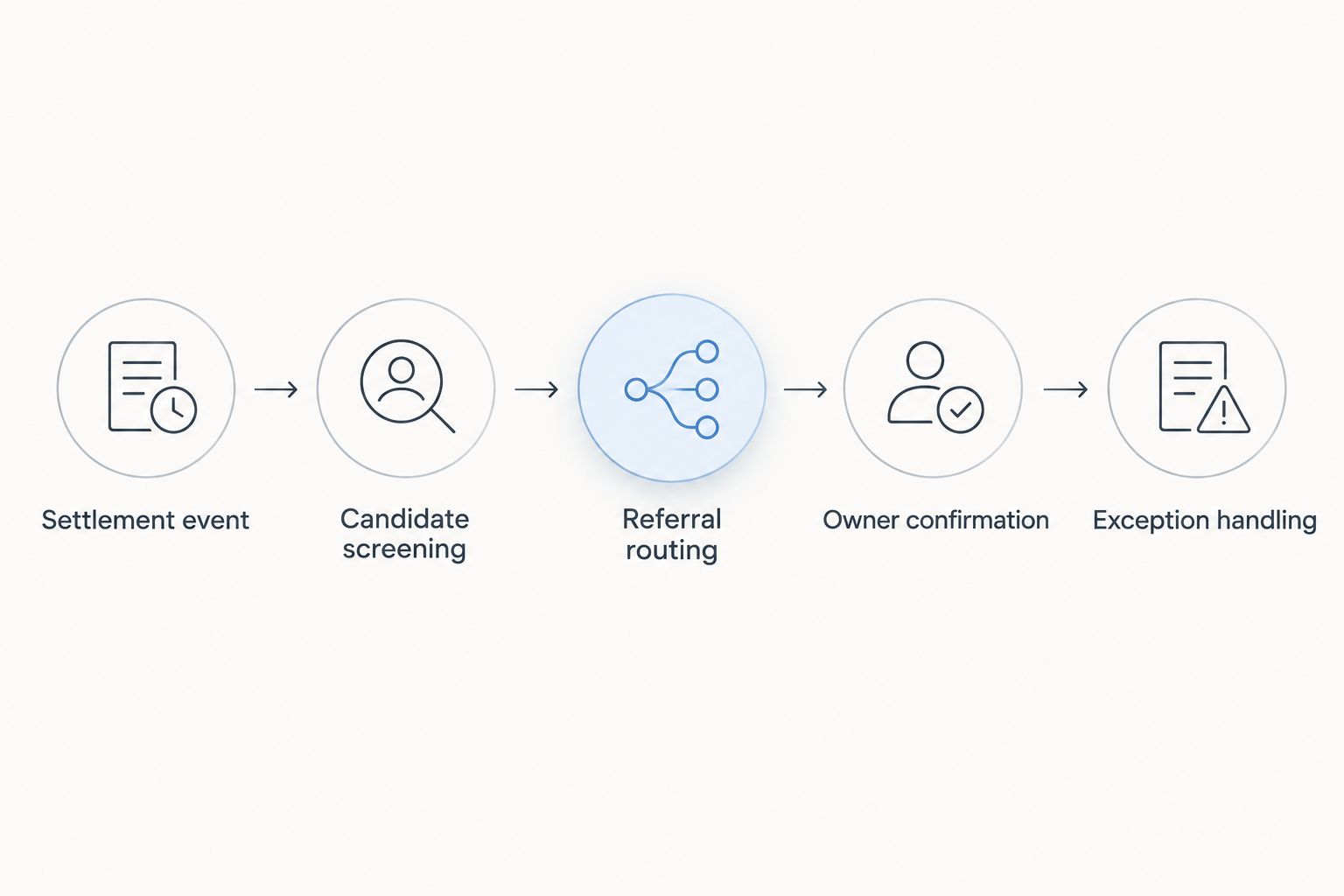
The routing design is a requirement for your Gethesperai claims automation implementation, not a claim that a particular connector or destination is already configured. Keep ownership and evidence requirements explicit in the implementation specification.
Validation and exception configuration
The fourth configuration unit proves that normal processing, uncertain decisions, and technical failures remain distinguishable. Before enabling your 2026 production workflow, test the business outcome as carefully as the connection.
- Prepare three business test cases. Use approved test records covering a clear candidate, an uncertain file, and a claim with no documented recovery basis. Specify the expected destination and reason before executing the tests.
- Replay one event twice. Confirm that the second delivery updates or recognizes the existing processing record rather than creating another referral. Also test whether a previously failed attempt can resume safely.
- Test a destination failure. Simulate an unavailable queue or rejected write through your approved test environment. Confirm that the workflow records the failure, alerts the responsible owner, and retains enough information for a controlled retry.
- Verify access boundaries. Check that the receiving team can open the evidence it needs and cannot access unrelated claim material. A document reference that the reviewer cannot open is an incomplete handoff.
- Approve activation. Have the recovery owner sign off on the test outcomes and exception path. Record which rules were enabled and how processing can be paused without losing incoming events.
Expected result: All three business outcomes reach their intended destinations, repeated delivery creates no duplicate, and a failed handoff remains visible until resolved.
Measure screening outcomes, referrals awaiting ownership, failed handoffs, and duplicate suppression separately. Combining them into a single success count hides whether work actually reached the recovery team.
Re-screen candidates when claim evidence changes
Settlement is a useful trigger, but it is not the only meaningful change. An updated liability assessment or newly attached evidence can justify another screening decision after the original referral assessment.
Use a second workflow for material updates, with the same evidence and duplicate controls. Do not trigger on every record edit: a formatting correction should not compete with a newly identified responsible party.
| Workflow | Best for | Advantage | Limitation |
|---|---|---|---|
| Settlement-triggered screening | Establishing a consistent referral checkpoint | Connects screening to a defined claim milestone | Does not independently capture later evidence |
| Material-update screening | Reassessing recovery when relevant facts change | Reopens the decision when its basis changes | Requires rules distinguishing substantive updates from routine edits |
Define material changes using fields or document events your integration actually exposes. Retrieve the current file, compare the relevant evidence, and update the existing referral when the recovery opportunity is unchanged.
Keep settlement screening as the checkpoint and material-update screening as the reassessment path. Neither workflow should automatically authorize a demand, compromise, or recovery payment.
Troubleshooting
The same claim creates repeated referrals
Check whether the trigger reacts to a state transition or merely to the presence of a settled status. Then inspect the referral key and the create-or-update operation. Repeated event delivery must resolve to the same recovery opportunity unless the underlying opportunity genuinely differs.
Settled claims never enter screening
Compare the event definition with the source system's actual settlement process. Confirm that the integration identity can receive or retrieve the relevant records and that scope filters are not excluding the account. Test a known settlement transition rather than an arbitrary claim update.
Candidates arrive without usable evidence
Check document permissions and whether the workflow captured a durable reference rather than a temporary location. Route inaccessible evidence to an exception owner; do not leave the recovery reviewer to reconstruct the entire claim file.
Reviewers cannot explain why a file was referred
Require a reason and supporting record references before creating the referral. Preserve the screening rule version and separate source facts from generated interpretation. A liability assertion without a traceable basis belongs in review, not in an established-fact field.
Failed handoffs disappear from view
Separate destination acknowledgment from event processing completion. Keep unsuccessful writes in an exception queue with a responsible owner and retry history. Do not mark the referral delivered until the destination confirms receipt.
Customize your workflow
Start with one approved claim scope and expand only after ownership, evidence access, and duplicate behavior pass validation. For a 2026 rollout, document the expansion criteria before adding another program or recovery destination.
Gethesperai covers FNOL intake, triage, coverage, fraud investigation, settlement, and subrogation recovery. That lifecycle scope supports planning adjacent workflows, but each handoff still needs its own approved trigger and authority boundary.
If your next step is connecting claim information to recovery work, use the automated subrogation recovery workflow guide to frame the next implementation discussion. Keep upstream evidence collection separate from downstream authorization.
FAQ
How do I automatically route subrogation candidates when a claim settles?
Trigger screening from a defined settlement event, assess the approved referral criteria, and send candidates with evidence to an accountable recovery queue. Add duplicate protection and require destination acknowledgment before recording a successful handoff.
Should claim closure or payment issuance trigger subrogation screening?
Use the event your recovery process defines as the referral checkpoint. Claim closure, payment issuance, and settlement agreement are distinct milestones, so document the intended event before configuring the trigger.
Can Gethesperai support settlement and subrogation workflows?
Gethesperai provides a claims automation platform covering settlement and subrogation recovery for P&C carriers, TPAs, and MGAs. Specify the source events, destination, evidence requirements, and authority boundaries for your implementation.
Does a subrogation referral establish that another party is liable?
No. A referral identifies an opportunity for recovery review; liability and recovery rights still require assessment of the facts and applicable requirements.
What happens if the settlement event arrives twice?
The workflow should recognize the existing processing record and avoid creating another referral for the same recovery opportunity. Test repeated delivery and failed-attempt recovery before activation.
Should a claim with missing evidence be rejected automatically?
No. Route material evidence gaps to review with a clear reason and an accountable owner rather than treating missing information as proof that no recovery opportunity exists.
Can I re-screen a claim after settlement?
Yes. Configure a material-update workflow for relevant changes, such as new evidence or an updated liability assessment, and update the existing referral when the recovery opportunity remains the same.
One last thing
Test the negative outcome as deliberately as the referral. A workflow that sends every uncertain claim to recovery has automated assignment, not screening. Require a reason for no referral, preserve the supporting record, and make that decision reviewable when new evidence arrives.