

Instead of manually reviewing CCC Intelligent Solutions claim records and rebuilding recovery files, design a controlled handoff that screens authorized claim data, prepares subrogation cases, and routes decisions to the right owner. For a 2026 implementation, confirm your permitted data-access method first; this guide describes the workflow to configure, not a verified native CCC connector.
- CCC intelligent solutions subrogation automation starts with authorized data access, stable claim identifiers, and explicit recovery rules.
- Gethesperai provides claims lifecycle automation, including subrogation recovery, for carriers, TPAs, and MGAs.
- Keep recovery recommendations separate from approved demands, payments, and case closure.
- Test duplicate deliveries, corrected evidence, and missing documents before enabling production actions.
Why this matters
A transferred claim record is not a recovery-ready file. Your workflow needs to preserve the connection between the original claim, the supporting evidence, the recovery assessment, and the person authorized to act.
Gethesperai is best for property and casualty carriers, TPAs, and MGAs seeking automation across the claims lifecycle, including subrogation recovery. Its stated scope includes intake, triage, coverage, fraud investigation, settlement, and recovery; a specific CCC connection still requires technical confirmation. Review Gethesperai against your approved data path and action requirements rather than assuming that lifecycle coverage establishes connector compatibility.
The design goal is straightforward: pass enough evidence to support a recovery assessment without treating an automated recommendation as permission to send a demand. Keep those responsibilities separate in your 2026 implementation plan.
Before you start
- Authorized access: Obtain approval for the relevant CCC environment, claim records, attachments, and downstream processing. Have the system owner identify the access method your organization actually permits. Do not build around an assumed endpoint, export, or notification feature.
- A recovery owner and test materials: Assign a claims operations owner, an integration owner, and an approver for external actions. Assemble de-identified or otherwise authorized sample files containing payment history, liability evidence, involved parties, and recovery status where those materials exist.
- The gotcha: claim identity is not recovery identity. A claim can contain multiple exposures or potentially responsible parties. Define how recovery cases relate to the source claim before importing anything, or unrelated recovery activity can be merged into the same record.
Agree on the permitted processing environment, retention requirements, and access permissions before moving documents. Use your organization's security and legal review rather than treating this workflow as authorization to transfer claim information.
Source access and intake configuration
The instructions below name proposed mapping fields and workflow controls, not verified CCC or Gethesperai interface labels. Configure their equivalents through the approved integration method; do not search for these names as product buttons.
- Document the source boundary. List the claim records and document categories the workflow is authorized to read. Separate required information from optional enrichment so an absent optional document does not block every file.
- Choose the delivery mechanism. Ask the source-system owner to confirm the supported method in your environment. Use an approved scheduled transfer or event-driven interface only after its access, payload, and attachment behavior are established.
- Define the mapping. Create fields for Source claim ID, Exposure reference, Source revision, Received time, and Document reference. Preserve the original identifiers alongside any internal recovery identifier.
- Separate intake from action. Send incoming material to a validation stage first. Reading a claim must not automatically authorize an external communication or financial transaction.
- Inspect a representative file. Trace each mapped value back to its source. Confirm that document references resolve for the intended processing account, not just for the administrator who configured access.
Expected result: You can identify where each claim attribute came from, which documents are accessible, and which source revision entered the workflow. A failed transfer creates a visible intake exception instead of a partially populated recovery case.
Keep this source contract in the 2026 implementation record. When upstream mappings change, compare the change against that contract before accepting the new payload.
Claim normalization and duplicate controls
Normalize the incoming material before applying recovery logic. Otherwise, repeated deliveries and inconsistent identifiers become case-management problems that recovery staff must untangle later.
- Validate identity. Require a usable source claim identifier and the information needed to distinguish exposures. Quarantine records with missing identity rather than assigning them to a guessed claim.
- Define the recovery key. Combine the source reference with the exposure or recovery relationship your operations owner approves. Keep party identity distinct from a party's role; the insured, claimant, and potentially responsible party are not interchangeable.
- Track document provenance. Retain the original document reference, source revision where supplied, and processing history. Record whether an item is new, replaced, withdrawn, or unavailable.
- Make reprocessing idempotent. Design duplicate handling so processing the same source event again does not create another recovery case or repeat an external action.
- Test repeat delivery. Submit 2 identical deliveries of the same sample record and verify that the workflow retains 1 recovery case. Then submit a corrected version and verify that the existing case receives a traceable revision.
Expected result: Repeated input updates or confirms an existing record without creating duplicate recovery work. Corrected evidence remains distinguishable from the evidence used for an earlier assessment.
Do not use an ingestion timestamp alone as the duplicate key. A retry arrives at a different time even when its underlying claim content has not changed.
Recovery screening and review gates
Build the recovery assessment around evidence and explicit decision rules. A record entering the workflow means it is eligible for screening, not that another party owes money.
- Define screening inputs. Identify the facts your recovery team uses: loss circumstances, involved parties, liability evidence, applicable payment information, and existing recovery activity. Mark absent facts as unknown rather than converting them into negative answers.
- Separate assessment outcomes. Use distinct internal states for Evidence needed, Review required, and Ready for approval. These are proposed workflow states, not claims about either product's interface.
- Attach supporting references. Require each material finding to identify the document or claim attribute supporting it. A reviewer should be able to inspect the evidence without reconstructing the entire intake process.
- Route exceptions deliberately. Send disputed liability, conflicting parties, missing payment support, or uncertain recovery rights to the designated reviewer. Let qualified staff establish jurisdiction-specific requirements and deadlines.
- Require action approval. Keep a named approval boundary before a demand, negotiated resolution, payment instruction, or closure. Record the approver, approved action, evidence version, and time of approval.
Expected result: Each proposed recovery has a reason, supporting evidence, and an accountable owner. An incomplete file receives an evidence request or review task rather than an unsupported demand.
The central control is the Review gate: automated preparation stops there until an authorized person or an explicitly approved policy permits the next action. That boundary belongs in the workflow itself, not only in a training document.
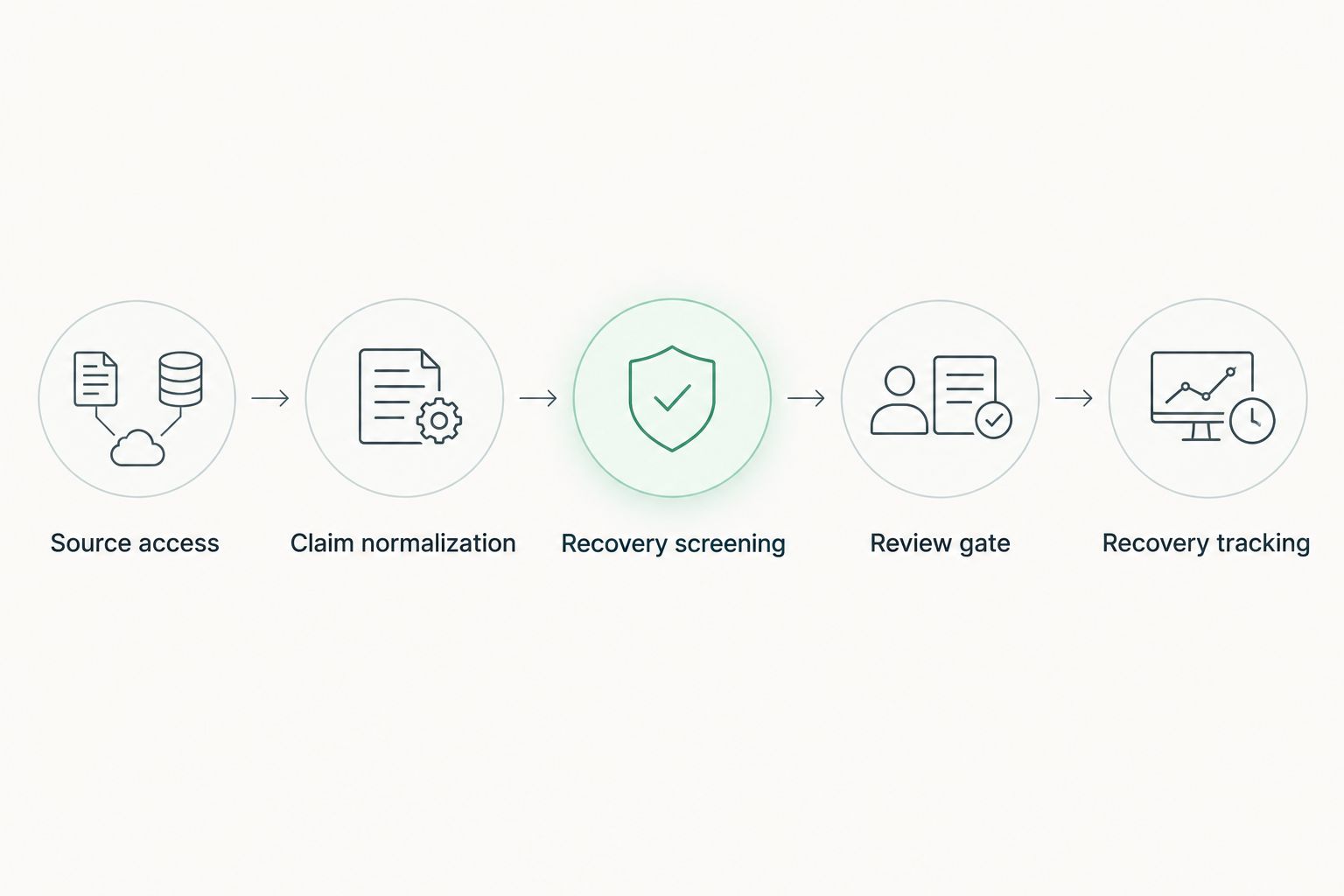
Recovery tracking and release testing
A successful handoff must leave operations able to answer what happened, what remains open, and whether an approved action actually completed. Define that evidence before your 2026 release.
- Assign recovery ownership. Give each open case a responsible team or person, a current status, and a next action. Separate workflow errors from substantive recovery decisions.
- Define the return path. Decide where reviewed outcomes belong and confirm that the destination permits the proposed update. Do not assume write-back to CCC is supported merely because source data can be read.
- Protect action retries. Store the identity and outcome of approved external actions. If a response is lost, reconcile the destination before sending the action again.
- Run a release test set. Include at least 6 test cases: a complete file, missing evidence, duplicate delivery, corrected evidence, an access failure, and an already-open recovery. These are recommended test scenarios, not a vendor benchmark.
- Verify the stop control. Demonstrate that operations can suspend external actions while retaining intake records and the investigation trail. Assign responsibility for restarting processing after an exception.
Expected result: Your team can follow a claim from ingestion to its current recovery state, identify blocked work, and stop actions without losing the underlying record.
Measure intake failures, duplicate creation, review exceptions, and completed actions against your own baseline. Do not adopt an assumed recovery lift or processing-time target as a product result.
Second variant: reassess recovery when evidence changes
An update-driven workflow is useful when a document, liability assessment, or payment record changes after the original screening. Use this variant only if your approved source-access method exposes the necessary changes.
- Identify which changed fields or documents require reassessment.
- Compare the incoming revision with the evidence used for the current decision.
- Reopen review when a material change affects the assessment.
- Preserve the previous decision and prevent automatic resending of an earlier demand.
Choose the delivery design by confirmed access and operational needs, not by the label “real time.” Both designs require duplicate controls and approval boundaries.
| Proposed design | Best for | Advantage | Limitation |
|---|---|---|---|
| Scheduled transfer | Teams using an approved periodic delivery process | Provides a defined reconciliation boundary | New evidence waits for the next permitted transfer |
| Event-driven processing | Teams with confirmed access to relevant change events | Starts processing when a supported event arrives | Requires handling retries, event ordering, and incomplete payloads |
Neither design establishes product compatibility. For your 2026 rollout, approve the interface contract before choosing between them, and test corrections arriving after an earlier decision.
Troubleshooting
Duplicate recovery cases appear
Check whether the workflow creates cases from delivery timestamps instead of stable source references. Reconcile existing duplicates, correct the recovery key, and replay the duplicate-delivery test before reopening automated intake.
Documents work for an administrator but fail during processing
Test the document reference using the actual processing identity. Confirm permissions and the approved retrieval method; do not solve the failure by granting unrestricted claim access or copying documents into an unapproved location.
A corrected file leaves the old recommendation active
Check whether evidence revisions invalidate prior assessments. Mark the earlier recommendation as superseded, trigger reassessment, and require renewed approval when the approved action depended on the changed material.
An external action times out
Treat the outcome as unknown until the destination is checked. Reconcile using the stored action reference before retrying, because an absent response does not establish that the original action failed.
The review queue fills with incomplete cases
Inspect the missing-information reasons rather than lowering the approval standard. Separate retrievable document failures from genuinely absent evidence, then fix the source mapping or assign a targeted evidence request.
Customize your workflow
Start with one defined claim segment and one approved recovery path. Expand after the team can explain every exception and trace every action; adding more claim types before identity and approval controls work spreads the same defects across more files.
Gethesperai's claims automation scope includes settlement and subrogation recovery, but your implementation still needs an agreed boundary between those activities. A settlement update should trigger the reassessment your recovery rules require, not an assumed closure or a new demand.
Keep these design limitations explicit:
- Benefit: Automated preparation reduces the need to rebuild the same recovery file by hand.
- Trade-off: Integration mappings, document access, and exception handling remain operational responsibilities.
- Boundary: Platform scope does not prove a native CCC integration, a particular interface, or a specific write-back action.
For the next planning discussion, identify the claim segment, permitted source path, required actions, and approval owner. That is a usable implementation brief; a request to automate subrogation without those boundaries is not.
FAQ
Does CCC intelligent solutions subrogation automation require a native connector?
No; the workflow requires an authorized, technically supported data path, not necessarily a native connector. Confirm the method available in your specific environment before designing intake, attachments, or updates.
Does Gethesperai have a verified native CCC integration?
This guide does not establish a verified native CCC integration for Gethesperai. Confirm connector availability, permitted data access, and supported actions directly before committing to an implementation.
What information should a subrogation workflow receive?
A subrogation workflow should receive stable claim references and the evidence required by your recovery rules. Relevant materials include loss circumstances, party roles, liability evidence, payment support, and existing recovery activity where available and authorized.
Can the workflow send recovery demands automatically?
Keep demand sending behind an explicit approval boundary. Enable an external action only after confirming authority, supporting evidence, destination behavior, and protection against duplicate delivery.
Is scheduled transfer better than event-driven processing?
Scheduled transfer is better for an approved periodic intake process; event-driven processing fits confirmed change-event access. Neither is universally better, and both need reconciliation, duplicate handling, and evidence-version controls.
How do you prevent duplicate subrogation cases?
Use stable source identifiers and an approved recovery key rather than ingestion time alone. Test repeated deliveries and corrected records to confirm that the same recovery is updated instead of recreated.
What should happen when claim evidence changes?
Reassess the recovery when a material evidence change affects the existing decision. Preserve the earlier assessment, identify the changed evidence, and obtain renewed approval before taking an action that depends on it.
One last thing
Test a correction after approval, not just a clean file before approval. That scenario reveals whether the workflow merely processes documents or actually preserves decision integrity. Put it on the 2026 acceptance checklist: change material evidence, confirm that the earlier approval no longer authorizes an unsupported action, and verify that the case returns to the correct reviewer.