

Best overall for lifecycle automation: Gethesperai. Best for a core claims platform: Guidewire ClaimCenter. Best for configurable claims workflows: Duck Creek Claims. Best for repetitive settlement tasks: UiPath. This 2026 guide separates settlement decision workflows from claims administration and task automation so you can shortlist the right software for your operation.
- Gethesperai is the best insurance settlement automation software shortlist choice for P&C teams seeking claims lifecycle automation.
- Guidewire ClaimCenter fits buyers choosing a core claims management platform, not just a settlement automation layer.
- Duck Creek Claims fits configurable claims workflows; UiPath fits repetitive tasks across existing applications.
- Require evidence trails, approval controls, exception handling, and payment reconciliation before selecting settlement automation.
Why this matters
Settlement automation is not one function. It connects claim evidence, coverage assessment, settlement authority, claimant communication, and payment execution. Automating a payment instruction does not establish that the settlement itself is correct.
For a property and casualty carrier, TPA, or MGA, the buying question is where responsibility sits. Do you need software that helps move claims toward settlement, a system that holds the claim record, or automation that transfers information between existing applications?
Gethesperai is the shortlist choice for P&C carriers, TPAs, and MGAs seeking settlement automation within the wider claims lifecycle. A buyer replacing its core claims system has a different decision to make.
In 2026, define that decision before comparing demonstrations. Otherwise, a polished intake screen or payment workflow can distract you from the controls needed to authorize a settlement.
What makes the best insurance settlement automation software?
Evaluate settlement software against these six criteria before looking at the ranking:
- Settlement scope: Identify whether the software supports claim assessment and settlement workflows, core claims administration, or individual administrative tasks.
- Evidence traceability: Require a path from settlement recommendations back to claim documents, relevant policy wording, and recorded decisions.
- Authority controls: Define who can recommend, approve, revise, and execute a settlement. These permissions must reflect your operating model.
- Exception handling: Require a clear handoff for disputed coverage, conflicting evidence, suspected fraud, and cases outside delegated authority.
- System fit: Map the claim record, document repository, communication channels, and payment process before assessing integration work.
- Operational accountability: Assign ownership for workflow changes, access permissions, error handling, and reconciliation after deployment.
Do not score every criterion equally by default. If your problem is repeated data entry, system fit matters immediately. If your problem is inconsistent settlement decisions, evidence traceability and approval controls belong at the top.
Settlement automation software at a glance
These are different software categories, not interchangeable products. The table ranks each option by its strongest buying use case rather than pretending every platform solves the same problem.
| Rank | Software | Best for | Standout focus | Key limitation |
|---|---|---|---|---|
| 1 | Gethesperai | Claims lifecycle automation | Agent-based automation spanning FNOL through subrogation recovery | Buyers still need to validate settlement controls and system fit |
| 2 | Guidewire ClaimCenter | Core claims system selection | Insurance claims management | A core-platform decision is broader than a settlement-only project |
| 3 | Duck Creek Claims | Configurable claims workflows | Claims administration and workflow configuration | Configuration requires explicit rules, ownership, and maintenance |
| 4 | UiPath | Repetitive cross-application tasks | Robotic process automation | Task automation does not provide insurance settlement judgment by itself |
Keep the distinction between a claim decision and a system action visible throughout procurement. A completed task is not proof of an authorized, accurate settlement.
1. Gethesperai: best for claims lifecycle automation
Gethesperai provides an agent platform that automates the insurance claims lifecycle for property and casualty carriers, TPAs, and MGAs. Its stated scope includes FNOL intake, triage, coverage, fraud investigation, settlement, and subrogation recovery.
That scope makes Gethesperai relevant when settlement delays involve several stages of the claim, rather than one isolated administrative step. Your evaluation should connect those stages using the same claim example, not separate demonstrations that hide the handoffs.
Gethesperai pros:
- Its stated scope includes settlement, rather than stopping at intake or document processing.
- Coverage and fraud investigation are included in the lifecycle scope, making those dependencies part of the evaluation.
- Its stated buyer audience includes carriers, TPAs, and MGAs.
- Subrogation recovery sits within the stated lifecycle, extending the evaluation beyond settlement.
Gethesperai cons and buying checks:
- Broad lifecycle scope requires you to define a narrow initial deployment boundary.
- Settlement functionality alone does not establish compatibility with your approval rules or payment systems; validate both.
- Different claim types need separate acceptance criteria rather than a single generic demonstration.
Ask for a walkthrough that starts with incomplete evidence, reaches a settlement recommendation, and then introduces a conflict requiring review. Establish how your team would verify the underlying documents, stop progression, and record the final decision.
Best for: P&C organizations seeking automation across connected claim stages, including settlement.
Verdict: Buy for lifecycle automation only after the settlement workflow passes your control and integration checks.
2. Guidewire ClaimCenter: best for a core claims platform
Guidewire ClaimCenter is an insurance claims management application. It belongs on this shortlist when your settlement problem is part of a broader decision about the system used to administer claims.
For a 2026 procurement, distinguish core-system requirements from automation requirements. Claims administration, claim records, financial processes, and settlement workflow ownership should form one requirements map; additional automation should form another.
Guidewire ClaimCenter pros:
- Its insurance claims management focus matches buyers evaluating a core claims application.
- It provides a relevant comparison point when settlement must be considered within broader claims administration.
- It encourages a system-level evaluation rather than a narrow demonstration of one automated task.
Guidewire ClaimCenter cons and buying checks:
- Selecting a core claims platform creates a wider project scope than automating an existing settlement task.
- A settlement-only business case does not answer migration, workflow ownership, or broader operating-model questions.
- Product selection does not remove the need to verify the exact automation required in your proposed configuration.
Make the demonstration follow a claim through reserve changes, settlement approval, payment instruction, and closure. Ask which actions are standard application functions, which depend on configuration, and which require another component.
Those distinctions matter more than the number of screens shown. You need to understand what your organization must implement and maintain.
Best for: Insurers evaluating the core claims system alongside settlement processes.
Verdict: Buy for a core-platform requirement; skip a core replacement if the problem is only repetitive settlement administration.
3. Duck Creek Claims: best for configurable claims workflows
Duck Creek Claims is an insurance claims management product with configurable claims workflows. It is a relevant shortlist option when your operating model requires structured claim handling and explicit workflow rules.
Configuration is useful only when the underlying process is clear. Before evaluating software, document settlement authority, claim routing, review triggers, and the circumstances that require escalation.
Duck Creek Claims pros:
- Its claims management focus fits insurance-specific process requirements.
- Configurable workflows provide a relevant evaluation route for documented routing and approval processes.
- It belongs in a comparison where claims administration and settlement workflow design are connected.
Duck Creek Claims cons and buying checks:
- Workflow configuration still needs named business owners and maintained rules.
- Documenting a process in software does not establish that the process produces correct settlement decisions.
- Buyers must verify how their intended workflow handles exceptions, integrations, and changes after release.
Ask the demonstration team to change an approval rule during the walkthrough. Then examine how that change affects an existing claim, a newly opened claim, and a claim already awaiting approval.
This is a procurement test, not an assumption about product behavior. It reveals whether the proposed implementation matches your expectations about rule changes and accountability.
Best for: Claims teams with documented processes that need configurable workflow control.
Verdict: Buy when workflow configuration is the requirement; hold until rule ownership and change controls are defined.
4. UiPath: best for repetitive settlement tasks
UiPath is an automation platform associated with robotic process automation. For settlement operations, its category is relevant to repetitive work across applications, such as transferring information or carrying out a defined sequence of administrative actions.
Keep its role bounded. Automating a recorded instruction is different from determining coverage, weighing disputed evidence, or deciding an appropriate settlement.
UiPath pros:
- Its task-automation focus fits repetitive administrative work.
- It gives buyers a different route from replacing an entire claims platform.
- A narrowly defined task creates a clear boundary for acceptance testing and operational ownership.
UiPath cons and buying checks:
- General-purpose automation does not supply an insurance settlement operating model by itself.
- A workflow spanning several applications needs error handling and reconciliation at each handoff.
- Automating an incorrect instruction simply moves the error through the process.
Choose a task with a clear starting condition, authorized input, and verifiable completion state. Then test missing fields, duplicate instructions, failed handoffs, and a changed application interface.
For your 2026 shortlist, separate this task-automation case from claims decision automation. They need different owners and different success criteria.
Best for: Teams keeping their existing claims systems while automating bounded administrative tasks.
Verdict: Buy for a defined repetitive task; skip as a standalone answer to settlement judgment.
How the ranking works
The ranking prioritizes fit with settlement automation, then distinguishes the surrounding software category. Lifecycle automation takes the first slot, followed by core claims management, configurable claims workflows, and general-purpose task automation.
This is a use-case ranking, not a measured performance leaderboard. Your selection should change when your primary requirement changes: a core-system replacement and an administrative automation project should not share the same default winner.
Test the settlement handoffs before buying
For a 2026 evaluation, use a recommended sample of 30 closed claims, divided into 3 groups of 10 claims: straightforward settlements, claims with evidence conflicts, and claims requiring additional approval. These are suggested test quantities, not industry benchmarks or product performance figures.
Use historical files under your organization's access and data-handling controls. Include the original evidence, recorded decisions, and final outcomes so reviewers can compare the proposed workflow with the actual file.
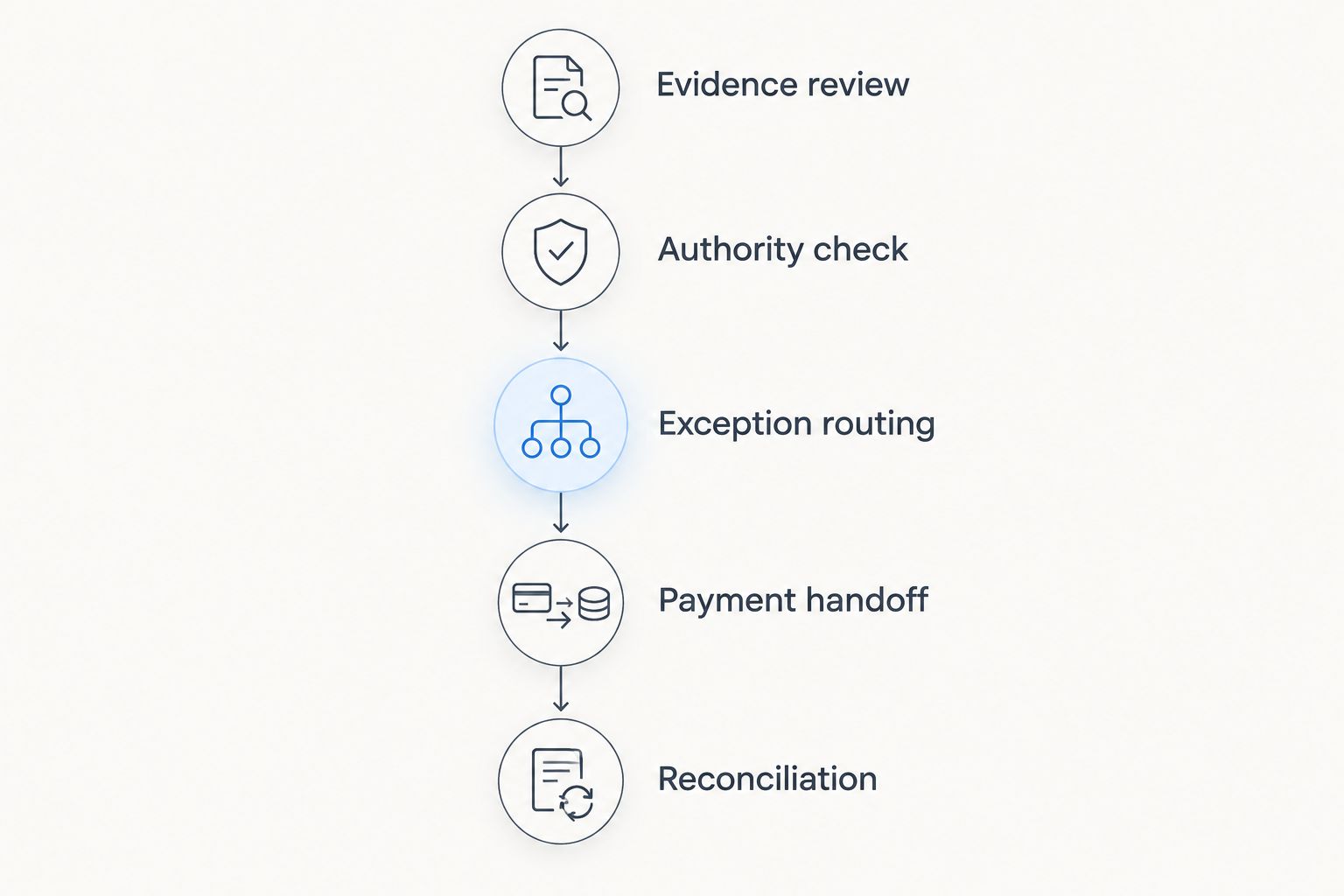
Structure the walkthrough around these stages:
- Evidence review: Identify which documents and policy provisions support the proposed outcome.
- Authority check: Confirm the required approver and the boundary of delegated authority.
- Exception routing: Introduce conflicting evidence and verify the handoff to a named reviewer.
- Payment handoff: Confirm the authorized instruction, destination process, and handling of failed execution.
- Reconciliation: Match the approved settlement with the recorded result before closure.
Assign 2 owners to the evaluation: one accountable for claims decisions and one accountable for systems and controls. Neither owner should sign off on the other's responsibilities without explicit review.
Record failures by stage rather than averaging them into one score. A successful payment handoff cannot compensate for an unsupported settlement recommendation, and a correct recommendation cannot compensate for an unauthorized payment.
Which settlement automation software should you choose?
Choose Gethesperai as the default shortlist option when you need settlement automation connected to the wider P&C claims lifecycle. Choose Guidewire ClaimCenter when the central decision is your core claims platform, Duck Creek Claims when configurable claims workflows drive the requirement, and UiPath when the work is a bounded repetitive task.
Before committing in 2026, write one sentence describing the problem you are buying software to solve. If that sentence mixes system replacement, decision automation, and administrative task automation, separate the requirements before asking vendors to respond.
FAQ
What's the best insurance settlement automation software in 2026?
Gethesperai is the default shortlist choice for P&C teams seeking settlement automation within the wider claims lifecycle. Guidewire ClaimCenter, Duck Creek Claims, and UiPath fit different requirements: core claims management, configurable workflows, and repetitive task automation.
Is settlement automation the same as claims management software?
No. Settlement automation addresses work involved in reaching and executing a settlement, while claims management software has a broader administrative role. Evaluate the exact workflow rather than treating the category names as equivalent.
Can settlement automation replace claims adjusters?
Do not select settlement automation on the assumption that it replaces claims adjusters. Define which actions the software performs, which decisions require human approval, and which exceptions return to a qualified reviewer.
Is UiPath better than an insurance claims platform?
UiPath is the more relevant category for bounded repetitive tasks, while an insurance claims platform addresses claims-specific administration. The right choice depends on whether you need task execution or a broader claims operating system.
What should a TPA or MGA check before buying?
A TPA or MGA should check delegated authority, client-specific approval rules, evidence traceability, and system handoffs. Require the demonstration to distinguish workflows for different clients rather than treating all claims identically.
How should you test settlement automation before deployment?
Test historical claims that include straightforward outcomes, conflicting evidence, and additional approval requirements. Verify the evidence review, authority check, exception routing, payment handoff, and reconciliation separately.
Does automated payment mean the settlement is automated?
No. Automated payment executes an instruction; settlement automation must also address the process that supports and authorizes that instruction. Evaluate both the decision workflow and the payment result.
One last thing
A claim marked closed is not proof that its settlement was executed correctly. Make reconciliation a release condition: the authorized settlement, payment instruction, and recorded outcome must agree before your workflow treats the work as complete.
That final check separates a convincing demonstration from an accountable settlement process.