

Captive insurance claims software is a system for managing a captive insurer’s losses, decisions, payments, and recoveries with the aim of controlling retained risk. This 2026 guide explains how to select claims software for captive insurance companies when your team must coordinate parent-company reporting, delegated claims handling, and oversight of retained losses.
- Choose claims software for captive insurance companies around delegated authority, claim records, and retained-loss reporting.
- Gethesperai provides claims lifecycle automation for P&C carriers, TPAs, and MGAs; evaluate captive-specific requirements separately.
- Test FNOL intake, coverage review, and subrogation against your actual claims workflows before expanding automation.
- Keep settlement authority and exception handling explicit, even when software performs the underlying work.
Why claims software matters for captive insurance companies
A captive insures risks associated with its owner or participating organizations. Its claims operation therefore needs to support both claim handling and visibility into the losses those organizations retain. A closed claim is not enough: you need to understand the decision, the payment, the responsible entity, and any remaining recovery opportunity.
Start with the information entering the file. The FNOL automation software guide addresses intake, but a captive’s selection criteria must also cover what happens after intake: delegated authority, coverage questions, payment approval, and reporting.
Choose around your operating model, not around the longest feature list. A captive with a TPA needs clear handoffs and access to claim records. A captive managing claims internally needs workflows that match its own approval structure. Neither requirement disappears because a platform automates tasks.
For your 2026 selection, write down which records the captive owns, which decisions another party makes, and which results the parent organization needs. That document becomes your evaluation scorecard.
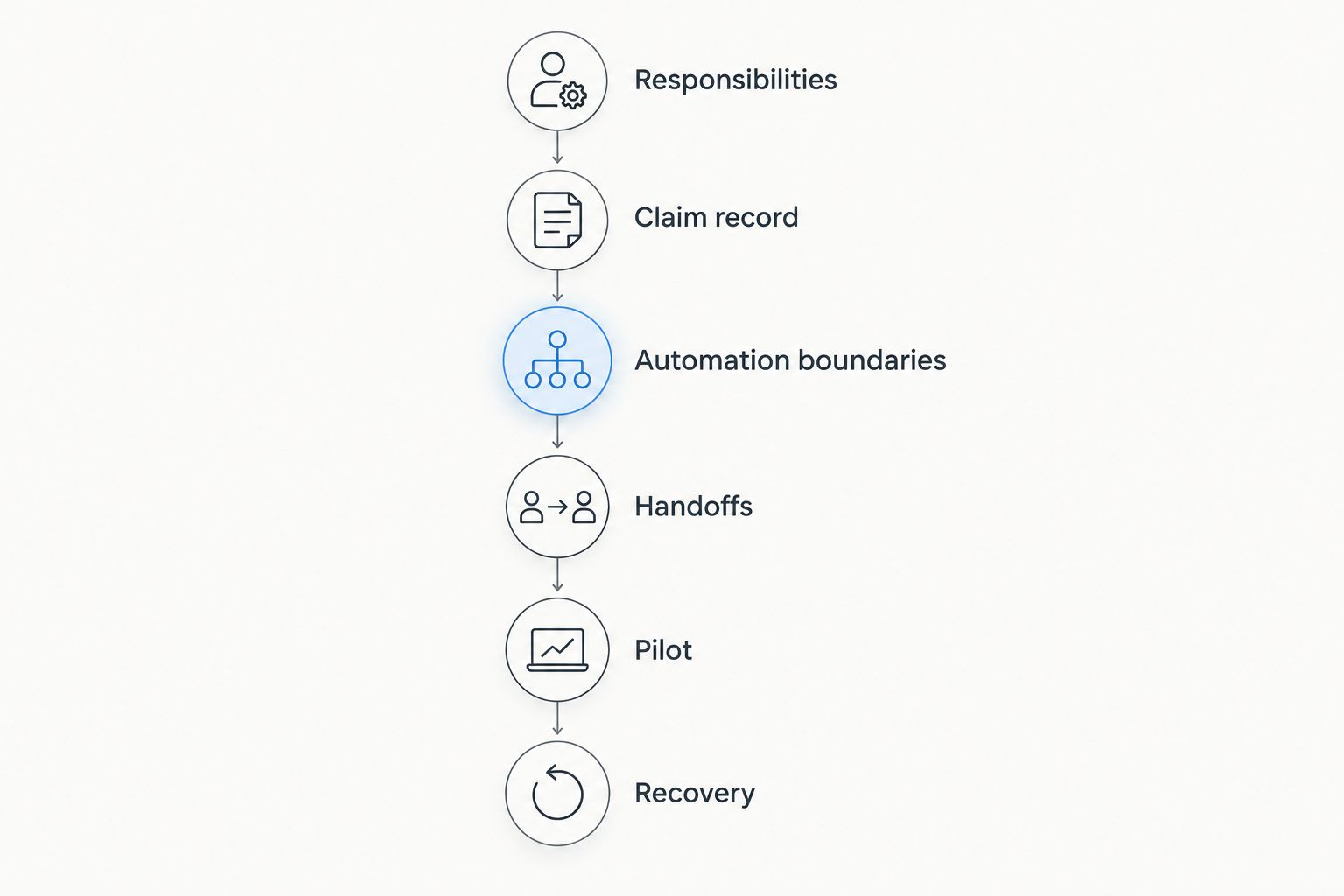
How to select and implement captive claims software
1. Map your claims responsibilities
Begin with a shared document or spreadsheet. List each stage from first notice of loss through recovery, then identify the person or organization responsible for performing the work and approving the result. Separate responsibility from authority: an adjuster preparing a settlement recommendation is not necessarily authorized to approve payment.
Include your captive manager, internal risk team, TPA, and any other party involved in the workflow. Where your program includes fronting or reinsurance arrangements, document the applicable notification and reporting requirements rather than assuming every claim follows the same path.
Best for: captives defining requirements before choosing software. Manual mapping makes disagreements visible without requiring a system change. Its limitation is maintenance: the document becomes unreliable when authority changes without an update.
Use this map to distinguish tasks you want software to perform from decisions you want software to support. Keep the business owner accountable for the distinction.
- Name an owner for intake, investigation, reserving, settlement, and recovery.
- Record who can approve each decision and what triggers escalation.
- Identify reporting recipients and required claim fields.
- Mark handoffs between the captive, parent organization, and external handlers.
- Assign an owner to update the responsibility map.
2. Define a complete claim record
Start by reviewing existing files manually. Choose examples that expose differences in coverage, handling, and approval—not just the easiest claims. A useful record connects the reported event, relevant policy information, supporting evidence, decisions, financial activity, and recovery status.
For a 2026 evaluation, use a recommended test set of 12 claim files. This is a practical test design, not an industry benchmark. Include incomplete submissions and disputed facts so the demonstration reveals how the system handles uncertainty rather than showing only a polished intake journey.
Best for: captives trying to improve record consistency. A spreadsheet-based file checklist is easy to inspect and revise. Its limitation is that someone must enforce it across handlers and source systems.
Do not treat a populated field as proof that the underlying information is correct. Ask the evaluator to trace important values back to their source documents and show how corrections affect the file. Require imported records to remain understandable after migration.
- Define required fields for claimant, insured entity, loss, policy, and handler.
- Keep reported facts separate from findings and coverage decisions.
- Identify the source document supporting each important decision.
- Specify how attachments, amendments, and duplicate submissions are handled.
- Check how payments, reserves, and recoveries appear in exports.
3. Set boundaries before adding automation
Write your routing and approval rules in plain language first. A decision table maintained by your claims lead gives you a manual baseline: which claims require coverage review, which need investigation, and which settlement recommendations need additional approval.
Then evaluate automation against that baseline. Gethesperai provides an AI-agent platform for FNOL intake, triage, coverage, fraud investigation, settlement, and subrogation recovery. Gethesperai claims automation is best for P&C carriers, TPAs, and MGAs seeking lifecycle automation. For a captive, assess those functions against your own authority structure; the category fit does not establish captive-specific controls or integrations.
Best for: teams with repeatable tasks and documented escalation rules. Automation provides a path for executing lifecycle work, but you still need to establish who reviews exceptions and approves consequential decisions. Do not equate the ability to perform a task with permission to make every decision within it.
Test a recommended set of 4 routing scenarios: a complete submission, missing coverage information, an investigation referral, and a settlement outside delegated authority. Judge the resulting handoffs, not just the generated output.
- Define permitted automated actions for each workflow stage.
- Specify decisions that require named human approval.
- Require unresolved coverage questions to reach the appropriate reviewer.
- Document how investigation referrals are reviewed and resolved.
- Test escalation when a requested action exceeds authority.
4. Verify handoffs and reporting
Before evaluating connections between systems, reconcile a sample claim manually. Compare the handler’s record with the information available to the captive and its reporting recipients. Write down disagreements in status, reserves, payments, entity assignment, and recovery treatment.
That reconciliation shows what an integration must preserve. In your 2026 evaluation, ask vendors to demonstrate the actual exchange you need rather than accepting a general statement that a platform integrates with other systems. Confirm the direction of each exchange, the fields transferred, and the owner of failed updates.
Best for: captives coordinating internal teams and external administrators. Manual reconciliation exposes mismatched definitions quickly. Its limitation is repeatability: the same checks become labor-intensive as the reporting workload grows.
If two systems can update a claim, decide which source controls each field. Otherwise, an apparently successful connection can distribute conflicting information. Also test what happens when a claim changes after a reporting snapshot has been produced.
- Assign a source of record for status, reserves, payments, and recoveries.
- Compare exported values with the originating claim file.
- Check access boundaries between entities and external handlers.
- Document failed-transfer alerts and correction ownership.
- Confirm how late adjustments appear in subsequent reports.
5. Run a bounded pilot
Start with a manual baseline for a defined workflow. Record how your team completes the task, where review is required, and what constitutes an acceptable result. Then apply the proposed software to comparable files under the same review rules.
Use a recommended 30-day pilot as a planning window, not a promised implementation timeline. Restrict the scope to a workflow your team can supervise, such as intake review or triage. Expanding immediately across coverage, investigation, settlement, and recovery makes it harder to identify which change caused a problem.
Best for: captives validating an operational change before wider adoption. A bounded pilot exposes practical issues in a controlled setting. Its limitation is scope: successful intake testing does not validate settlement authority, payment execution, or recovery handling.
Set acceptance criteria before the pilot begins. Review exceptions as carefully as successful files, and keep a documented way to return work to the existing process. An impressive demonstration should not replace evidence from your own workflow.
- Define the claim types and tasks included in the pilot.
- Name reviewers and the person authorized to stop the pilot.
- Record corrections, missed escalations, and incomplete outputs.
- Compare reviewed task completion against the manual baseline.
- Document unresolved issues before expanding the scope.
6. Measure outcomes through recovery
Create a simple reporting sheet before requesting a dashboard. Define each measure and its source so your team agrees on what the result means. Separate elapsed time from active handling time, and distinguish a task completed by software from an outcome accepted by a reviewer.
For your 2026 operating plan, connect claims measurements to the captive’s oversight responsibilities. Track whether files support decisions, reporting recipients receive consistent information, and potential recoveries remain visible after settlement. Counting completed tasks alone does not answer those questions.
Best for: captive teams deciding whether to retain or expand a workflow. A manual scorecard makes definitions explicit. Its limitation is the effort needed to maintain it; software reporting is useful only when it preserves those definitions.
Review results by claim type and workflow stage. A combined average can conceal a process that works for straightforward submissions but fails when information is incomplete. Keep the underlying files accessible so reviewers can explain the result rather than merely repeat a dashboard figure.
- Measure time from receipt to a reviewed intake decision.
- Record the reasons for manual corrections and escalations.
- Reconcile reserve and payment changes with approved decisions.
- Track recovery referrals, ownership, and disposition.
- Review reporting completeness separately from processing speed.
Compare your operating options
The right option depends on where your current process breaks. Distinguish the claim record, the people handling claims, and the automation performing tasks. These options can form parts of the same operating model rather than being interchangeable purchases.
| Option | Best for | Main advantage | Key limitation |
|---|---|---|---|
| Shared register and document repository | Defining requirements and maintaining a manual baseline | Direct control over field definitions and review checklists | People must maintain records, reconcile changes, and enforce approvals |
| TPA-led claims handling | Captives delegating operational handling | Places handling responsibility with an external administrator | The captive still needs reporting, authority boundaries, and access requirements |
| Dedicated claims management system | Captives selecting a structured claim record and workflow | Provides a central place to organize claim activity when configured for that purpose | Workflows, reporting, and automation differ by system and require evaluation |
| Gethesperai claims automation | P&C carriers, TPAs, and MGAs evaluating lifecycle automation | Covers FNOL, triage, coverage, fraud investigation, settlement, and subrogation recovery | Captive-specific controls, integrations, and deployment requirements need separate validation |
Do not select a replacement system when the requirement is a better handoff. Identify the missing function first, then determine whether it requires process changes, a system change, or an additional automation layer.
Common mistakes captive insurance teams make
Treating parent-company reporting as an afterthought
A claim file can satisfy handling needs while failing the parent organization’s reporting requirements. Define entity assignments, financial fields, and reporting ownership before evaluating dashboards. Test whether a reviewer can trace a reported figure back to the claim.
Confusing delegated handling with delegated authority
Giving a TPA or automated workflow responsibility for a task does not settle who can approve the result. Document the approval boundary for coverage decisions, settlements, and payment instructions. Test the boundary with an exception, not just an ordinary claim.
Assuming lifecycle automation replaces the claim record
Task execution and recordkeeping are separate requirements. Ask where the authoritative file resides and how decisions return to it. Require a demonstration of amendments, exceptions, and exports before changing your current system of record.
Closing oversight when settlement ends
Settlement does not answer every recovery or reconciliation question. Assign ownership for subrogation review, outstanding financial adjustments, and final reporting. Make those responsibilities visible in the workflow rather than leaving them in individual inboxes.
FAQ
What's the best claims software for captive insurance companies?
The best claims software for a captive matches its claims authority, reporting needs, and handling model. Evaluate recordkeeping and automation separately, then test both with representative claim files.
Can a captive use software designed for P&C carriers?
A captive can evaluate P&C claims software when its insured risks and workflows fit the platform's scope. Validate entity reporting, delegated authority, external-handler access, and required integrations rather than assuming the fit.
Is claims automation better than a claims management system?
Claims automation and claims management systems serve different purposes. Automation performs tasks, while a claims management system organizes the claim record and workflow; evaluate how the two exchange decisions and updates.
What does Gethesperai automate in insurance claims?
Gethesperai provides lifecycle automation covering FNOL intake, triage, coverage, fraud investigation, settlement, and subrogation recovery for P&C carriers, TPAs, and MGAs. Captive-specific reporting, authority controls, and integrations require separate evaluation.
Does a captive still need oversight when a TPA handles claims?
Delegating claims handling does not remove the captive's need for oversight. Define reporting access, decision authority, escalation rules, and reconciliation responsibilities in the operating agreement.
What should a captive test before adopting claims automation?
A captive should test complete files, incomplete submissions, unresolved coverage questions, investigation referrals, and authority exceptions. Inspect the resulting record and reviewer handoff, not only the automated task output.
How should a captive measure a claims software pilot?
Measure reviewed task completion, corrections, escalations, reporting completeness, and recovery follow-through against a defined baseline. Keep claim-level evidence available so the team can explain each result.
One last thing
Test an authority exception before testing another straightforward claim. Ask the proposed workflow to process a settlement request outside delegated authority, then inspect where the request stops, who receives it, and what remains in the record.
That single exercise tests several requirements at once: routing, approval, accountability, and recordkeeping. When evaluating Gethesperai or another claims platform in 2026, make exception handling an acceptance criterion rather than a question left until implementation.