

Instead of manually rebuilding fraud referrals from claim notes, connect Hesper AI to NICB fraud referral reporting through an approval-led workflow: prepare the evidence, obtain investigator approval, submit through your authorized channel, and reconcile the result. Use Gethesperai for the claims-automation side; confirm the available integration method before configuring submission.
- To connect Hesper AI to NICB fraud referral reporting, separate evidence preparation, investigator approval, submission, and receipt reconciliation.
- Gethesperai provides claims automation; confirm the supported NICB submission method before building the connection.
- Keep fraud indicators separate from verified facts, and require investigator approval before external disclosure.
- Test duplicate prevention and uncertain submission outcomes before enabling production reporting.
Why this matters
A suspicious claim is not a completed fraud referral. Your workflow must preserve the evidence behind the concern, identify who authorized disclosure, and distinguish a prepared package from a submission the receiving system accepted.
Gethesperai is best suited to P&C carriers, TPAs, and MGAs seeking claims-lifecycle automation, including fraud investigation. Its stated scope does not establish a native NICB connector, particular interface controls, or an approved submission mechanism. This guide defines the connection requirements without assuming those capabilities.
For your 2026 implementation, make the approval boundary explicit. Automation can organize a referral package, but your designated investigator should determine whether that package is ready for external reporting under your organization's procedures.
Before you start
- Access and ownership: Identify your claims-system administrator, special investigation unit (SIU) approver, and authorized NICB reporting user. Confirm the submission channel and permissions applicable to your organization before building the workflow.
- Claim materials: Assemble a representative claim record, supporting documents, investigation notes, and your approved disclosure rules. Use synthetic or appropriately de-identified materials for initial testing.
- The non-obvious gotcha: A successful send is not proof of acceptance. Establish how the receiving channel confirms receipt and how your team checks an uncertain outcome before retrying; otherwise, retries can create duplicate referrals.
Gate the project on a documented submission method. If that method is not confirmed, build preparation and internal approval only. Do not treat an assumed API, export format, or screen-automation route as an established connection.
The worksheet labels below describe information your implementation needs. They are not asserted product UI labels, and no button sequence is implied.
Referral scope and submission route
Start with the boundary between investigation and reporting. This configuration unit should produce an agreed route, an accountable owner, and a clear definition of what the workflow is allowed to send.
- Define the referral event. Specify the investigation milestone that makes a claim eligible for referral review. Use an investigator-approved decision, not the appearance of a fraud indicator alone.
- Confirm the supported route. Ask your platform administrator and authorized reporting contact to document the available submission mechanism. Record authentication requirements, accepted information, attachment handling, and acknowledgment behavior from the applicable documentation.
- Assign responsibility. Name the role that approves disclosure, the role that submits, and the role that resolves failed or uncertain submissions. Keep those responsibilities visible in the operating procedure.
- Limit the initial scope. Select 1 claim for the first controlled test. Keep external submission disabled until your organization has approved the test destination and method.
Expected result: You have a documented route and ownership model. No claim leaves the internal workflow merely because an automated assessment identifies suspicious activity.
Choose the operating model
Use the following models as implementation choices, not as claims about available product features. The appropriate choice depends on your confirmed access and reporting method.
| Operating model | Best for | Advantage | Limitation |
|---|---|---|---|
| Investigator-mediated submission | Teams establishing their first controlled referral workflow | Keeps submission with an authorized reporting user | Requires manual transfer and reconciliation |
| Approved automated transport | Teams with a documented, supported machine-to-machine submission route | Removes repeated transfer work after approval | Requires authentication, error handling, and receipt reconciliation |
Start with investigator-mediated submission when the automated route is unconfirmed. It lets you validate the package and approval process without pretending the transport layer already exists.
Evidence mapping and referral package
Your referral package should make the investigator's reasoning traceable. A polished narrative is not enough if the underlying facts, documents, and uncertainties cannot be identified.
- Map the claim reference. Preserve the source claim identifier and the organization responsible for the record. Keep that reference attached to every internal package version.
- Separate facts from indicators. Label source-supported observations separately from inconsistencies, unresolved questions, and investigator conclusions. Do not rewrite a risk signal as a proven allegation.
- Attach evidence references. Associate each material statement with the relevant document, note, or record location. Record the version used so later changes do not silently alter an approved package.
- Apply disclosure controls. Include only information authorized for the reporting purpose. Have your privacy or compliance owner decide what must be excluded, restricted, or reviewed.
- Validate the receiving requirements. Check required information, permitted attachment types, and other submission constraints against the confirmed channel's documentation. Do not substitute a locally invented schema for those requirements.
Expected result: An investigator can trace the proposed referral back to its sources and identify missing information without reconstructing the entire claim file.
For the 2026 rollout, retain both the source material and the approved narrative version. If a material fact changes after approval, return the package for review rather than silently replacing the approved content.
The guide to automatically flagging suspicious claims at FNOL addresses the upstream detection stage. Keep that stage separate from the decision to disclose an investigation externally.
Approval controls and submission handoff
Build 2 review checkpoints into your implementation: one for the investigation decision and one for the exact outbound package. A single person can perform both where your procedures permit, but the workflow should record both decisions.
- Review the investigation basis. Have the designated investigator assess the evidence, unresolved questions, and rationale for referral. Return incomplete cases to investigation rather than sending a partial allegation automatically.
- Approve the outbound version. Present the exact narrative and attachments intended for submission. Record the approving identity, approval time, and package version.
- Prevent silent changes. Require renewed approval when the narrative, attachments, recipient, or other material content changes. Do not let approval follow a mutable document indefinitely.
- Create the handoff. Send the approved package to the authorized reporting user or confirmed automated transport. Include the internal claim reference and a submission tracking reference where your implementation supports one.
- Record the attempt. Preserve when submission was attempted, which package was used, and what response was returned. Restrict access to credentials and sensitive response content.
Expected result: Every submission attempt points to an approved package, an accountable actor, and a traceable claim record.
The sequence should remain readable without opening individual task histories: Evidence mapping, Investigator review, Approved package, Authorized submission, Receipt reconciliation.
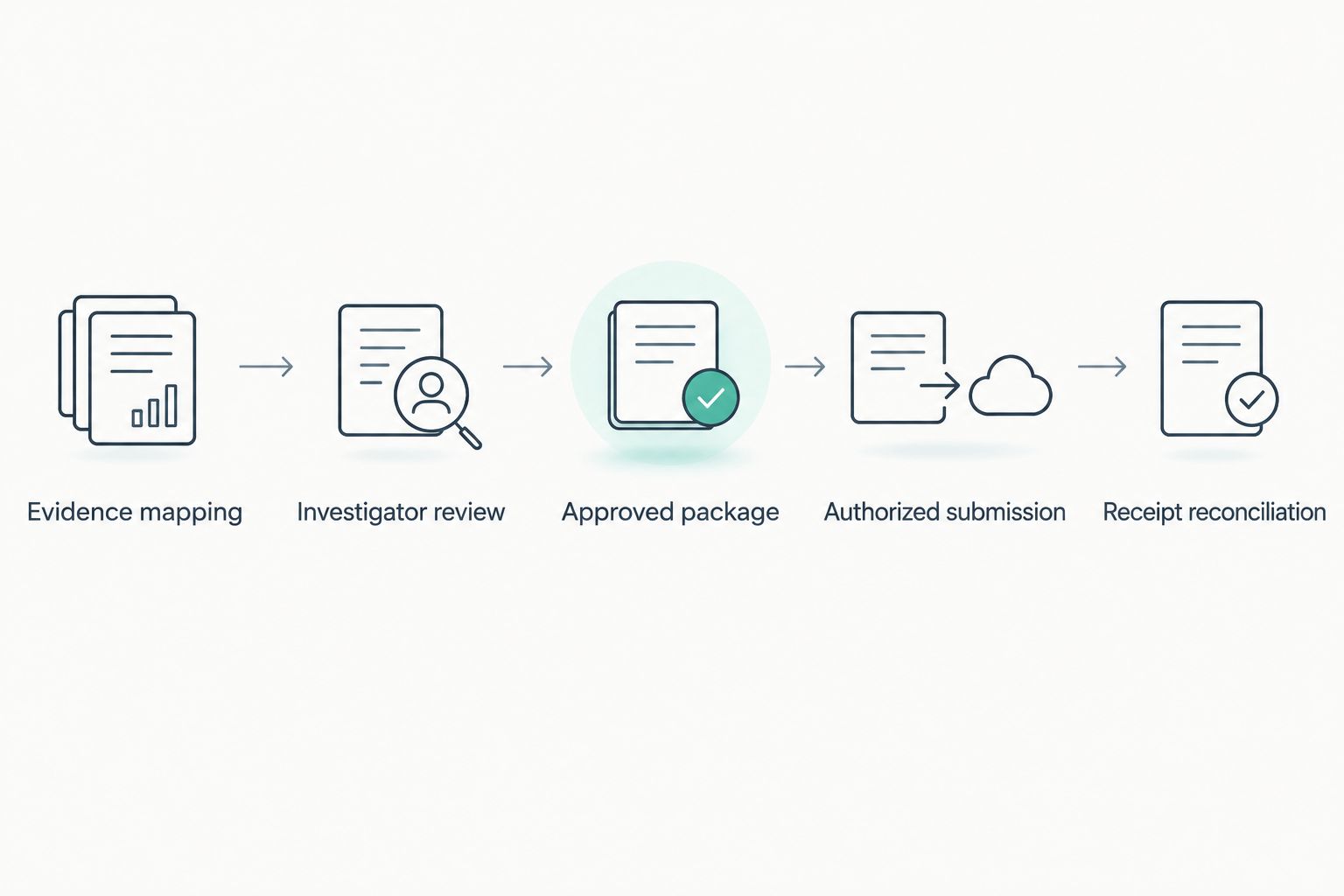
Keep the 2026 operating procedure aligned with this sequence. If the implementation cannot preserve approval and package version together, retain a controlled manual handoff until that gap is resolved.
Receipt reconciliation and release testing
Submission status should describe what you know, not what you hope happened. Define 3 reconciliation outcomes in your implementation: confirmed receipt, confirmed failure, and unresolved outcome. These are internal tracking categories, not claimed NICB response labels.
- Capture the receiving response. Retain the acknowledgment or other evidence of receipt provided by the confirmed submission channel. Store any returned reference alongside your internal tracking record.
- Classify the outcome. Mark receipt confirmed only when the channel provides supporting evidence. Treat a rejected submission as a failure and a timeout without confirmation as unresolved.
- Control retries. Before repeating an unresolved attempt, check the receiving channel or ask the authorized reporting user to verify whether the original submission arrived. Preserve the relationship between attempts.
- Run a negative-path test. Deliberately omit a locally required package element in a controlled internal test. Verify that validation blocks the handoff and explains what needs correction.
- Test changed content. Modify an approved test package and confirm that it returns for approval. Then test an uncertain submission outcome and confirm that it does not trigger an unchecked retry.
Expected result: Your team can distinguish preparation, approval, attempted transmission, and confirmed receipt. A transmission event alone never closes the reporting task.
For your 2026 release decision, require evidence that each control works. Keep a test record showing the input condition, expected behavior, actual behavior, and person accepting the result.
Handle updates after a referral
A second workflow is needed when an investigation changes after the original referral. Treat an update as a reviewable reporting event, not a reason to create another initial referral automatically.
- Identify the change. Compare the new material with the previously approved package. Record what changed and why the investigator considers it relevant.
- Locate the original reference. Retrieve the receiving reference or other evidence connecting the claim to its previous submission. If receipt remains unresolved, reconcile that first.
- Confirm the update procedure. Follow the authorized channel's documented method for supplemental information or corrections. Do not assume that resending the original package updates the existing record.
- Approve and reconcile again. Apply the same package-level approval, attempt tracking, and receipt checks used for the initial referral.
Best for: investigations with material new evidence after submission. The benefit is continuity with the original referral; the limitation is that you must establish the receiving channel's update procedure separately.
Troubleshooting
The receiving channel rejects the package
Compare the rejection information with the documented submission requirements. Correct the specific missing or invalid element, then obtain renewed approval if the outbound content changes. Do not repeatedly resend an unchanged package.
The request times out without confirmation
Classify the outcome as unresolved, not failed. Have the authorized owner check for receipt before retrying, and preserve the original attempt details so the investigation does not split across duplicate records.
Claim changes invalidate an approval
Compare the current content with the approved package version. Return material changes for investigator review; do not repair the audit trail by changing the recorded approval after submission.
The narrative contains an unsupported allegation
Trace the statement to its source and remove or correct anything the evidence does not support. Keep the observation, the investigator's interpretation, and unresolved questions distinct throughout the referral package.
The reporting user loses access
Stop the handoff and route the issue to the designated access owner. Restore authorized access through the approved process; never work around the problem by sharing another person's credentials.
Customize your workflow
Expand the workflow only after the initial referral path passes release testing. Add claim types, teams, or upstream signals individually so each change has a clear owner and an observable effect.
Gethesperai covers the claims lifecycle from FNOL through subrogation recovery. That scope supports planning across stages, but each new connection still needs its own confirmed access, data boundaries, and acceptance checks.
For a 2026 operating review, inspect unresolved outcomes, returned packages, approval overrides, and duplicate attempts. Define the review cadence internally rather than assuming a universal reporting interval. Use those records to decide whether the next improvement belongs in evidence preparation, approval, transport, or reconciliation.
FAQ
How do I connect Hesper AI to NICB fraud referral reporting?
Establish a confirmed submission method, then connect evidence preparation, investigator approval, authorized submission, and receipt reconciliation. Do not assume a native connector or API is available without documentation.
Does Gethesperai have a native NICB connector?
A native NICB connector is not established here. Confirm the supported integration route with the platform administrator and your authorized reporting contact before configuring transport.
Can a fraud score automatically trigger a referral?
Keep a fraud score separate from authorization to submit a referral. In this workflow, an investigator reviews the evidence and approves the exact outbound package before external disclosure.
What information should an insurance fraud referral include?
Use the information required by your authorized reporting channel, supported by traceable claim evidence. Keep verified facts, suspicious indicators, investigator conclusions, and unresolved questions distinguishable.
What should I do if a submission times out?
Treat the outcome as unresolved until you verify whether the receiving channel accepted it. Check for receipt before retrying so an uncertain response does not produce duplicate referrals.
Can I add evidence after submitting a referral?
Follow the confirmed channel's procedure for supplemental information or corrections. Link the update to the original referral reference, obtain approval for the changed package, and reconcile receipt again.
Does NICB referral reporting replace other reporting obligations?
Do not treat NICB referral reporting as a substitute for other reporting obligations. Have your compliance owner identify any separate requirements applicable to the claim and jurisdiction.
One last thing
The most consequential test is an uncertain outcome, not a successful submission. Simulate a lost acknowledgment before production release and confirm that nobody sends the package again without checking receipt. That test exposes whether your workflow tracks a referral or merely records a send attempt.