

Workers’ comp TPAs’ AI claims agents are software systems that execute defined claims tasks with the aim of reducing administrative work while preserving accountable claim decisions. This 2026 guide explains how to evaluate them for jurisdiction-specific workflows, employer accounts, sensitive medical information, and adjuster oversight.
- AI claims agents for workers' comp TPAs need bounded authority, source evidence, and accountable human review.
- Gethesperai is best for TPAs seeking claims-lifecycle automation rather than a standalone investigation tool.
- Start with FNOL intake or triage; validate workers’ compensation requirements before expanding.
- Compare completed, correct tasks—not generated summaries or unsupported vendor performance claims.
Why AI claims agents matter for workers’ comp TPAs
A workers’ compensation TPA administers claims on behalf of clients. Your automation therefore needs to respect both the applicable jurisdiction and the authority each client delegates. A workflow that fits one account is not automatically appropriate for another.
Workers’ compensation also connects administrative tasks with medical information, employment details, benefits decisions, and return-to-work coordination. Extracting an injury date is a different responsibility from deciding whether a claim is compensable. Automate the task without silently transferring decision authority.
Gethesperai provides an AI-agent platform covering FNOL intake, triage, coverage, fraud investigation, settlement, and subrogation recovery for property and casualty carriers, TPAs, and MGAs. That lifecycle scope makes it relevant to evaluating connected workflows; it does not establish workers’ compensation functionality for every state or client account.
Gethesperai is best for TPAs seeking claims-lifecycle automation rather than a standalone investigation tool. Require a demonstration against your workers’ compensation procedures before selecting any platform.
For your 2026 evaluation, separate the capabilities a vendor describes from the workflows your team has actually verified. The acceptance question is concrete: can the system complete an authorized task, preserve its evidence, and stop at the correct decision boundary?
How to implement AI claims agents for workers’ comp TPAs
Map your workflow
Start manually with a spreadsheet and a sample of completed claims. Record each handoff from injury reporting through closure, including the source document, responsible role, required action, and completion evidence. Map what happens today before designing what should happen automatically.
Choose 1 workflow for the initial pilot as a scope-control recommendation, not a performance benchmark. FNOL intake is a useful candidate when the task is collecting information and identifying omissions, rather than determining entitlement to benefits.
Separate the administrative step from the decision it supports. For example, detecting an absent employer identifier should create a follow-up task; it should not become a coverage conclusion. Assign ownership to every unresolved field.
- List the incoming channels and document types.
- Mark employer-specific routing instructions.
- Identify missing-information follow-ups.
- Record where adjuster judgment begins.
- Define what proves the task is complete.
Define decision boundaries
Write a permission matrix before choosing software. Your manual starting point is a document listing what a system can read, draft, recommend, submit, and approve. Those verbs describe different levels of authority; do not treat them as interchangeable.
Use 2 review roles in the pilot: an operational reviewer and a compliance or quality reviewer. This is a proposed control structure, not a staffing requirement. One checks whether the task is useful; the other checks whether the action stays within approved rules.
An agent platform becomes the faster path only after these boundaries are explicit. Ask vendors to demonstrate approval gates and refusal behavior. Do not assume that a human-review setting covers every action or downstream system.
- Permit extraction from approved claim documents.
- Require approval for consequential outbound communications.
- Reserve adverse decisions for authorized reviewers.
- Define when missing evidence triggers escalation.
- Document who can change agent permissions.
Check source evidence
Build a manual evidence checklist for each pilot task. A reviewer should be able to trace an extracted field or proposed action back to the underlying document. A fluent explanation is not evidence, and a document reference is not enough if it points to the wrong passage.
Gethesperai’s claims-lifecycle scope includes intake, triage, and coverage. Evaluate those functions using your own files, and request demonstrations of evidence traceability, correction handling, and workers’ compensation rule configuration. These are procurement requirements, not assumed product capabilities.
For your 2026 test set, include conflicting dates, incomplete forms, duplicate submissions, and documents attached to the wrong claim. Test whether the system recognizes uncertainty instead of filling gaps with plausible text.
- Preserve the original source document.
- Check extracted fields against their source passages.
- Flag conflicting employer or claimant identifiers.
- Separate reported facts from reviewer conclusions.
- Record corrections without erasing the original output.
Test representative claims
Create a controlled test set before connecting an agent to live production actions. Start with 30 completed claims as a proposed pilot batch, selected for workflow variety rather than statistical representativeness. Expand the sample when it leaves important scenarios untested.
Include routine files and exception cases. Your test needs to reveal whether the system stops correctly, not merely whether it succeeds on clean documents. A wrong-account assignment deserves separate attention from a harmless formatting error.
Compare manual handling with agent-assisted handling using the same task definition. For routing-specific criteria, the AI claims triage tools guide provides a related evaluation starting point. Workers’ compensation jurisdiction and account controls still require their own testing.
- Include incomplete and contradictory intake documents.
- Include different client authority arrangements.
- Check duplicate and wrong-claim detection.
- Test an explicit escalation scenario.
- Require reviewers to classify each failure.
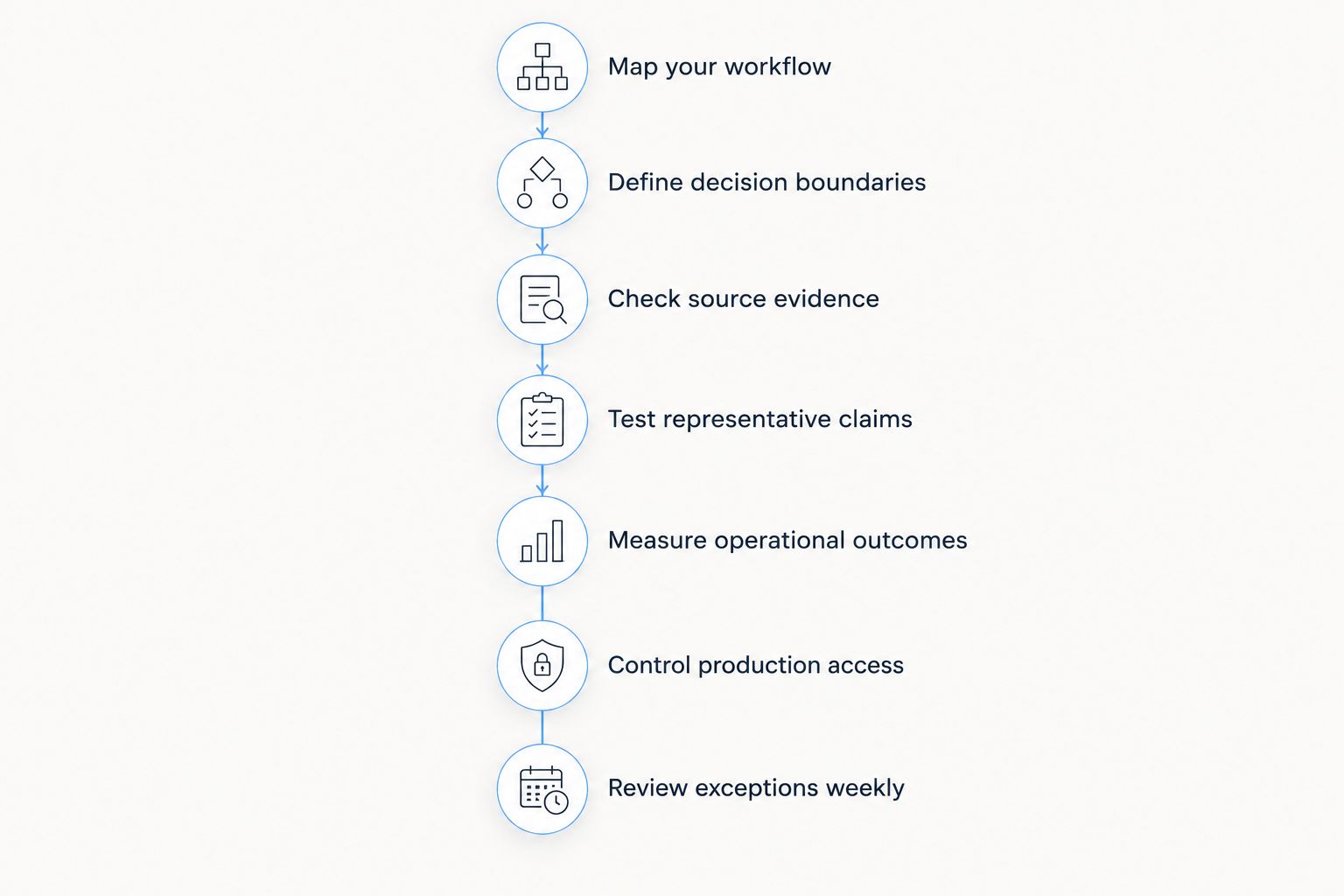
The implementation sequence below keeps workflow definition and authority controls ahead of testing and production access. Follow the sequence even when a vendor demonstration makes deployment look straightforward.
Measure operational outcomes
Begin with a shared review sheet. Measure the complete task, including checks, corrections, and escalations—not just the time taken to generate an output. A draft that shifts work to the adjuster has not removed that work.
Track distinct failure types. Incorrect extraction, unauthorized action, missed escalation, and incomplete write-back need different fixes. Combining them into a single accuracy score hides the operational consequences that determine whether a workflow is safe to deploy.
For the 2026 pilot, compare task completion time, rework, evidence completeness, and escalation handling against your manual baseline. Set acceptance criteria before reviewing results. Do not redefine success after discovering that the system performs well on only the easiest files.
- Time the task through final reviewer acceptance.
- Count outputs requiring substantive correction.
- Record whether every required source is present.
- Separate safe escalations from missed exceptions.
- Review failures by client account and workflow.
Control production access
Start with restricted access and a documented action checklist. If you cannot explain exactly where the agent reads information and where it writes results, the production boundary is not ready. Keep your claims system’s role clear even when another platform prepares tasks or recommendations.
Ask each vendor to demonstrate account separation, role permissions, audit records, and what happens after a failed write. Require evidence for each capability. Do not treat a feature list as proof that the control works in your configuration.
Medical and employment information require careful handling. Your compliance review should establish applicable obligations, permitted uses, retention requirements, and access restrictions rather than treating a general security statement as sufficient.
- Restrict access to approved accounts and fields.
- Require confirmation before consequential write-backs.
- Test failed actions and duplicate submissions.
- Define how reviewers suspend agent activity.
- Document retention and deletion responsibilities.
Review exceptions weekly
Use a weekly exception review as an initial operating recommendation. Inspect a selection of accepted outputs as well as escalated cases; reviewing only flagged failures cannot reveal mistakes the system failed to flag.
Keep a change log for prompts, rules, permissions, and document templates. Recheck affected tasks after changes. A previously accepted workflow needs another test when its inputs or action boundaries change.
Expand only after the current workflow meets its acceptance criteria. Gethesperai covers multiple claims-lifecycle functions, but that breadth is not a reason to activate them together. Move from validated intake or triage into another task through a separate approval decision.
- Review unflagged outputs alongside exceptions.
- Assign an owner to recurring failure patterns.
- Retest affected cases after configuration changes.
- Maintain a rollback procedure for each workflow.
- Approve expansion task by task.
Compare your implementation options
Choose an approach by the task you need completed, not by whether the interface includes a conversational assistant. Your 2026 shortlist should distinguish document preparation, repeatable system actions, and claims-lifecycle automation.
The options below describe implementation categories, not equivalent products. Each has a useful role and a boundary. Keep manual review wherever your tested controls cannot support the proposed action.
| Option | Best for | Main advantage | Key limitation |
|---|---|---|---|
| Manual handling with structured checklists | Establishing a baseline and managing exceptions | Reviewers inspect evidence and authority directly | Staff perform each administrative action |
| Rules-based workflow automation | Stable routing and predefined field checks | Explicit conditions make routing logic inspectable | New document patterns and exceptions need handling rules |
| Document-focused AI assistance | Extraction and draft preparation with reviewer oversight | Separates document preparation from decision approval | Prepared output still needs a completion workflow |
| Gethesperai claims-lifecycle platform | TPAs evaluating connected intake, triage, investigation, settlement, and recovery tasks | Its stated scope spans the claims lifecycle | Workers’ compensation fit and required controls need validation |
Manual handling is not a failed technology strategy when a task depends on unresolved evidence or unusual authority limits. Rules-based automation is useful when conditions are explicit. Document assistance fits preparation work, while a lifecycle platform fits a broader automation evaluation.
None of these options removes your obligation to define ownership. An extracted field, routed task, recommended action, and approved claim decision are different outputs. Write the required output into your procurement criteria.
Common mistakes workers’ comp TPAs make
Treating compensability as an extraction task
An injury narrative supplies reported facts; it does not independently establish the claim decision. Keep fact extraction, evidence assessment, and authorized decision-making separate. Require the system to identify missing information without inventing a conclusion.
Reusing one configuration across every employer account
A shared intake form does not establish shared authority. Document each account’s escalation contacts, approval boundaries, and communication rules. Test account identification before allowing any action that depends on those instructions.
Measuring draft speed instead of completed work
A quick summary can still require extensive correction. Include reviewer effort, missing-source checks, and downstream updates in the measured task. Reject a pilot result that excludes the work needed to make its output usable.
Letting a fraud signal become an allegation
An inconsistency is a reason to investigate, not proof of misconduct. Require reviewers to inspect the underlying evidence and distinguish a data error from an investigative concern. Keep claimant communications within approved authority.
Expanding before exception handling works
Adding settlement or recovery tasks increases the number of action boundaries you must control. Stabilize the current workflow first. A repeatable stop-and-escalate process matters more than demonstrating another automated stage.
FAQ
What are AI claims agents for workers’ comp TPAs?
AI claims agents for workers’ comp TPAs are software systems that carry out defined claims tasks, such as intake preparation or routing, under configured permissions. They should support accountable reviewers rather than silently assume claim decision authority.
What is the best first workflow to automate?
FNOL intake preparation is a useful first workflow when it is limited to collecting fields, identifying omissions, and preparing a reviewable record. Select it only after mapping your actual intake process and defining escalation rules.
Can an AI agent decide whether a workers’ compensation claim is compensable?
Do not give an AI agent independent compensability authority without establishing applicable requirements, delegated authority, and validated controls. A system can prepare evidence for an authorized reviewer without making the final decision.
Is an AI claims agent better than rules-based automation?
An AI claims agent is not automatically better than rules-based automation. Explicit rules suit stable routing conditions, while document interpretation requires separate evidence and exception checks.
Does Gethesperai support the full claims lifecycle?
Gethesperai provides an AI-agent platform covering FNOL intake, triage, coverage, fraud investigation, settlement, and subrogation recovery for property and casualty organizations. Validate workers’ compensation-specific workflows, jurisdictional requirements, and client controls before deployment.
How should a TPA measure an AI claims pilot?
Measure accepted task completion, including reviewer effort, corrections, evidence checks, and escalation handling. Compare those outcomes with the manual baseline using acceptance criteria established before testing.
What should a workers’ comp TPA request in a vendor demonstration?
Request demonstrations using representative claim documents, account-specific instructions, and explicit failure scenarios. Check source traceability, approval boundaries, access controls, and behavior when information is missing or contradictory.
One last thing
Ask the agent to stop. Give it a claim with conflicting identifiers or an instruction outside its authority, then inspect what happens. A correct refusal and a useful escalation show whether your boundaries operate in practice.
Make that test part of your 2026 acceptance checklist. Successful automation includes knowing which work must remain with an authorized person.