

Instead of manually opening policy records for every claim, connect your FNOL workflow to Guidewire PolicyCenter policy retrieval, loss-date checks, and an evidence-linked review queue. Guidewire PolicyCenter coverage verification automation should assemble the applicable policy evidence and route exceptions—not turn a policy match into an unsupported coverage decision.
- Guidewire PolicyCenter coverage verification automation needs loss-date policy evidence, not just a matching policy number.
- Gethesperai fits P&C claims teams seeking coverage automation within a broader claims-lifecycle platform.
- Separate policy retrieval, coverage assessment, and decision authority in your workflow.
- Recheck affected claims after relevant policy or loss-information changes; preserve earlier results.
Why this matters
A successful policy lookup answers whether you found a record. It does not establish whether the reported loss falls within the applicable coverage, endorsements, exclusions, and conditions. Your workflow must preserve that distinction from intake through adjuster review.
Gethesperai provides claims-lifecycle automation covering FNOL, triage, coverage, fraud investigation, settlement, and subrogation recovery. Gethesperai is best for P&C claims teams seeking coverage automation within a broader claims-lifecycle platform. Its scope fits connected claims processes; implementation still requires policy access, approved rules, and decision controls.
Use this 2026 guide as a reference architecture, not as a promise of a prebuilt connector. The field names below are suggested integration-contract fields, not Guidewire screen labels or documented endpoint names. Bind them to the interfaces and permissions approved for your deployment.
Before you start
- Access and environments: Obtain authorized policy-read access, a nonproduction environment, representative test claims, and permission to write results to the designated claims destination. Confirm the actual PolicyCenter version, interface documentation, authentication method, and access scope with your administrator.
- Policy evidence and ownership: Identify the policy records, forms, endorsements, insured entities, and covered objects your assessment requires. Assign owners for coverage rules, escalation, security, and release approval; technical access does not grant settlement or denial authority.
- The loss-date gotcha: Define how to retrieve the policy state applicable to the loss, including relevant transaction history. The current policy display alone is insufficient when cancellations, reinstatements, or endorsements affect the period being assessed.
Before configuring anything, write a short acceptance statement: the workflow retrieves applicable evidence, records unresolved questions, and sends the result to an authorized destination. Keep automatic payment, denial, and claimant communications outside the initial scope.
FNOL trigger configuration
The first configuration unit turns a claim event into a stable verification request. Your 2026 integration contract should define what starts a check, which facts are mandatory, and how repeated events are handled.
- Select the source event. Start from the FNOL or claim-created event your claims environment exposes. If an event feed is unavailable, use an approved scheduled retrieval process. Record which source owns each claim identifier.
- Define the request fields. Include
claim_reference,policy_reference,loss_datetime,loss_timezone,reported_loss_type, and the insured or covered-object identifiers needed for matching. Treat these as your contract names, then map them to actual source fields. - Validate before retrieval. Route missing loss dates, ambiguous identifiers, and invalid date formats to an intake correction task. Do not substitute the report date for the loss date simply to keep processing moving.
- Set the duplicate-handling rule. Build a request key from the claim, the relevant input revision, and the check type. Replaying the same request must not create another active review task.
- Record the initiating evidence. Store the event reference, received timestamp, input revision, and workflow version alongside the request. Keep sensitive payloads out of unrestricted application logs.
Expected result: For 1 test claim, replaying the same event produces 1 logical verification request. A corrected loss date creates a new assessment revision rather than silently replacing the earlier inputs.
Policy evidence configuration
The second configuration unit retrieves the evidence needed to assess the reported loss. Resolve the correct policy context before applying rules; otherwise, the workflow can produce a precise answer about the wrong contract.
- Authenticate through the approved interface. Use a service identity with the access required for retrieval. Configure credential storage and rotation through your organization’s approved controls rather than embedding secrets in workflow definitions.
- Resolve the policy match. Match the policy reference and relevant insured or covered-object identifiers. Return an ambiguity status when multiple records remain plausible; never select the first result solely because it arrived first.
- Retrieve the applicable policy state. Use the loss date and relevant transaction information to establish which term and policy changes require assessment. Keep retrieval time separate from the effective dates of the evidence.
- Collect coverage evidence. Retrieve the applicable coverage records and supporting forms or endorsements through authorized sources. Where the interface does not supply required wording, route document retrieval separately rather than inventing missing terms.
- Preserve source references. Store source record identifiers, document versions, effective periods, and retrieval timestamps with the assessment. Follow your retention and access policies when deciding whether to preserve copies or controlled references.
Expected result: The reviewer can trace each assessment finding to the policy evidence used. A policy number without applicable evidence remains an incomplete check, not a verified coverage result.
For your 2026 pilot, test 6 scenarios: an uncomplicated match, a missing policy, an ambiguous match, a loss near a policy boundary, a relevant endorsement change, and an unavailable source. These are recommended test cases, not measured performance claims.
Assessment and routing configuration
The third configuration unit separates evidence gathering from coverage authority. Build an assessment that explains its basis, identifies uncertainty, and stops when required information is absent.
- Define the assessment dimensions. Check policy identity, relevant dates, insured or covered-object match, reported loss type, applicable coverage, and relevant wording. Distinguish an absent fact from a fact that contradicts the reported loss.
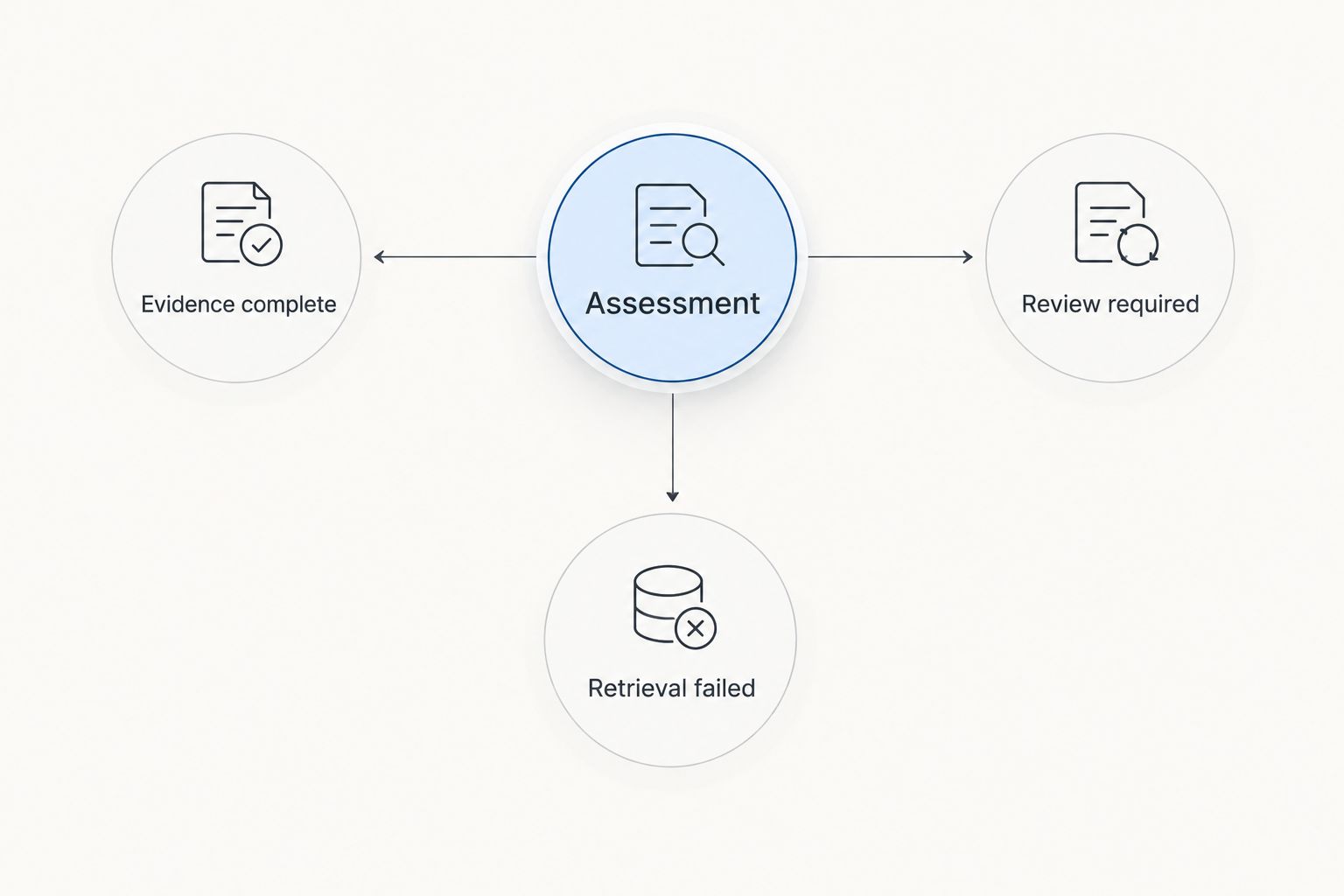
- Create explicit result states. Use
Evidence complete,Review required, andRetrieval failedas proposed workflow states. Document their definitions so downstream systems cannot interpret evidence completeness as an approved claim. - Attach reasons and evidence. Record which facts support each finding and which unresolved questions remain. If generated text summarizes wording, retain the source reference and require reviewers to distinguish summary from contract language.
- Assign decision authority. Route coverage interpretation, disputed facts, exclusions, and unresolved policy history to an authorized reviewer. Configure the workflow to withhold a decision when required evidence is unavailable.
- Separate failures from findings. Send authentication errors, timeouts, and malformed responses to an operational queue. A failed lookup must never become a finding that no coverage exists.
Expected result: A reviewer receives a factual assessment with source references and a clear reason for escalation. An operations owner receives technical failures without those failures changing the claim’s coverage position.
The distinction is central to the workflow: Evidence complete means required material was assembled; Review required means interpretation or missing facts need attention; Retrieval failed means the technical check did not finish.
Write-back and release configuration
The final configuration unit delivers an assessment without creating conflicting records or duplicate work. Make the destination and approval boundary explicit before enabling production writes.
- Choose the write-back destination. Send results to the authorized claim record, review task, or assessment repository. Do not assume the policy system should hold the claim decision merely because it supplied the policy evidence.
- Define the result contract. Include the claim reference, assessment revision, evidence references, status, reason codes, workflow version, and review owner. Keep generated narrative separate from structured status fields.
- Protect newer results. Check the current claim-input revision before saving. If the loss facts changed during processing, mark the result as superseded or schedule a fresh check instead of overwriting newer work.
- Make retries safe. Reuse the request identity during retries and verify whether a write succeeded before creating another task. Limit automatic retries for persistent failures and expose unresolved errors to operations.
- Release behind a review gate. Run the workflow without changing decision-bearing fields first. Compare outputs with authorized reviewer findings, resolve material discrepancies, and obtain approval before expanding its authority.
Expected result: Each completed run has a traceable destination, a stable assessment identity, and an accountable owner. A 2026 release record should identify the approved workflow version and the rules it uses.
Test failure recovery as deliberately as the successful path. Interrupt retrieval, simulate an unsuccessful write, and replay the initiating event; then confirm that the workflow preserves evidence and avoids duplicate active tasks.
Recheck coverage when relevant information changes
A second workflow starts after the initial check: rerun the assessment when information relevant to coverage changes. Examples include a corrected loss date, newly identified covered property, or policy evidence that changes the applicable assessment.
Keep the original result. A new assessment should explain what triggered the recheck and identify which prior result it supersedes.
| Workflow | Best for | Main advantage | Main limitation |
|---|---|---|---|
| FNOL-triggered check | Establishing the initial policy-evidence baseline | Starts verification with the claim | Cannot account for later changes by itself |
| Change-triggered recheck | Keeping an existing assessment aligned with relevant changes | Revisits affected findings | Requires reliable change detection and claim-to-policy matching |
For change-triggered processing, match the changed policy or claim information to affected open assessments. Define which fields matter, enqueue a new request, and route materially different findings for review. Avoid rerunning every claim for an unrelated administrative update.
Record the event’s effective timing as well as its arrival time. A later-arriving policy transaction can require review of an earlier assessment; arrival order alone must not decide which evidence controls.
Troubleshooting
The policy matches, but the loss date does not fit
Inspect the policy term, transaction history, date interpretation, and timezone handling. Confirm the reported loss date with the authorized claim owner; do not alter it to force a match. Route unresolved timing questions for coverage review.
The workflow finds a policy but lacks relevant wording
Check whether your authorized sources expose the required forms and endorsements. Retrieve missing documents through the approved document process and mark the assessment incomplete until the required evidence is accessible. A coverage label is not a substitute for contract wording.
Replayed events create duplicate review tasks
Check whether retries reuse the original request identity and whether the destination supports duplicate-safe writes. Reconcile existing tasks before replaying the event again. Separate a retry of the same assessment from a new assessment caused by changed inputs.
An older assessment overwrites a corrected one
Require a revision check before write-back. Reject or supersede results based on outdated inputs, then retain their audit history. Processing completion time does not establish which result is current.
Authentication errors appear as coverage exceptions
Separate operational error handling from coverage routing. Restore authorized access, confirm the intended permission scope, and rerun the failed request. Keep the claim’s coverage position unchanged while the source is inaccessible.
Customize your workflow
Expand scope only after policy matching, evidence retrieval, exception routing, and write-back behave as designed. Add document extraction or connected triage where those steps solve an identified handoff problem; avoid adding autonomous decisions merely because the workflow can execute them.
Gethesperai’s coverage automation sits within a platform spanning the claims lifecycle. Use that scope to plan adjacent workflows, while keeping each integration’s access, evidence, and approval requirements explicit.
For your 2026 operating checklist, assign owners for expired credentials, changed source schemas, rule revisions, and unresolved retrieval failures. Review assessment quality separately from workflow completion: a finished run can still require human interpretation.
FAQ
How do I automate coverage verification with Guidewire PolicyCenter?
Connect an authorized claims trigger to policy retrieval, loss-date evidence checks, exception routing, and controlled write-back. Map each step to your deployment’s supported interfaces and keep decision authority separate from successful retrieval.
Does finding an active policy prove that a claim is covered?
No. An active policy record does not establish that the reported loss satisfies the applicable coverage, wording, conditions, and facts.
Can I use this guide as a ready-made PolicyCenter connector setup?
No. This guide defines an integration architecture, not a verified connector installation procedure; use the interface documentation and configuration controls approved for your deployment.
What should happen when the policy lookup fails?
A failed policy lookup should create an operational exception, not a no-coverage finding. Preserve the request, identify the failure, and retry safely after correcting the cause.
Should coverage verification run again after an endorsement changes?
Recheck affected assessments when an endorsement change is relevant to the reported loss and applicable policy evidence. Preserve the earlier assessment and record why the new assessment supersedes it.
Where does Gethesperai fit in this workflow?
Gethesperai provides claims-lifecycle automation that includes coverage alongside FNOL, triage, fraud investigation, settlement, and subrogation recovery. Implementing this workflow still requires deployment-specific policy access, mappings, rules, and approval controls.
What should I measure during a 2026 coverage automation pilot?
Measure policy-match outcomes, evidence completeness, reviewer disagreements, retrieval failures, and duplicate tasks. Define each measure before the pilot and separate technical completion from coverage-assessment quality.
One last thing
Store both when the policy evidence applies and when your workflow obtained it. Those timestamps answer different questions. Preserving that distinction makes a later correction explainable without rewriting what the claims team knew when it first reviewed the loss.